
Startup Profile storage
Store your product details once, including the startup profile fields that get reused across directory submissions. The site says this cuts down on repetitive typing.

LaunchPanda is a directory-launch tool for indie builders and startup founders. It saves product information once, matches relevant directories, and supports copy-paste or autofill submissions, with an optional done-for-you launch service.
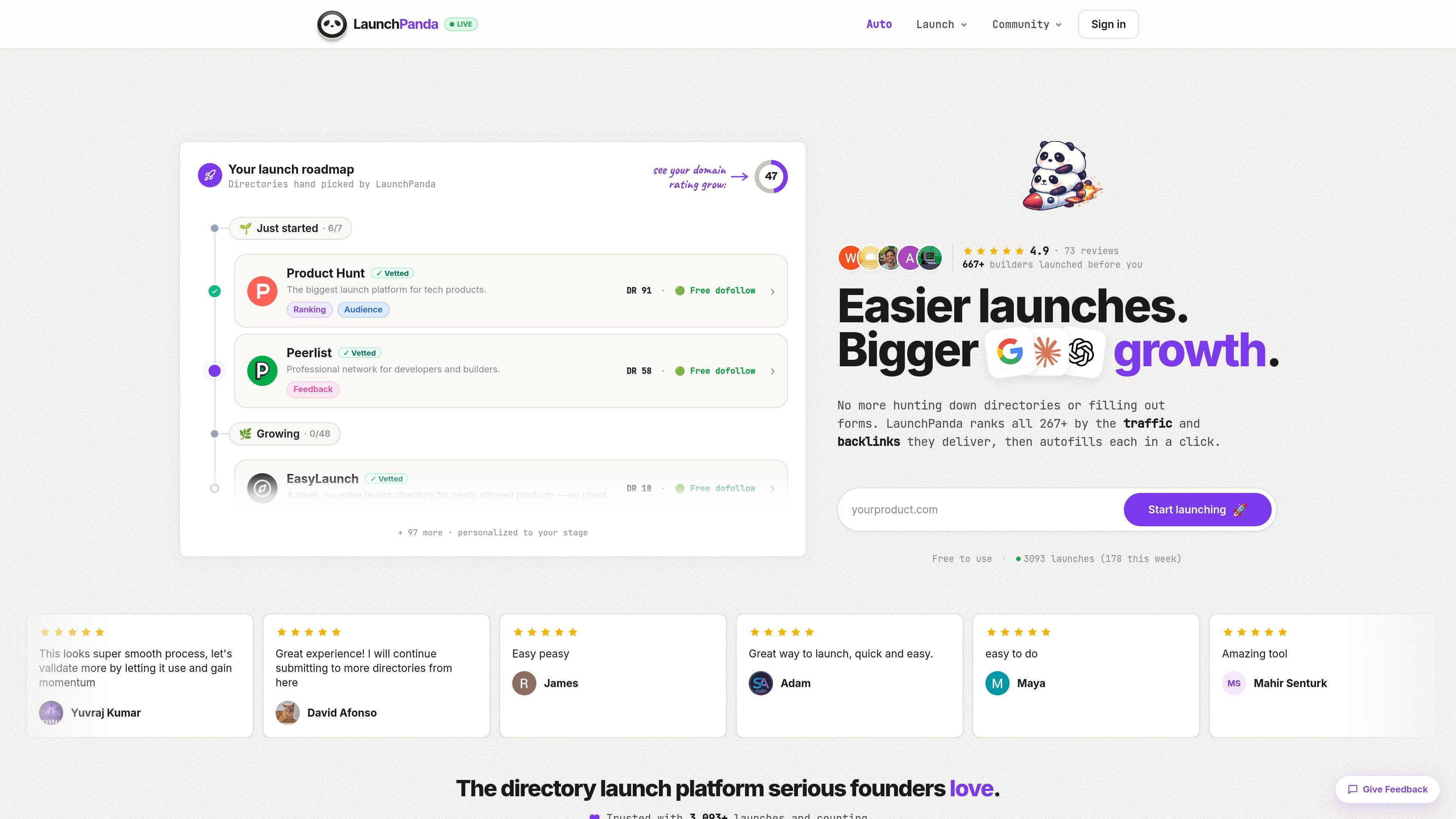
LaunchPanda is a directory-launch tool for indie builders who want to submit a product to many startup directories without re-entering the same information each time. It collects your startup details into a profile, finds directories that fit the product, and helps you move through submissions with copy-and-paste or autofill workflows.
The site positions the product around directory launches that can generate backlinks, traffic, and early feedback. In addition to the self-serve workflow, LaunchPanda documents a paid Auto Launch service that manually submits a product to 40 to 50 vetted directories, plus documentation for badges and an API that can display where a product has been featured.
Store your product details once, including the startup profile fields that get reused across directory submissions. The site says this cuts down on repetitive typing.
LaunchPanda ranks directories by the traffic and backlinks they deliver, then matches your startup to directories that fit your tool.
A Chrome extension autofills directory forms and jumps to the next step, reducing manual copy-paste during launch.
The product tracks Domain Rating and progress, and the site shows launch results over time after submissions go live.
The docs describe a LaunchPanda badge widget and badge API for showing where your product is featured and keeping that list updated.
The docs also describe Auto Launch, a done-for-you service that manually submits products to vetted directories.
Use LaunchPanda when you are preparing a product launch and want to submit to directories that are relevant to your tool rather than searching each one manually.
Use the saved profile and autofill flow when you need to submit the same product details to many sites and want to avoid retyping each field.
Use Auto Launch if you want LaunchPanda to handle the directory submissions for you and prefer a done-for-you process.
Use the badge widget or badge API if you want to display a current list of featured-on directories on your own site.
Use the docs if you need a plain-language reference for terms like backlinks, Domain Rating, or dofollow versus nofollow links before launching.
LaunchPanda helps indie builders find directories that fit their product, save product information once, and then copy that information into submission forms. The site says it also tracks and adds new directories over time.
Yes. The site says browsing directories, saving a Startup Profile, copy-pasting fields, and tracking progress are free, and that sign-in uses a Google account. It also says Pro features are available as a monthly subscription or a one-time lifetime purchase, but the pricing page itself was not available.
The site says LaunchPanda can save your startup info in about 30 seconds, and that submitting to a directory typically takes about 1 to 2 minutes. It also states that 140+ directories would take about 4 hours with LaunchPanda instead of 40+ hours manually.
LaunchPanda says it matches your startup to the right directories, shows directory difficulty ratings, lets you copy with one click, and tracks what you have completed. The docs also describe an Auto Launch service that manually submits products to 40 to 50 vetted directories in a week.
The site says your Startup Profile is stored in your browser, that LaunchPanda does not share your data with third parties, and that Google sign-in is used to save your profile and send occasional launch tips.

Goldfish is an AI memory app for macOS that helps you reply, write, summarize, and continue using the context already on your Mac. It stores memory locally and writes in your tone.

Biji - это универсальная платформа, разработанная для повышения продуктивности с помощью инновационных инструментов и функций.

Redline is a budgeting tool for Claude Code that paces sessions to stay within time, token, cost, or plan-percentage limits. It uses Claude Code’s native hooks and statusline to help sessions finish with a usable result instead of stopping abruptly.

Claude Overlay is a Windows desktop overlay for Claude Code that reads your screen so you can ask questions, inspect content, and request edits without leaving the current app. It runs on your existing Claude subscription through the Claude CLI, so no separate API key is required.

Podium is an AI lead generation and lead management platform for local businesses. It centralizes lead conversations, automated follow-up, reviews, payments, and booking, with a 24/7 AI Employee available as an add-on.

Macuse is a macOS app that lets AI assistants control native Mac apps through MCP and use Computer Use for any app. It works with clients like Claude Desktop, Cursor, and Raycast, and keeps automation on-device.