
Live-status listings
Browse Java and Bedrock servers with the address, reported player count, supported types, and status from the latest check shown on each listing.

NewMinecraftServers is a directory for finding Java and Bedrock Minecraft servers by platform, game mode, status, and newest listing date. Server owners can add or claim listings for free, while Paper operators can optionally use an open-source plugin for ownership verification and server statistics.
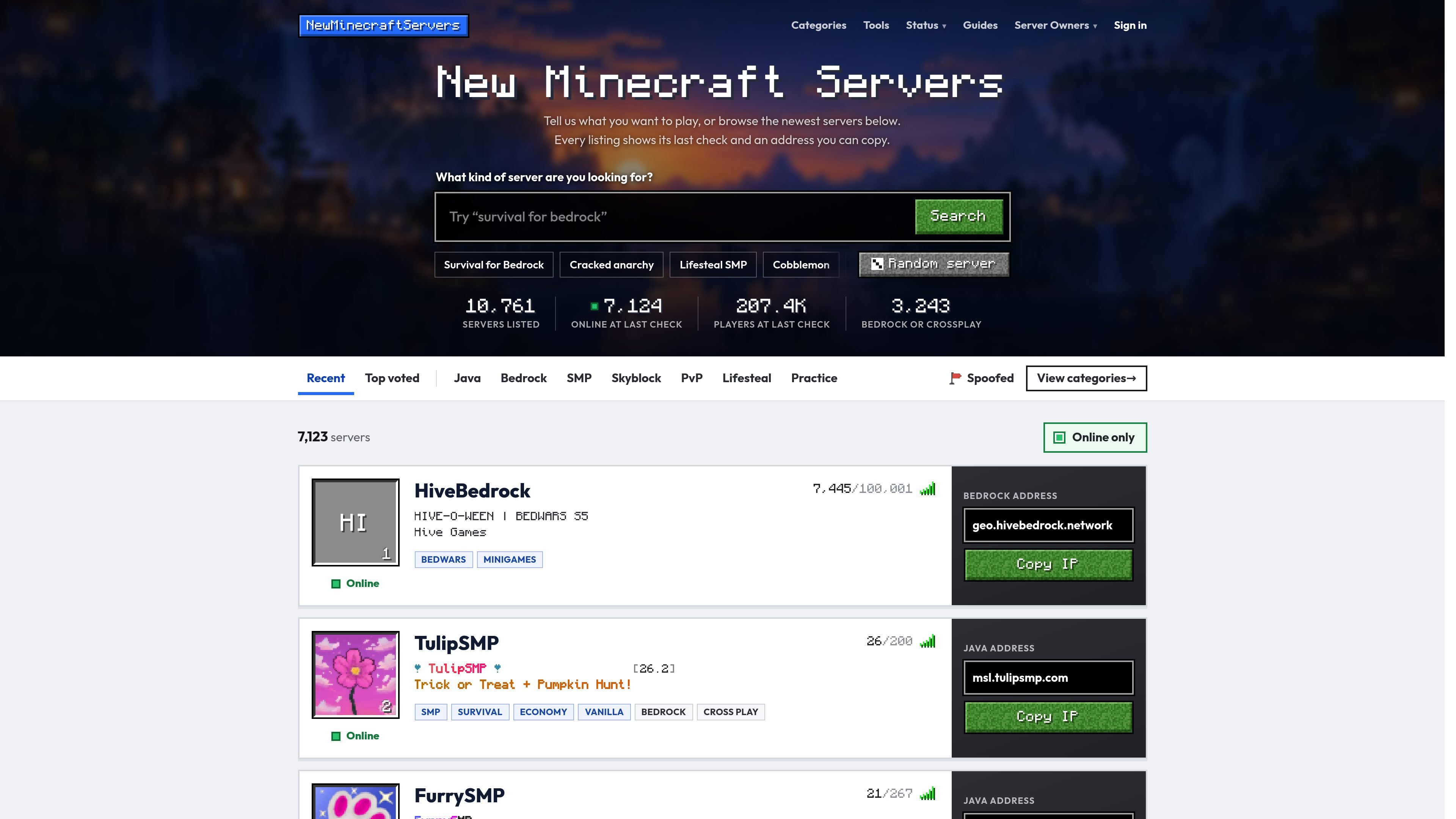
NewMinecraftServers is a directory for discovering Minecraft servers on Java Edition and Bedrock Edition. It presents listings with server addresses, player counts, supported game modes, platform information, and the result of the server’s most recent check.
The directory is designed for two audiences: players looking for an available community and server owners who want to add, claim, or maintain a listing. Players can search by plain-language requests, filter out servers that were offline at their last check, and copy an address for a guided three-step join process. Owners can verify control through an MOTD code, a Paper plugin, or a DNS TXT record. An optional free, open-source Companion plugin adds in-game stats and listing-management commands for Paper servers.
Browse Java and Bedrock servers with the address, reported player count, supported types, and status from the latest check shown on each listing.
New listings appear first, helping players find recently added communities before they become more established.
Search in plain language, such as a request for a particular mode or platform, with matching filters selected for the results.
Offline servers are hidden by default, while category pages and filters cover modes including SMP, survival, PvP, lifesteal, Skyblock, BedWars, modded, and others.
Copy the full server address, including a non-default port after a colon, directly from a listing for use in Minecraft.
Owners can add or claim a server, edit its name, description, gamemodes, links, and banner, and bump its listing every two hours.
Search by a mode such as SMP, survival, lifesteal, or PvP, review the latest reported status and player count, then copy the address to join.
Use newest-first browsing and category filters to identify recently added communities before choosing one that matches a preferred platform and game mode.
Submit a new listing or locate an existing one by address, then verify ownership and maintain the listing details, links, gamemodes, and banner.
Install the Companion plugin on a Paper server to claim the listing, link the server for up to 90 days of statistics, and inspect peak players, averages, uptime, and busy periods in game.
Use the directory’s latest-check information and the Minecraft status tools linked from the site when investigating whether a server or authentication service is reachable.
Copy a listing's address, open Minecraft Java Edition, choose Multiplayer, select Add Server, paste the address, save it, and join using the supported game version.
In Minecraft Bedrock, choose Play, open Servers, select Add Server, and enter the listing's name, address, and port. Use port 19132 unless the listing shows another port. Console players may need an additional workaround because consoles show featured servers by default.
The directory includes both Java and Bedrock listings and shows the relevant address. Java and Bedrock players generally cannot join the same server unless the server uses a bridge; listings then show both a Java and Bedrock address.
Servers can be added or claimed for free. To verify ownership, use a one-time code in the MOTD, run the Companion plugin on Paper, or add a DNS TXT record under a domain you control. The code remains valid for 72 hours.
The optional Companion plugin runs on Paper 1.20.4 or newer. It supports listing claims, player statistics, uptime and busiest-hour data, and lookups for listed servers. The plugin is free, open source, and does not send player names, UUIDs, IP addresses, or chat.

GameGrad turns PDF study material into quiz questions that appear inside arcade games, so users can practice active recall while they play. It offers a free tier with one PDF and a Pro plan with more uploads, more questions, and answer explanations.

DailyPlay.ai is a behavioral growth platform that uses AI site scanning and micro-games to help brands improve engagement and conversion. It supports web, mobile, and other digital touchpoints, with a one-line script setup and a free engagement scan.

ChessWoodie is a chess tactics training app based on the Woodpecker Method. It helps players build pattern recognition through repeated puzzle cycles, track speed and accuracy, and review missed tactics from their own games.

PixelForge turns a single photo into a game-ready 2D character sprite pack, including a 4×4 sheet, transparent frames, direction strips, and looping walk GIFs. It is designed for engine-ready use in Godot, Unity, Phaser, GameMaker, and web games.

Loniva is a mobile puzzle app that offers a calm daily mix of games across memory, attention, language, speed, logic, and focus. It runs on iPhone, iPad, and Android, with a free 7-day trial and a free daily workout after the trial.

Mixels.ai is a browser-based AI pixel art generator for creating 8-bit characters, sprites, avatars, and photo-to-pixel conversions. It is designed for users who want grid-aligned retro artwork without installing software.