
Projects, boards, and timelines
Organize work with projects, boards, sprints, timelines, tasks, priorities, milestones, and deadlines in a shared workspace.
Theta PM is a project management and team collaboration workspace for organizing projects, tasks, documents, schedules, and team conversations in one place. It supports startups, agencies, product teams, distributed teams, and larger organizations with boards, timelines, dashboards, permissions, and automation.
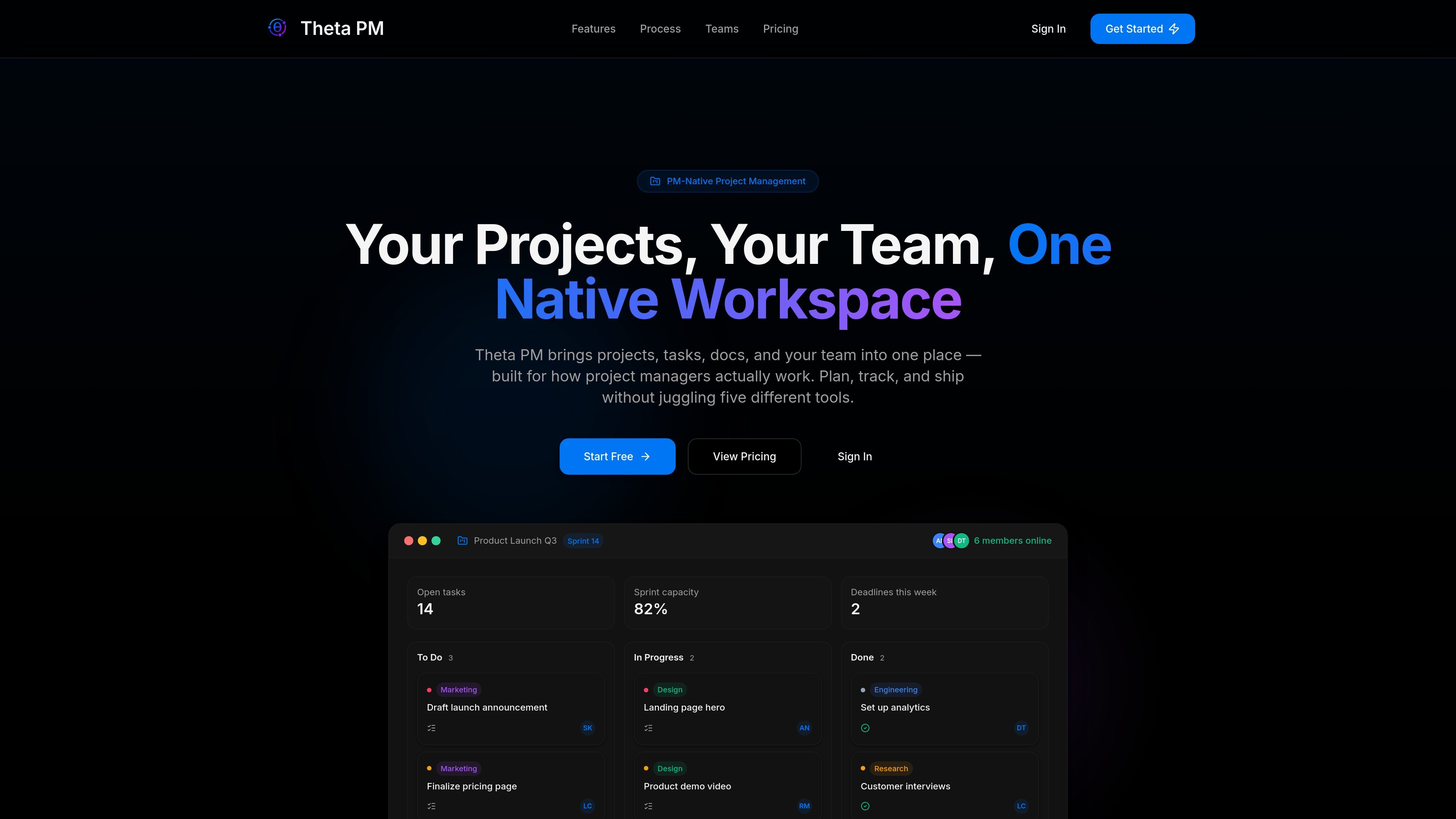
Theta PM is a project management workspace that brings projects, tasks, documents, calendars, dashboards, and team conversations into one environment. It is designed for teams that want to plan, assign, track, and deliver work without switching among separate project, document, and chat tools.
Teams can create projects, boards, sprints, timelines, and tasks; collaborate through chat and comments; and follow progress through dashboards and notifications. The product supports workflows ranging from sprint planning and product delivery to campaign coordination and multi-client agency work, with workspace isolation and role-based access for separate teams or clients.
Organize work with projects, boards, sprints, timelines, tasks, priorities, milestones, and deadlines in a shared workspace.
Create, assign, prioritize, schedule, and track tasks, with dashboards that show progress and potential bottlenecks.
Keep specifications, notes, and plans alongside the projects they support, with search across projects, tasks, and documents.
Use chat, comments, notifications, and shared updates to coordinate work as it happens rather than relying only on status meetings.
Automate assignments, reminders, and status updates; plan capacity with sprints and, on higher plans, use advanced automation options.
Apply workspace isolation, role-based permissions, multi-factor authentication, OAuth 2.0 with PKCE, and encryption for data in transit and at rest.
Define roadmap work, organize backlogs, prioritize features, schedule sprints, and track progress from planning through release.
Coordinate campaigns and launches by combining briefs, tasks, deadlines, documents, and team discussion in one project workspace.
Keep client work separated with isolated workspaces, then manage multiple projects using boards, timelines, priorities, and dashboards.
Use shared updates, chat, comments, notifications, and dashboards to maintain visibility when teammates work across time zones.
Manage larger organizational workflows with role-based access, workspace isolation, audit trails, advanced permissions, and expanded plan capacity.
Theta PM creates a workspace with boards, sprints, and an initial project after sign-up. Teams can then invite members using secure links, assign roles, and begin planning.
Teams can organize work into projects, create and assign tasks, set priorities and deadlines, collaborate through chat and comments, and monitor progress with dashboards. Available planning views depend on the plan.
Theta PM combines projects, tasks, documents, calendar items, chat, dashboards, and notifications in a shared workspace. It also provides search across projects, tasks, and documents.
The Free plan supports up to 5 users, while paid plans provide higher user limits; Theta PM Plus supports unlimited users. Storage, automation, views, exports, analytics, permissions, and support vary by plan.
The source describes secure authentication, workspace isolation, role-based permissions, encrypted data in transit and at rest, and a 99.9% uptime SLA. It does not document every integration or platform detail.

Biji - это универсальная платформа, разработанная для повышения продуктивности с помощью инновационных инструментов и функций.

runevr is a connected workspace for creative teams that combines boards, media review, chat, recordings, drive, calls, and AI agents in one room-based environment. It is designed to reduce tool switching and keep project context together.

BotBoard is a task-management layer for AI agents that helps teams assign work, track progress, and review output. It supports CLI, MCP, and HTTP connections for tools like OpenClaw, Codex, Claude Code, and Cursor.
HackathonHost is white-label hackathon and game jam management software for organizers running hackathons, game jams, demo days, and related competitions. It combines registration, team building, judging, live control, certificates, and analytics in one hosted workspace.

Offloop is a workspace for teams using AI Agents to run recurring work with shared context, approvals, and visible handoffs. It helps keep the result, the decision, and the next step in one record so teammates can continue the work together.

hob is an independent workspace for coding agents that keeps agent sessions, terminals, history, and follow-up work organized around the tools and providers you already use. It is aimed at developers who want local control over routing, history, and workspace structure rather than a bundled model stack.