
Agents
Build autonomous agents with reasoning, tools, and memory for production use. The site positions these agents as suitable for real work rather than simple demos.

Timbal is an end-to-end AI platform for enterprise teams to build, deploy, and govern agents, workflows, interfaces, and knowledge bases. It supports multiple model providers and deployment options, including cloud, VPC, and on-premise.
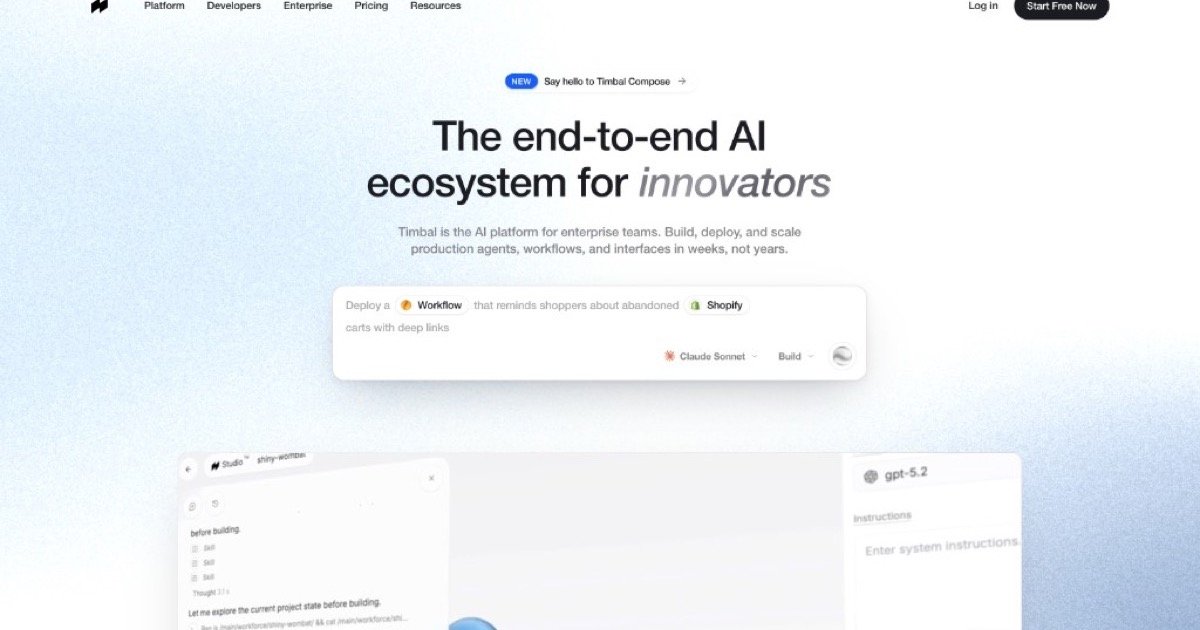
Timbal is an end-to-end AI platform for enterprise teams that want to build, deploy, and govern production agents, workflows, interfaces, and knowledge bases. The homepage positions it as a system for shipping AI in weeks rather than years, with support for models and deployment environments chosen by the customer.
The product combines an AI framework, hybrid database engine, action control engine, CLI, SDK, MCP access, and a UI builder. Timbal also says every agent, workflow, and integration compiles down to exportable code, so teams can read, edit, run locally, and self-host what they build.
Build autonomous agents with reasoning, tools, and memory for production use. The site positions these agents as suitable for real work rather than simple demos.
Create deterministic AI pipelines that chain steps, branch on logic, and aim for predictable outcomes across multi-step processes.
Design chat, dashboard, and voice interfaces for AI applications. Timbal presents interfaces as custom front ends for the systems you ship.
Store and retrieve knowledge with enterprise-grade RAG on a hybrid database engine. The homepage describes syncing, chunking, and retrieval as part of the knowledge base layer.
Connect to existing systems through 100+ native connectors, custom tools, and MCP servers. The source specifically references SAP, Salesforce, Slack, Teams, Drive, and Jira among the listed examples.
Ship applications through an API, TypeScript SDK, Python framework, CLI, and React client. The site also says deployments can be cloud, VPC, or on-premise.
Teams can build an AI support assistant that uses tools, memory, and knowledge base retrieval to respond with account- or product-specific context.
Operations and process teams can turn repetitive business steps into deterministic workflows that branch on logic and aim for consistent outcomes.
Product teams can ship AI chat, dashboard, or voice interfaces instead of relying on a single generic chat surface.
Enterprises with existing systems can connect Timbal to SaaS tools, databases, and MCP servers without building a separate glue layer for each integration.
Engineering teams can prototype in one environment and then move the same code toward local execution or self-hosted deployment when governance or portability matters.
Timbal is presented as an end-to-end AI platform for enterprise teams. Its homepage describes the product as a system for building, deploying, and governing agents, workflows, interfaces, and knowledge bases on the models you choose.
The site says Timbal can run on AWS, Azure, GCP, inside your VPC, or fully on-premises. The same API and governance model are described as following each deployment option.
Timbal describes support for model-agnostic routing, including OpenAI, Anthropic, Google, Mistral, Llama, and any OpenAI-compatible endpoint.
The platform says everything you build is exportable code and can be read, edited, run locally, and self-hosted. It also mentions CLI, SDK, and MCP access for developers.
The source does not list pricing tiers or plan names on the pages provided. The homepage does state that you can experience it with no credit card required.

CreateOS Sandbox is an isolated compute environment for running code and agent workloads inside Firecracker micro-VMs. It is designed for workflows that need machine-level isolation, private networking between sandboxes, and programmatic control through SDK, CLI, or MCP.

AakarDev AI helps teams manage AI provider access, project-level setups, logs, and analytics from one dashboard. It supports BYOK workflows and lists providers including OpenAI, Google Gemini, Anthropic, Groq, Mistral AI, and Perplexity AI.

Trigger.dev chat agent is a durable AI chat backend for developers building stateful conversations that can survive refreshes, crashes, and long-running turns. It connects with the AI SDK `useChat` flow and runs on managed infrastructure with no timeout on a turn.

ByteAsk is a terminal-first AI coding agent for C and C++ that edits repositories and verifies changes with the real compiler, debugger, sanitizers, and tests before showing a diff. It offers a free tier plus paid plans, with editor connectors and zero-retention handling described in the source.

Codex Plugins bundle reusable skills, app integrations, and MCP servers into workflows you can install in the Codex app or use from Codex CLI. They help extend Codex with connected-service tasks, reusable instructions, and shared team workflows.

hob is an independent workspace for coding agents that keeps agent sessions, terminals, history, and follow-up work organized around the tools and providers you already use. It is aimed at developers who want local control over routing, history, and workspace structure rather than a bundled model stack.