
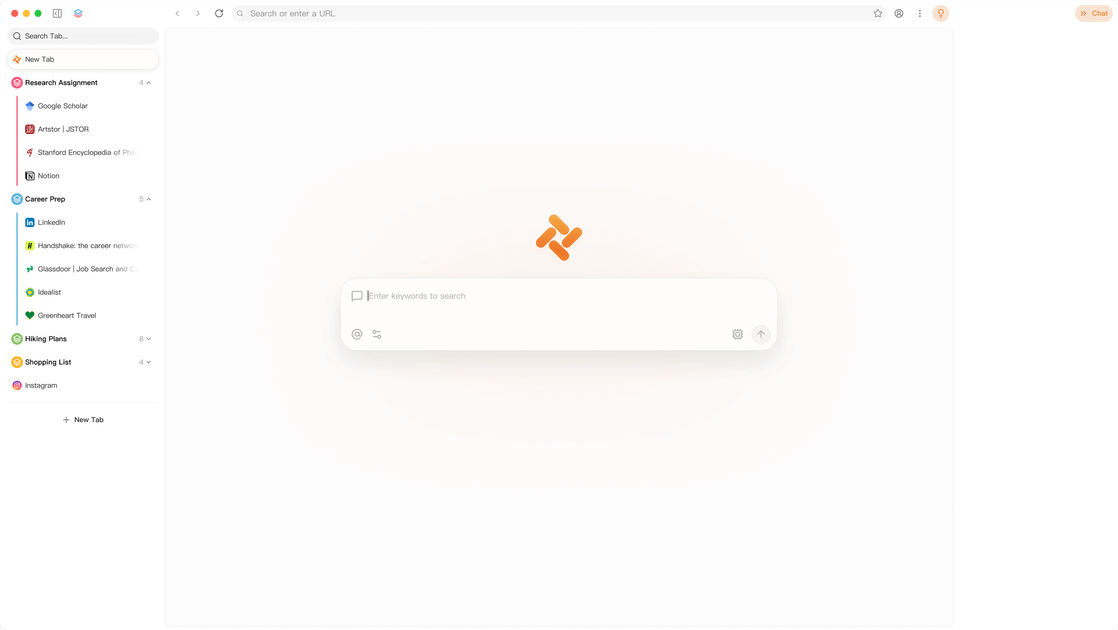
AI Browsers Are the New Workspace: Atlas, Dia, Tabbit
Explore Atlas, Dia, and Tabbit—the best AI browsers for browsing as a contextual workspace with AI, memory, summaries, and automation.
Introduction
For years, browsers have been built around the same basic model: open a tab, search for information, copy content, switch between apps, and repeat. AI browsers are trying to change that pattern.
Instead of treating the browser as a passive window for websites, new AI-native browsers are turning it into an active workspace. They can understand the page you are reading, summarize multiple tabs, help you write, search across your context, and in some cases take actions for you.
Products like ChatGPT Atlas, Dia, and Tabbit show three different directions for this category. Atlas brings ChatGPT directly into the browsing experience. Dia focuses on work context and proactive assistance. Tabbit pushes toward an agentic browser where tabs, files, screenshots, and websites can become actionable context.
This article looks at what AI browsers are, why they matter, and how Atlas, Dia, and Tabbit compare.
What Is an AI Browser?
An AI browser is a web browser that integrates large language models directly into the browsing flow.
A traditional browser helps you access websites. An AI browser tries to understand what you are doing across those websites.
Common AI browser features include:
- Summarizing webpages, PDFs, and long articles
- Chatting with the current page or selected text
- Comparing information across multiple tabs
- Rewriting emails, documents, comments, and posts
- Remembering browsing context when allowed
- Automating repetitive web tasks
- Connecting browser activity with work tools like calendar, email, docs, Slack, Notion, or GitHub
The key difference is context. A normal chatbot waits for you to paste information into it. An AI browser can work directly with the context already open in your browser.
Why AI Browsers Matter
The browser is where most modern work happens.
Research, writing, product comparison, customer support, coding, documentation, shopping, scheduling, reading, and collaboration all happen across tabs. The problem is that browsers were designed for navigation, not for understanding intent.
AI browsers matter because they reduce three common forms of friction.
First, they reduce context switching. You no longer need to copy text from a webpage into a separate AI chat window, explain what the page is, and paste the result back.
Second, they improve context awareness. The browser can see what page, tab, or workflow you are working on and provide more relevant help.
Third, they enable action. The next stage of AI browsers is not just answering questions, but helping complete tasks: collecting information, filling forms, organizing tabs, generating reports, or running repeatable workflows.
This is why AI browsers are not just “Chrome with a chatbot.” The best ones are becoming lightweight operating systems for web-based work.
ChatGPT Atlas: ChatGPT Built Into the Browser
ChatGPT Atlas is OpenAI’s browser built around ChatGPT. Its biggest advantage is obvious: it brings one of the most widely used AI assistants directly into the browsing layer.
Instead of opening ChatGPT in a separate tab, Atlas lets users bring ChatGPT into the page they are viewing. That makes it useful for summarizing content, comparing products, analyzing data, drafting text, and asking follow-up questions without leaving the browser.
Atlas also introduces the idea of browser memory. When enabled, ChatGPT can remember useful context from browsing activity and use it later to provide more personalized help. This can be powerful for ongoing research, job searching, travel planning, learning, or product discovery.
Another important feature is Agent Mode. In this mode, ChatGPT can interact with websites on behalf of the user under user control. This moves the browser from “assistant beside the page” toward “agent operating inside the page.”
Best For
Atlas is a strong choice for users who already use ChatGPT heavily and want AI assistance to be available across the web.
It fits:
- Researchers who summarize and compare web content
- Students who want explanations while reading
- Knowledge workers who use ChatGPT daily
- Users who want an AI assistant tightly integrated with browsing
Things to Consider
Atlas is powerful because it connects browsing with AI memory and agents. That also means users should understand the privacy settings carefully. Browser memory, browsing visibility, and training preferences should be configured based on personal or company requirements.
Dia: A Browser for Work Context
Dia comes from The Browser Company, the team known for Arc. Compared with Arc’s power-user interface, Dia is positioned more directly around AI-assisted work.
Dia’s core idea is that the browser should know what is happening across your workday. It can surface a Morning Brief, suggest what to do next, and answer questions from your broader work context, including tabs and connected tools.
The most interesting part of Dia is not just “chat with a page.” It is the way Dia tries to organize the user’s work environment. Features like Reports, Live Work, Better Meetings, Profiles, Splits, and Organized Tabs suggest that Dia is designing the browser as a work command center.
For example, instead of searching across Slack, Notion, Calendar, and open tabs manually, the user can ask Dia to pull scattered context into something useful. That makes Dia especially interesting for teams, operators, managers, founders, and anyone whose work lives across many SaaS tools.
Best For
Dia is a strong choice for users who want a cleaner, AI-assisted browser for work.
It fits:
- Team members working across Slack, Notion, Calendar, and docs
- Managers preparing for meetings
- Operators who need summaries and reports
- Users who want proactive suggestions instead of only manual chat
Things to Consider
Dia’s value depends heavily on connected work context. Users who mostly browse public websites may not feel the full benefit. But for users whose day is spread across multiple work apps, Dia’s direction is compelling.
I’ll translate this chunk directly, keeping the markdown structure, headings, list count, and table intact.## Tabbit: The Agentic Browser for Power Users
Tabbit describes itself as an agentic AI browser. Its focus goes beyond page-level chat. It treats browser context as something an AI agent can read, organize, and act on.
Tabbit can work with tabs, pages, screenshots, highlights, bookmarks, local files, and other desktop context. It also emphasizes Skills: repeatable AI workflows that can be used for specific sites or tasks.
This makes Tabbit feel closer to an AI productivity environment than a simple browser assistant. Instead of only asking, “What does this page say?”, a user might ask the browser to extract highlights from a long video, organize research into a knowledge base, explain a GitHub PR, find test gaps, summarize subscriptions, or search across previous reading context.
Tabbit’s positioning is especially interesting for creators, researchers, developers, and heavy browser users. These users do not just browse the web; they collect, process, transform, and reuse information every day.
Best For
Tabbit is a strong choice for advanced users who want AI automation inside their browser.
It fits:
- Researchers working with papers, PDFs, and saved reading
- Developers reviewing GitHub, docs, and technical content
- Creators summarizing videos, podcasts, newsletters, and comments
- Power users who want custom AI workflows and browser-level agents
Things to Consider
Agentic browsers can be more powerful, but they also require more trust and more careful usage. Users should pay attention to what context is shared with models, which data stays local, and which actions require approval.
Atlas vs Dia vs Tabbit: Which AI Browser Should You Try?
These three browsers represent different product philosophies.
| Browser | Core Idea | Best Use Case |
|---|---|---|
| ChatGPT Atlas | ChatGPT built directly into the browser | Everyday AI assistance, research, summaries, task help |
| Dia | Work-aware browser with proactive context | Meetings, reports, team workflows, workday organization |
| Tabbit | Agentic browser with contextual skills | Research, automation, creator workflows, developer productivity |
If you already rely on ChatGPT, Atlas is the most natural starting point.
If your browser is mainly a workspace connected to calendar, docs, Slack, Notion, and meetings, Dia may be more suitable.
If you want deeper automation, cross-tab context, and reusable AI workflows, Tabbit is worth exploring.
The important point is that AI browsers are no longer a single product pattern. Some are assistant-first. Some are workspace-first. Some are agent-first.
The Bigger Trend: Browsers Are Moving From Search to Action
The rise of AI browsers reflects a larger shift in software.
The old browser was built around search and navigation:
- Search for a page
- Open several tabs
- Read and compare manually
- Copy information into another tool
- Take action somewhere else
The AI browser changes that flow:
- Describe what you want
- Let the browser understand the current context
- Ask it to summarize, compare, organize, or act
- Review and approve the result
This does not mean traditional browsers will disappear. Chrome, Safari, Edge, and Firefox still define the baseline for performance, compatibility, extensions, and security. But AI browsers are showing what the next layer of browsing may look like.
The browser is becoming less like a window and more like a collaborator.
Privacy and Trust Will Decide the Winners
AI browsers need more context to be useful. That context can include browsing history, page content, selected text, open tabs, connected apps, files, and sometimes personal workflows.
This creates a tradeoff.
More context can produce better answers and more useful automation. But more context also requires stronger privacy controls, clearer data policies, and greater user trust.
Before adopting any AI browser, users should check:
- What data the AI can access
- Whether browser memory is optional
- Whether browsing content is used for model training
- How connected apps are authorized
- Whether actions require user approval
- How local data, sync, and cloud processing are handled
- Whether the browser is suitable for company or sensitive work
For personal productivity, AI browsers can be extremely useful. For business use, teams should evaluate privacy, compliance, admin controls, and data boundaries before rolling them out widely.
Final Thoughts
AI browsers are still early, but the direction is clear. Browsing is no longer just about opening websites. It is becoming a context-rich workflow where AI can read, reason, summarize, and act alongside the user.
ChatGPT Atlas brings a familiar AI assistant directly into the browser.
Dia turns the browser into a proactive work hub.
Tabbit explores what an agentic, skill-based browser can become.
For most users, the best way to choose is not by asking which AI browser is “the best,” but by asking what kind of work they want the browser to help with.
If you want AI everywhere while browsing, try Atlas.
If you want a calmer work browser that understands your day, try Dia.
If you want browser automation and agentic workflows, try Tabbit.
The next browser war may not be about tabs, extensions, or speed alone. It may be about which browser understands your intent best — and which one you trust enough to let it help.