
Live scan of running apps
Scans the shortcuts exposed by every running application through the Accessibility API, so you can see menu bar shortcuts exactly as macOS presents them.

HotkeyClash is a macOS utility that scans running apps, Karabiner, skhd, and system shortcuts to find keyboard shortcut conflicts. It helps you identify which app owns a hotkey and where to change it.
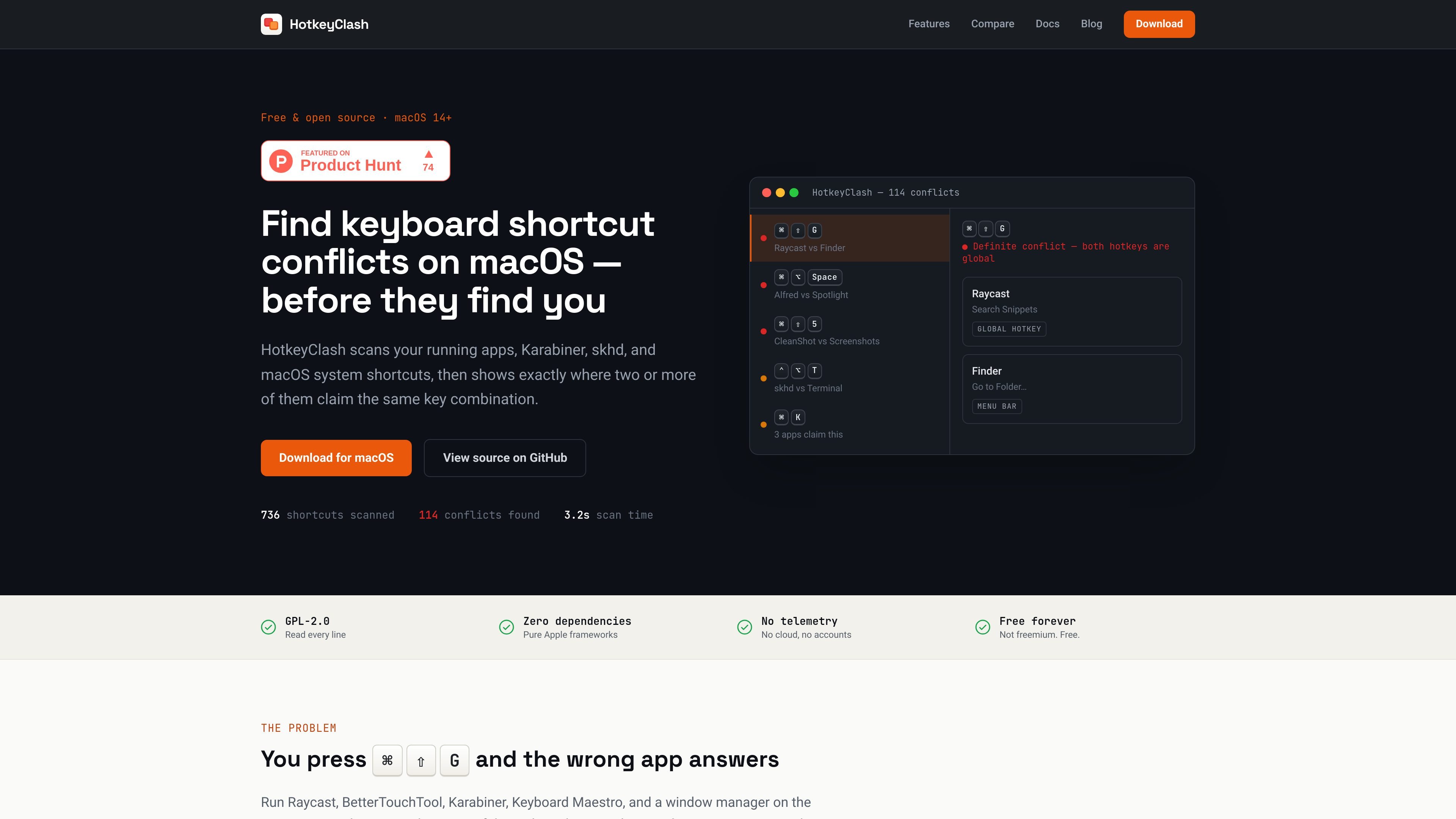
HotkeyClash is a macOS utility for finding where keyboard shortcuts clash across running apps, automation tools, and built-in system shortcuts. It scans menu bar shortcuts from live apps, reads Karabiner-Elements and skhd configuration files, and checks macOS symbolic hotkeys so you can see every claimed key combination in one place.
The app is aimed at people who use multiple shortcut-heavy tools on the same Mac and need to know which app owns a combination when something stops working. It distinguishes definite conflicts from focus-dependent overlaps, then shows the claimants and their source so you can change the right setting instead of guessing.
Scans the shortcuts exposed by every running application through the Accessibility API, so you can see menu bar shortcuts exactly as macOS presents them.
Reads `karabiner.json` and `skhdrc` directly, so remapped or config-defined hotkeys are included even when they never reach another app.
Pulls in macOS symbolic hotkeys, including built-in shortcuts such as Mission Control, Spotlight, Screenshots, and Dock hiding.
Groups all bindings by key combination and marks definite versus potential conflicts, helping you tell a true collision from a focus-dependent overlap.
Shows a native split-view interface with source badges, app icons, and a menu bar badge that counts definite conflicts.
Keeps the app lightweight and inspectable, with no network requests, no accounts, no telemetry, and no persistence of scan results after quitting.
Check whether a launcher, window manager, or shortcut utility is claiming the same key combination as another global hotkey before you spend time debugging by hand.
Compare an app’s menu shortcuts with system-level bindings to understand why a command only fails when that app is open and focused.
Review Karabiner-Elements and skhd rules alongside app shortcuts so remapped keys and shell-driven bindings are part of the same inventory.
Verify a new shortcut choice before assigning it in System Settings or an app’s preferences, especially when you already run several tools that register global hotkeys.
Use the scan output as a source-of-truth list when cleaning up a crowded Mac setup that mixes built-in shortcuts with third-party apps.
HotkeyClash asks for Accessibility permission on the first scan so it can read menu shortcuts from running apps. It can still scan Karabiner, skhd, and macOS system shortcuts without that permission, but it cannot inspect running apps’ menus until access is granted.
It scans running apps’ menu shortcuts, Karabiner-Elements rules, skhd hotkeys, and macOS system shortcuts in one pass. The features page also says more parsers are on the roadmap, including Keyboard Maestro, BetterTouchTool, Hammerspoon, Alfred, and Raycast.
The app highlights definite conflicts and potential conflicts. Definite conflicts are two global hotkeys on the same combination; potential conflicts are global hotkeys that overlap with an app’s menu shortcut and only break when that app is focused.
HotkeyClash does not edit or reassign shortcuts. After a scan shows the clash, you change the shortcut in the relevant app or in System Settings, then scan again to confirm the conflict is gone.
HotkeyClash is a macOS utility for finding shortcut conflicts, with downloads offered as a DMG or through Homebrew. The site states it supports macOS 14+, including Apple Silicon and Intel Macs, and that it is free and open source under GPL-2.0.

MacSpoof ist ein MAC-Adressenwechsler für macOS: WLAN-MAC ändern oder randomisieren, um Verbindungen zu erneuern und die Protokollierung auf öffentlichem WLAN zu reduzieren.

DemoTV is an audience-ranked station for discovering and comparing independent product demos. Founders can submit videos, embed approved demos on their websites, collect viewer inquiries and optionally commission demo production or labelled promotion without buying ranking.

Ship It: Idle Dev Tycoon is an iPhone incremental simulation game about building apps, managing a software studio, and selling it for lasting progression benefits. It supports offline play, automated builds, adviser collection, and optional in-app purchases.

NomNak ist eine kostenlose Restaurant-Discovery-App für iPhone, mit der du Orte über Empfehlungen von Freunden statt über anonyme Bewertungen findest.
CAPTA is a mobile GPS waypoint app for quickly saving, organizing, and revisiting locations. It supports offline use, camera-based coordinate capture, optional cross-device synchronization, and GPX export for fishermen, explorers, and field professionals.

Ctrl+Shift+3 is a calm, text-first community platform with a chronological feed, profiles, RSS, and private groups called Clicks. It is built for reading, posting, and joining smaller communities without algorithmic ranking or vanity counts.