
Auto-built relationship capsules
min. continuously builds relationship context from meetings and emails, so each person or company has a living capsule instead of a manually maintained record.
min. is a CRM that automatically builds relationship context from meetings, calendars, and email. It helps people who rely on follow-through prep for calls, share capsules, and turn conversation history into next steps.
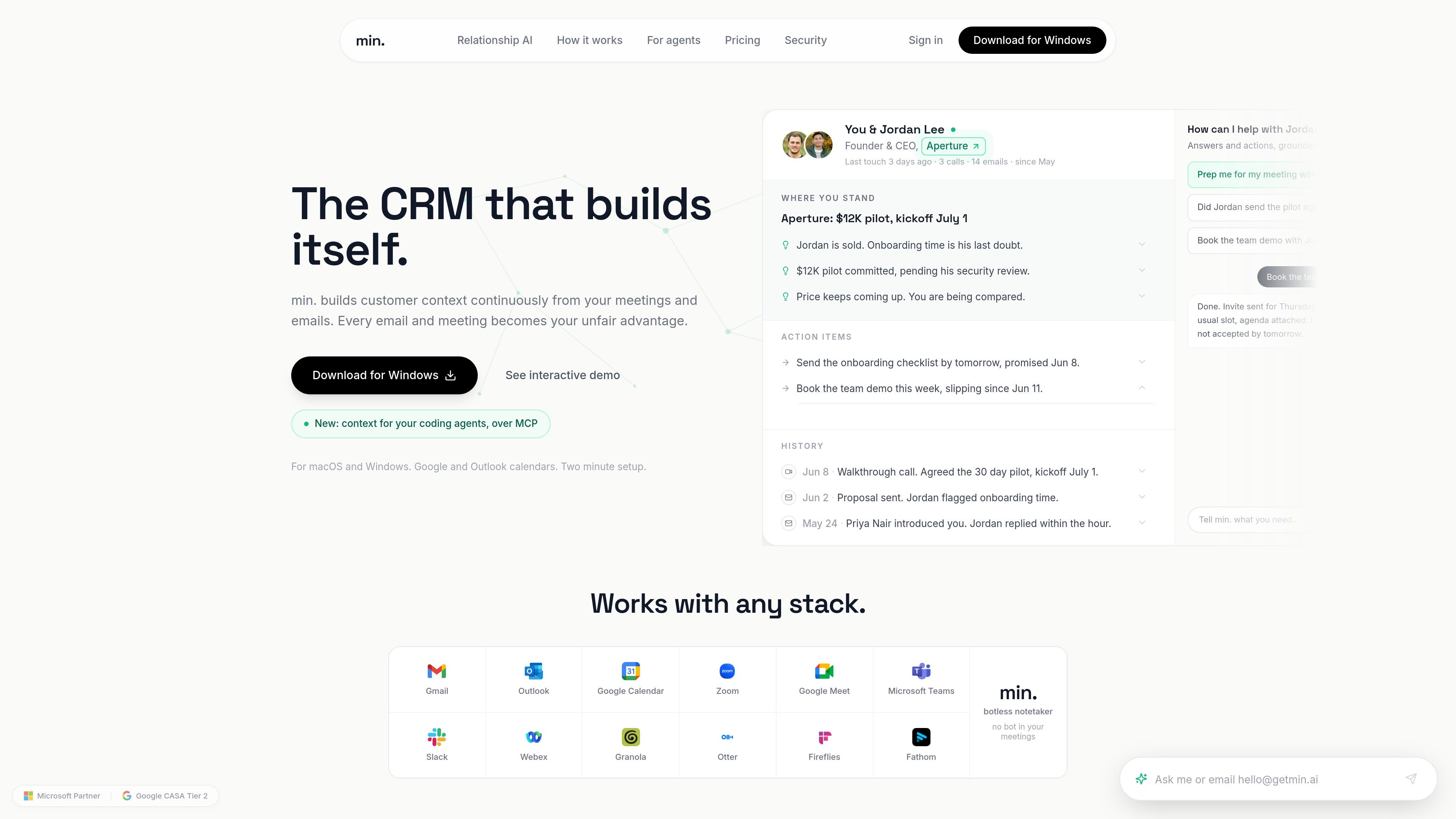
min. is a CRM that builds itself from the work people already do in meetings, email, and calendars. Instead of relying on manual data entry, it keeps a living memory of relationships and turns that context into a capsule for each person, company, or group.
The product is aimed at people whose work depends on relationships and follow-through. It presents current context, action items, and history in one place, then helps with next steps such as follow-up emails, reminders, and meeting prep. The site says it works on macOS and Windows, supports Google and Outlook calendars, and includes a botless notetaker.
min. continuously builds relationship context from meetings and emails, so each person or company has a living capsule instead of a manually maintained record.
Each capsule is organized into a few clear sections: where you stand, action items with deadlines, and history. The site also says every line expands into its source.
min. can draft the follow-up, the next-step email, and reminders such as a security-review nudge straight from the capsule, rather than only surfacing information.
A built-in botless notetaker is included, and the site says no bot joins your meetings.
The product supports macOS and Windows and works with Google and Outlook calendars. It also lists Gmail, Outlook, Zoom, Google Meet, Microsoft Teams, Slack, Webex, Granola, Otter, Fireflies, and Fathom as compatible tools.
The pricing page describes Free, Pro, and Business plans, with the higher tiers adding longer recall history and team or enterprise controls such as roles, admin, SSO, SAML, SCIM, and data residency.
Use min. to prepare for a customer call or deal review by opening the relevant capsule before the meeting. The site says you can see where you stand, what is owed, and the history in advance.
Use min. after a meeting to generate follow-up work from the discussion that just happened, including draft follow-up emails and next-step nudges.
Use min. to keep a long-running manager or internal relationship current across 1:1s, promotions, and ongoing asks. The demos highlight a year of one-on-ones and the ability to track action items over time.
Use min. when you want a shared capsule for a meeting, person, or company that others can review and revoke later. The pricing page says sharing is available on every plan.
Yes. The pricing page says min. is free to use, with the Free plan including the last 3 months of recall for every relationship. Additional recall history is paid for, and referrals add one more month of recall.
The pricing page says shared capsules can be sent on every plan. You can share a single meeting, a person capsule, or a whole company capsule, and revocation is available at any time.
min. is built from your calendar, meetings, and email, and the site says it replaces data entry rather than existing reporting. If your team already uses a CRM for reporting, you can keep it and paste a capsule into it.
The site says min. keeps distilled memory and metadata, not raw mail. It also says it does not train on your data, sell it, or share it.
The site says min. works on macOS and Windows, and it connects with Google and Outlook calendars. It also mentions use with Gmail, Outlook, Zoom, Google Meet, Microsoft Teams, Slack, Webex, Granola, Otter, Fireflies, and Fathom.

Liam is an AI copilot for managing inboxes, writing replies, prioritizing email, and scheduling meetings. It is offered free for individuals, with custom pricing for teams and enterprise.

Volanea is an email platform for transactional email, campaigns, and lifecycle automation. It combines sending, tracking, and deliverability monitoring on one contact graph, with a free plan and paid monthly credit tiers.

Habitu est une plateforme de fidélité client pour commerçants, basée sur Apple Wallet et Google Wallet, sans application à installer. Elle aide les boutiques et les e-commerces à automatiser les tampons ou points, puis à relancer les clients avec un coach IA.

Tactiq is an AI note taker for Google Meet, Zoom, and Microsoft Teams that transcribes meetings live and turns them into summaries, action items, and follow-up outputs. It is built around a Chrome extension and supports team workflows through sharing and integrations.

garden-md is an open-source Node.js CLI that turns meeting transcripts into a local company wiki. It links entities across transcripts, keeps the original text intact, and renders the result as a browsable wiki.

Podium is an AI lead generation and lead management platform for local businesses. It centralizes lead conversations, automated follow-up, reviews, payments, and booking, with a 24/7 AI Employee available as an add-on.