

Dropstone
Dropstone is a collaborative AI workspace with an AI-powered editor, autonomous agents, persistent memory, and MCP tool integrations like Figma.
What is Dropstone?
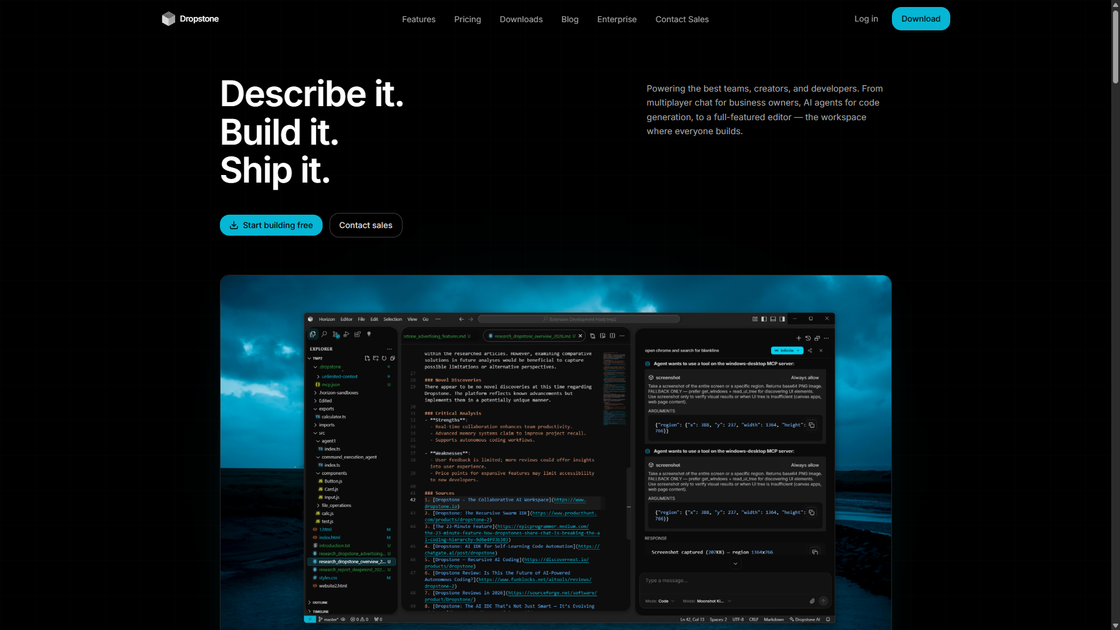
Dropstone is a collaborative AI workspace for building software with real-time teamwork and AI-supported coding workflows. It’s positioned for developers and founders, with support for both an editor experience and an agents experience to help with end-to-end feature work.
The product combines AI-assisted code generation and review with a multiplayer workspace and persistent memory intended to carry context across sessions. It also includes an AI-native integration layer based on MCP, including a connection to Figma through Figma MCP.
Key Features
- Dropstone Editor (AI-powered autocomplete + multiplayer editing): Write and debug production code with AI inline suggestions and natural language code generation while multiple people edit together in real time.
- AI-assisted code workflow in one workspace: Support an end-to-end flow from writing code through review/debug activities in a unified environment (as described on the page).
- Dropstone Agents (configure, deploy, and monitor autonomous agents): Set up agents intended to build features end-to-end, then run and monitor them from the agents experience.
- Persistent memory / context across sessions: Keep knowledge that’s retrieved in future conversations, including patterns and architecture decisions, with auto-capture from interactions and cross-session persistence.
- MCP integrations for AI-native tool use: Use MCP integrations such as Figma MCP, where Dropstone can operate on a canvas by selecting layers and applying described edits.
- Native desktop control (Windows MCP): On Windows, Dropstone interfaces with the desktop via native OS APIs, with a screenshot-based fallback mentioned.
How to Use Dropstone
- Start with the editor or agents experience: Use Dropstone Editor for interactive coding (autocomplete, inline suggestions, and natural language generation) and Dropstone Agents when you want autonomous agents to handle feature work.
- Collaborate in the same workspace: Invite teammates so multiple people can review, discuss, and edit code together in real time.
- Rely on persistent context for ongoing work: Continue conversations over time so Dropstone can retrieve saved memory and patterns from prior interactions.
- Connect to MCP-integrated tools when needed: For design-related tasks, use the Figma MCP integration to apply edits directly to your Figma canvas based on natural language instructions.
- Use Windows desktop control (if applicable): When running on Windows, use the native OS API approach described, with screenshot capture available as a fallback.
Use Cases
- Team-based feature development in code: A development team uses Dropstone Editor for real-time multiplayer editing, AI autocomplete, and inline suggestions while iterating on production code.
- End-to-end feature generation with agents: A founder or engineering lead configures a Dropstone Agent to handle tasks from planning through implementation, then monitors the agent’s activity.
- Maintain continuity across engineering conversations: An engineering team uses persistent memory so architecture decisions and codebase patterns remain available in future conversations without re-explaining context.
- Design-to-prototype editing on the canvas: A designer or product collaborator uses Figma MCP integration to select Figma layers and apply fill or size changes described in natural language, with edits applied in real time.
- Operational automation and iteration during development: Teams run agent-assisted workflows like updating configuration or running tests (as shown in examples on the page) as part of a developer workflow.
FAQ
-
What are the two main experiences in Dropstone? Dropstone offers Dropstone Editor (writing/debugging with AI assistance and multiplayer editing) and Dropstone Agents (configure, deploy, and monitor autonomous AI agents).
-
What does “persistent memory” mean in Dropstone? The page describes memory that persists across sessions and is automatically captured from interactions, then retrieved in future conversations to maintain context.
-
How does Dropstone connect to design tools like Figma? Dropstone connects to Figma via Figma MCP, where it can act on the canvas by selecting layers and applying edits described in natural language.
-
Does Dropstone support desktop control, or is it only browser-based? The page mentions Windows MCP with native OS API control, and also notes a screenshot-based fallback.
-
Is collaborative editing supported? Yes. Dropstone Editor is described as supporting real-time multiplayer editing so teammates can review and work together in the same workspace.
Alternatives
- AI coding assistants integrated into IDEs (code completion + chat): Tools that focus on autocomplete and code generation inside an editor, but typically don’t combine the same multiplayer editing and persistent-memory workflow described for Dropstone.
- AI agents / workflow automation platforms: Platforms for running autonomous agents to complete tasks, often without the same unified editor + persistent memory experience or MCP-native tool integrations.
- Collaborative code editors and IDE pair-programming tools: Real-time collaboration tools for code review and editing that may not include AI-native MCP integrations or the persistent memory behavior.
- Design tool workflows with manual Figma edits or generic automation: Approaches where design changes are applied manually in Figma or via separate automation scripts, rather than through an MCP-connected AI layer that edits directly on canvas.
Alternatives

CodeSandbox
CodeSandbox is a cloud development platform for running code in isolated sandboxes—code, collaborate, and execute projects from any device.

Biji
Biji is a versatile platform designed to enhance productivity through innovative tools and features.

Falconer
Falconer is a self-updating knowledge platform for high-speed teams to write, share, and find reliable internal documentation and code context in one place.

OpenFlags
OpenFlags is an open source, self-hosted feature flag system with a control plane and typed SDKs for progressive delivery and safe rollouts.

skills-janitor
Audit, track usage, and compare your Claude Code skills with skills-janitor—nine focused slash commands and zero dependencies.

BotBoard
Manage AI agents like a team with a shared backlog, structured context, and human review workflow to assign, track, and approve outputs.