

Plae
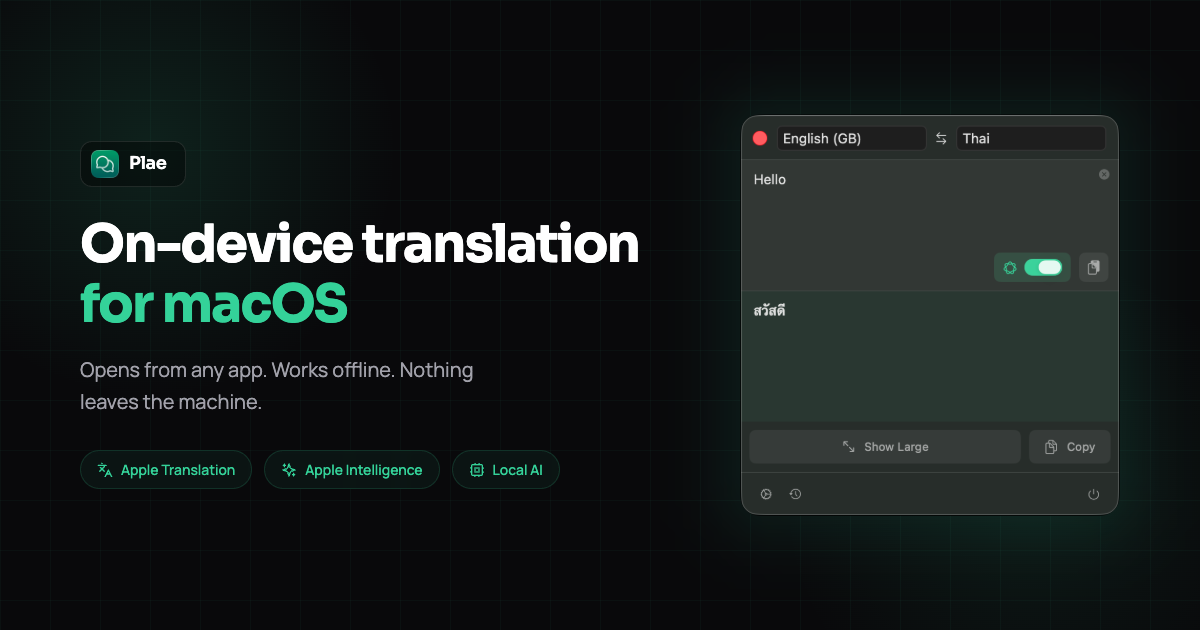
Plae is a privacy-focused macOS menu bar application that provides instant, on-device text translation accessible via a global keyboard shortcut.
What is Plae?
What is Plae?
Plae is a powerful, privacy-centric translation utility designed exclusively for macOS users. It operates entirely from the menu bar, allowing you to translate text instantly from any application without needing to switch windows or rely on cloud services. The core philosophy of Plae is absolute privacy: every translation happens directly on your device, ensuring that sensitive information, conversations, or documents never leave your machine. This makes Plae the ideal solution for professionals, multilingual individuals, and anyone who values data security while communicating across language barriers.
This application eliminates the friction associated with traditional translation tools. By assigning a simple, memorable keyboard shortcut (Cmd+Shift+T), Plae surfaces instantly, accepts input, provides a local translation, and even offers a full-screen presentation mode for easy sharing. With multiple translation engine options—including native Apple Translation, Apple Intelligence (where available), and a fully offline, built-in AI model powered by Google's TranslateGemma—Plae adapts to your needs, whether you prioritize speed, context awareness, or complete offline functionality.
Key Features
- 100% On-Device Translation: All processing occurs locally. No servers, no cloud uploads, no data collection, telemetry, or accounts are ever required. Your privacy is guaranteed.
- Global Shortcut Access: Instantly summon the translator from any application using the default shortcut,
Cmd+Shift+T. - Multiple Translation Engines: Choose between three powerful, locally running engines:
- Default Apple Translation: Fastest option, supporting 19 languages with native macOS quality.
- Smart Apple Intelligence: Offers better context handling and more languages (requires macOS Tahoe).
- Independent Built-in AI: Ships with its own downloadable AI model (based on Google's TranslateGemma via llama.cpp) supporting 55 languages for complete offline use on any Mac.
- Full-Screen Presentation Mode: A dedicated 'Present' button blows up the translation to full screen, making it easily readable from across a room for face-to-face communication.
- Offline Functionality: After an initial language pack download, the app functions perfectly without any internet connection.
- Translation History: Automatically saves the last 20 translations, with the ability to 'star' important entries for permanent retention.
- One-Time Purchase: Available for a low, one-time fee on the Mac App Store, including all future updates.
How to Use Plae
Getting started with Plae is designed to be seamless and immediate:
- Download & Install: Download the free 7-day trial directly from the website (DMG) or purchase the full version from the Mac App Store. Installation is a simple drag-and-drop to your Applications folder—no sign-up or credit card required for the trial.
- Activate: Once installed, Plae resides in your menu bar. Hit the universal shortcut,
Cmd+Shift+T, from any application (browser, email, document editor). - Translate: Type or paste your source text into the Plae window and press Enter. The translation will appear instantly below.
- Present (Optional): If you need to show the translation to someone else, tap the presentation icon to enter the large, full-screen reading mode.
- Engine Selection: If you require languages beyond the initial 19, navigate to settings to download and switch to the Apple Intelligence or the built-in AI model.
Use Cases
- International Business Communication: Quickly verify the nuance of an incoming email or draft a sensitive message in a foreign language before sending, ensuring accuracy and privacy, especially when dealing with proprietary information.
- Travel and Expat Life: Use Plae in situations where internet access is unreliable (e.g., airplanes, remote locations) or when interacting with locals in high-privacy settings like banks or government offices.
- Multilingual Families and Couples: Facilitate smooth, real-time conversations by typing phrases and quickly presenting the translation during face-to-face interactions without fumbling with a phone.
- Language Learning: Practice translating complex sentences and immediately review past translations using the history feature, leveraging the context-aware Apple Intelligence engine for better learning outcomes.
- Secure Document Review: When reviewing technical specifications or legal documents in a foreign language, Plae ensures that the sensitive text being analyzed never leaves the local machine environment.
FAQ
Q: How much does Plae cost and is it a subscription? A: Plae is a one-time purchase of $4.99 on the Mac App Store. There are absolutely no subscriptions, upsells, or recurring fees required to use the application.
Q: What operating systems are compatible with Plae? A: Plae requires macOS Sequoia or later for optimal performance, especially if utilizing the Apple Intelligence features. The core functionality works on any supported Mac.
Q: Can I use Plae completely offline? A: Yes. After the initial download of the application and any desired language packs for the built-in AI model, Plae requires zero internet connectivity to function.
Q: What happens after the 7-day free trial ends? A: Translation functionality stops working, and a screen will prompt you to purchase the full version from the Mac App Store. There are no surprise charges or automatic billing associated with the trial.
Q: How many languages does Plae support? A: Support varies by engine: Apple Translation offers 19 languages; Apple Intelligence supports more; and the built-in AI model supports 55 languages.
Alternatives

Glarity
Glarity is a free ChatGPT AI extension that summarizes YouTube videos and translates web pages using advanced AI technologies.

Biji
Biji is a versatile platform designed to enhance productivity through innovative tools and features.

Prompty Town
Prompty Town is an innovative platform that allows users to transform their links into virtual buildings, creating a unique and engaging way to share and interact with content.

Planndu: Daily Task Planner
Planndu is an intuitive productivity application designed to help users organize tasks, manage projects, build routines, and enhance focus using tools like AI generation and a built-in Pomodoro timer.
MealTime
MealTime is your personal, offline-first recipe companion designed to help you save, organize, plan meals, and generate smart grocery lists, all while keeping your data private.

GitBoard
GitBoard is a native macOS menu bar application designed to provide seamless, in-workflow access to GitHub Projects Kanban boards, allowing users to manage tasks without leaving their current application.