

Subscription Day
Track paid subscriptions and upcoming charges with a mini calendar, multi-currency support, notifications, and statistics on macOS and iOS.
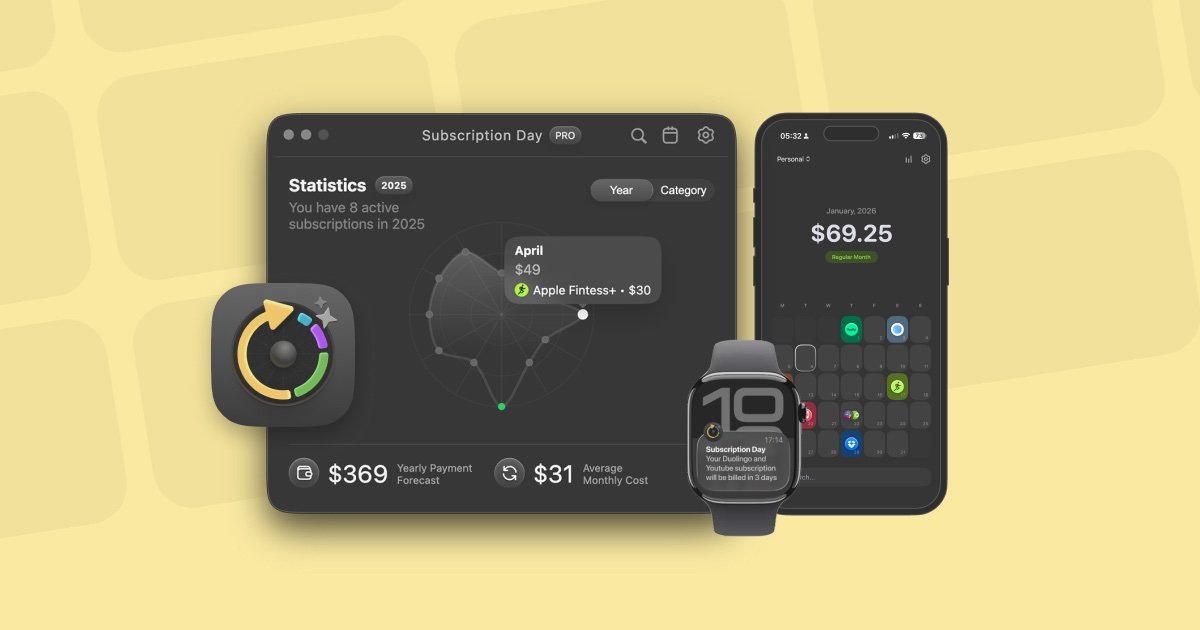
What is Subscription Day?
Subscription Day is an app for tracking paid subscriptions and viewing upcoming charges, with built-in statistics. It’s available for macOS and iOS (and also on Apple Watch via the iOS app), helping you organize subscription expenses in one place and review how spending changes over time.
The core purpose is to give you a clear overview of what you pay for and when payments are due, including category-based insights and month-by-month patterns. It also supports importing subscription lists and exporting your data when you need to analyze it elsewhere.
Key Features
- Mini calendar view of subscriptions and upcoming charges: shows the schedule of payments without requiring “complicated lists.”
- Multi-currency support (168 currencies) with conversion to a single currency: subscriptions added in different currencies are converted using the current exchange rate.
- Fast adding with assisted setup: enter a subscription name and the app helps by selecting a logo, choosing a color, and setting a category.
- iCloud sync across devices: subscriptions are synchronized between Mac and iOS; data is backed up and synchronized through iCloud when sync is enabled.
- Smart import manager: import from the App Store or bring in existing lists from Notion and Google Sheets (and other files with a subscription list) in a few clicks.
- Flexible notifications for upcoming charges: configure reminders and sync with your calendar or Apple Reminders.
- Statistics and analytics: analyze categories and peak payment months; the app performs the calculations for you.
- Data export to CSV: export your subscription data to a CSV file for use in other tools.
How to Use Subscription Day
- Install Subscription Day on your device(s) (macOS and/or iOS). On iOS, you can also use Apple Watch support through the mobile app.
- Add subscriptions either by entering a subscription name (the app assists with logo/color/category) or by importing a list via the Smart Import Manager.
- Review your subscriptions on the mini calendar to see upcoming charges and the timing of payments.
- Set reminders for upcoming charges, optionally syncing them with your calendar or Apple Reminders.
- Use the statistics section to review category spending and identify peak payment months; export to CSV if you need to analyze or share the data elsewhere.
Use Cases
- Monthly subscription overview: track services with recurring payments and quickly see which charges are coming next on the mini calendar.
- Managing subscriptions in multiple currencies: add subscriptions in different currencies and view them in one selected currency using current exchange-rate conversion.
- Consolidating data from existing sources: import subscription lists from Notion or Google Sheets to avoid re-entering items manually.
- Setting charge reminders: configure notifications so you get advance warnings before upcoming deductions, with delivery via your calendar or Apple Reminders.
- Reviewing spending patterns: use category and peak-month statistics to understand where subscription costs cluster and when your spending is highest.
FAQ
Is Subscription Day free?
The app is free, but it includes limitations that can be removed by purchasing the PRO version. It is described as a one-time lifetime purchase for the app’s management purpose (not a recurring subscription).
Can I automatically add my subscriptions from services/apps?
No. The FAQ states there is currently no technical possibility to automatically add subscriptions to the calendar. You can add them manually (semi-automatic mode) or use the Smart Import Manager to import a subscription list in one click.
Where is my data stored?
Your data is stored locally on your computer. If you enable iCloud synchronization, your data is also synced through iCloud.
What can I import subscription lists from?
The Smart Import Manager supports importing from Notion and Google Sheets, and it can also bring in existing lists via files containing your subscription list.
Does it support Windows?
Plans for a Windows version exist, but the source says it will not be immediate.
Alternatives
- Subscription tracking spreadsheets (e.g., Google Sheets): similar workflow for organizing subscriptions, typically with manual categorization and calendar/notification setup handled outside the app.
- Personal finance budgeting apps with recurring expenses: aimed at broader budgeting and reporting; subscription-focused calendar views and assisted subscription importing may differ.
- Expense tracking and analytics tools: useful if you primarily want charts and reporting, but the subscription-specific mini calendar, logo-assisted adding, and subscription import workflow may vary.
- Reminder/calendar-based subscription management: for users who only need due-date alerts; it lacks dedicated subscription statistics and CSV export tailored to subscription tracking.
Alternatives

Finchum
Finchum is a personal finance planning tool that forecasts future bank balances, helping users visualize financial runway, mortgage readiness, and large purchase timelines through secure, read-only account synchronization.

CashPylot
CashPylot is an all-in-one business finance dashboard for startups: track expenses, manage invoices, and forecast cash flow with insights.

Ramp
Ramp is a spend management platform combining corporate cards, expense management, travel, accounts payable, and accounting automation for finance teams.

Double
Double practice management software for bookkeepers and accountants with QuickBooks/Xero integration to streamline month-end close, reviews and client portal updates.

Estimatic AI Estimating Software
Create accurate estimates in minutes with Estimatic AI. Automate material takeoffs, pricing, and proposals with AI estimating that wins jobs.

Lums
Lums is an AI-powered personal finance and budgeting application that provides real-time balance predictions, automated transaction categorization, and proactive smart alerts to help users save more.