
Now Playing
Shows album art, playback controls, and scrubbing in the MacBook notch so media controls remain accessible while other apps are in use.

OmniNotch is a MacBook notch utility app with twenty tools for media control, clipboard history, file staging and AirDrop, on-device AI chat, and everyday Mac tasks. It supports macOS 14 or later on Apple silicon and Intel Macs and is sold with a lifetime license.
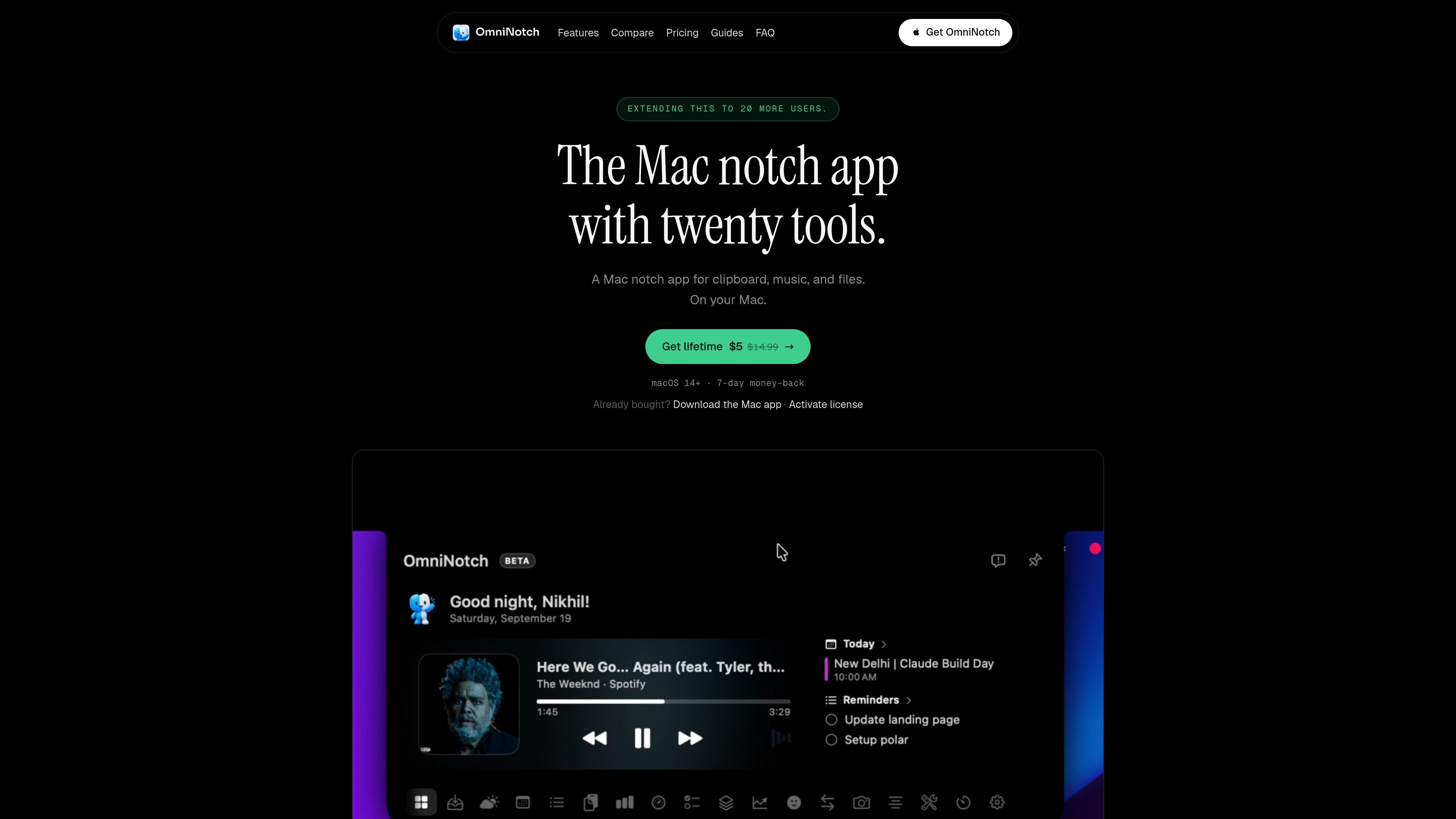
OmniNotch is a MacBook notch utility app that places media controls, clipboard history, file handling, on-device AI chat, and other small tools around the camera area. It is intended to make frequently used actions available from the notch rather than requiring separate menu-bar or application windows.
The app includes twenty tools, with highlighted functions such as Now Playing, Ask Omni, a file shelf with AirDrop, a teleprompter, camera mirror, quick mirror, and live AI usage. OmniNotch is sold with a lifetime license rather than a subscription, and its setup flow provides a Mac download followed by license-key activation.
Shows album art, playback controls, and scrubbing in the MacBook notch so media controls remain accessible while other apps are in use.
Provides on-device chat through Apple Intelligence Foundation Models; the site says prompts stay on the Mac.
Keeps a local history of copied content, with re-copy and Option-delete actions. The site also says password-manager clips are skipped.
Lets users stage files in a shelf, send them with AirDrop, and use auto-save with a configurable retention window, according to the comparison page.
Reads local CLI tokens on-device to show live AI usage for Claude, Codex, and Copilot CLI.
Adds smaller utilities including weather, stocks, timers, Pomodoro, calendar, reminders, to-dos, system stats, shortcuts, emoji and unit conversion, quick notes, keep-awake, and a volume HUD.
Control playback, scrub through a track, or check album art from the notch without switching away from the current document or browser window.
Retrieve an earlier copied item when moving between apps, while using the stated re-copy and Option-delete actions to manage the local clip history.
Drop a screenshot or other file into the shelf during a call or work session, then send it through AirDrop when the recipient is ready.
Use Ask Omni to rewrite or work with text in a private on-device chat workflow while keeping prompts on the Mac, as described by the product site.
Keep a timer, Pomodoro session, reminder, to-do, quick note, or keep-awake control available without opening a separate utility app.
Download the Mac build, drag OmniNotch into Applications, and on the first launch use the standard macOS Open flow for an app downloaded outside the App Store. Then paste the license key from the receipt email into the License key field and choose Activate.
The purchase includes a lifetime license, and the setup page states that the license unlocks all twenty tools on up to three Macs.
OmniNotch supports macOS 14 or later and both Apple silicon and Intel Macs.
Ask Omni uses Apple Intelligence Foundation Models on the Mac, while clipboard history and file-shelf files are described as staying on the Mac. The site does not provide broader system or service-integration documentation.
OmniNotch is designed around a MacBook notch and combines media controls with utilities such as clipboard history, a file shelf, timers, reminders, and on-device chat. The available source does not specify team features or broader device compatibility.

ArtDeck is a visual reference board app for iPhone, iPad, and Mac that lets artists collect mixed reference material on one canvas and study it with ToolBox lenses. It works offline, supports optional iCloud sync, and is sold as a one-time purchase with no account required.

Claude Overlay is a Windows desktop overlay for Claude Code that reads your screen so you can ask questions, inspect content, and request edits without leaving the current app. It runs on your existing Claude subscription through the Claude CLI, so no separate API key is required.

Goldfish is an AI memory app for macOS that helps you reply, write, summarize, and continue using the context already on your Mac. It stores memory locally and writes in your tone.

Flunkey is a voice-first productivity layer for Windows that converts speech into text, AI-assisted outputs, and remembered context. It is built for users who want to capture ideas and actions without leaving the app they are working in.

Biji es una plataforma versátil diseñada para mejorar la productividad a través de herramientas y características innovadoras.

Malyatko is a baby tracker for logging feeding, sleep, growth, teething, and milestones in one app. It works on iPhone, Apple Watch, and widgets, with no sign-up, offline use, and family sharing through iCloud.