
Searchable clipboard history
Keeps copied text, links, code, images, colour codes, and other clipboard items in a searchable local history. The site says searches return results in under a millisecond, including with thousands of clips.
Pastily is an offline clipboard manager for macOS, Windows, and Linux that stores copied text, links, code, images, and colour codes in a searchable local history. It helps desktop users recover previous copies, queue multiple items for sequential pasting, save images, and auto-expire sensitive clips.
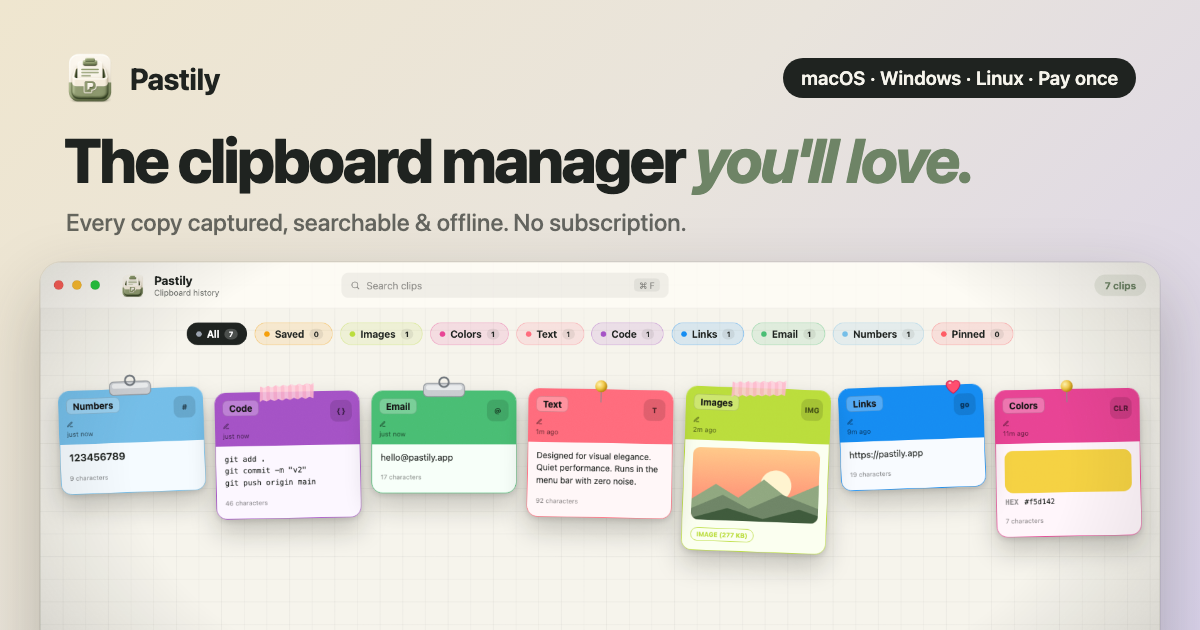
Pastily is an offline clipboard manager for macOS, Windows, and Linux. It records copied text, links, code, images, colour codes, and other clipboard items in a local history so users can search for and reuse material they copied earlier.
The app is designed for people who frequently switch between copied items while writing, coding, completing forms, or handling visual assets. Its core workflow combines searchable history, ordered multi-item pasting, clip organization, image saving, and optional auto-expiration for sensitive data without sending clipboard contents to a cloud service.
Keeps copied text, links, code, images, colour codes, and other clipboard items in a searchable local history. The site says searches return results in under a millisecond, including with thousands of clips.
Universal Paste Queue places copied items in sequence so they can be pasted one after another with a keyboard shortcut, useful for forms and spreadsheets.
Assigns clips to colour-coded spaces, pins important items, and lets users pause capture or set an auto-disappear timer. Timers can remove sensitive clips from RAM and disk, with a maximum documented duration of 24 hours.
Offers one-click saving of copied images to disk and shows a notification that helps locate the saved file.
On supported MacBooks, Notch Island previews new copies, displays queue status and auto-delete countdowns, and opens the four newest clips when the pointer moves to the notch.
Runs locally without cloud sync, accounts, telemetry, or network access according to the site. macOS builds are signed with an Apple Developer ID and notarized by Apple.
Copy notes, links, snippets, and references while researching or planning, then search the local history to recover an item without repeating the original navigation.
Queue several fields such as names, addresses, invoice details, or other values and paste them sequentially into a form or spreadsheet using the platform shortcut.
Keep frequently reused commands, SQL snippets, commit messages, and links available in searchable history, with pins for items that need to stay visible during a work session.
Save screenshots and other copied images directly to disk, while using colour-code recognition and alternate formats when working with visual references.
Set auto-disappear timers for passwords, API keys, one-time codes, and other temporary secrets so they are removed from local memory and storage after the selected period.
No. Pastily stores clipboard history, files, and images locally on the computer and states that it operates without cloud sync, accounts, telemetry, or network access. Sensitive clips can also be configured to auto-expire after a timer of up to 24 hours.
On macOS, download the Pastily DMG, open it, and drag Pastily into the Applications folder. The site states that one universal build supports both Apple silicon and Intel Macs and is signed and notarized by Apple.
Yes. Universal Paste Queue lets you copy several items in sequence and paste them one at a time with Cmd+Shift+V on Mac or Ctrl+Shift+V on Windows and Linux.
Notch Island requires Pastily 2.2.0 or later and a Mac with a built-in notch. It works on the built-in display of 2021 14-inch and 16-inch MacBook Pro models and MacBook Air models from M2 onward; it does not appear on external displays, Macs without a notch, Windows, or Linux.
Yes. Turn it off in Settings → General, or use the Pastily menu bar icon and choose Notch Island under Control. The regular clipboard history continues to work after it is disabled.

Goldfish is an AI memory app for macOS that helps you reply, write, summarize, and continue using the context already on your Mac. It stores memory locally and writes in your tone.

ArtDeck is a visual reference board app for iPhone, iPad, and Mac that lets artists collect mixed reference material on one canvas and study it with ToolBox lenses. It works offline, supports optional iCloud sync, and is sold as a one-time purchase with no account required.

Biji es una plataforma versátil diseñada para mejorar la productividad a través de herramientas y características innovadoras.

Malyatko is a baby tracker for logging feeding, sleep, growth, teething, and milestones in one app. It works on iPhone, Apple Watch, and widgets, with no sign-up, offline use, and family sharing through iCloud.

Redline is a budgeting tool for Claude Code that paces sessions to stay within time, token, cost, or plan-percentage limits. It uses Claude Code’s native hooks and statusline to help sessions finish with a usable result instead of stopping abruptly.

Claude Overlay is a Windows desktop overlay for Claude Code that reads your screen so you can ask questions, inspect content, and request edits without leaving the current app. It runs on your existing Claude subscription through the Claude CLI, so no separate API key is required.