
Translated messaging
Participants write in their own language and receive translated chat messages on their phones. Chats support group conversations, photos, videos, documents, places, voice messages, and end-to-end encryption.

Sponkly translates chats, voice and video calls, meetings, browser content, and short videos in 32 languages. It is designed for individuals, teams, creators, and website operators who need multilingual conversations without requiring every participant or visitor to install the same app.
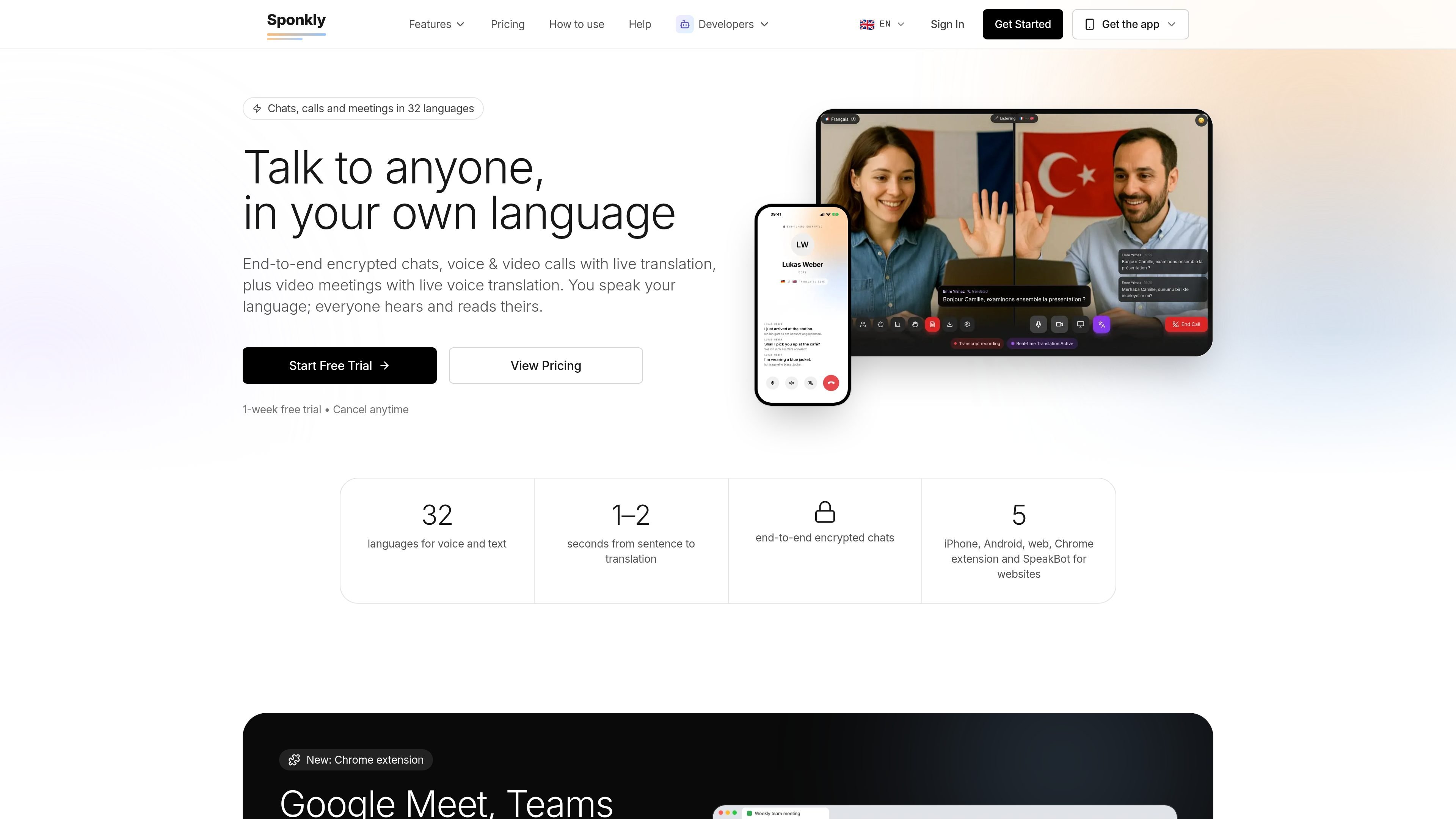
Sponkly is a language-translation communication platform for chats, voice calls, video calls, and online meetings. It translates written messages on the phone and provides live subtitles and spoken translation so people can communicate while choosing their own languages.
The service also extends translation to browser-based meetings and videos. Its Chrome extension can translate Google Meet, Microsoft Teams, Zoom, YouTube, webinars, and online classes, while SpeakBot adds translated visitor conversations to websites. Mobile-only tools include Face to Face conversations and Video Studio for translating short videos.
Participants write in their own language and receive translated chat messages on their phones. Chats support group conversations, photos, videos, documents, places, voice messages, and end-to-end encryption.
Voice and video calls provide live subtitles and spoken translation in a natural voice. Calls are encrypted between phones, and Sponkly says it retains none of the speech used for translation.
Meetings support up to 8 people, with each participant choosing a language and voice. They include translated subtitles, live voice translation, translated chat, polls, reactions, files, and browser screen sharing.
The Chrome extension overlays translated subtitles on Google Meet, Microsoft Teams, Zoom, YouTube, webinars, and online classes. It can also read translations aloud without requiring other participants to install anything.
Video Studio translates videos up to 5 minutes long with subtitles in both languages and, where dubbing is offered, a translated voice that resembles the speaker's voice. It is available in the iPhone and Android apps.
SpeakBot adds translated chat, voice, and video calls to websites and includes an AI receptionist that answers from the site's own information when a team member is unavailable.
Use translated chats, calls, and meetings to coordinate with clients, colleagues, or partners who speak different languages. Each participant can follow the conversation in a selected language without requiring an interpreter to join.
Join a Google Meet, Microsoft Teams, or Zoom call as usual and use the Chrome extension for subtitles and optional spoken translation. Other participants do not need to install Sponkly.
Add SpeakBot to a WordPress, Shopify, Wix, React, or PHP website so visitors can write, call, or video call in their language while a team responds in its own. The AI receptionist can answer when nobody is available, using the site's own information.
Translate a short recorded video for YouTube, TikTok, Instagram, product presentations, or customer communications. Video Studio accepts videos up to 5 minutes and returns translated subtitles and, where available, dubbing.
Put one phone between two people who speak different languages and use Face to Face mode for sentence-by-sentence spoken translation. This workflow is intended for in-person conversations rather than a scheduled online meeting.
Sponkly supports translated chats, voice and video calls, and video meetings in 32 languages. The product also offers browser translation for Google Meet, Microsoft Teams, Zoom, YouTube, webinars, and online classes through its Chrome extension.
You can sign up on the web or in the iPhone and Android apps. Chats and calls can be used in the app, while meetings can be joined from the app or a modern browser. Some features, including Video Studio and Face to Face, are available only in the mobile app.
Meetings support up to 8 participants. They can include translated subtitles, live voice translation, chat, file sharing, polls, reactions, and browser-based screen sharing. The meeting host can also enable a written transcript on Business and Enterprise plans.
A one-week free trial is available and can be canceled anytime. Plans can be changed from the Subscription page. Sponkly states that it does not provide refunds, including for unused time, and annual plans remain active until the paid period ends after cancellation.
Chats and call audio and video are encrypted. Sponkly uses HTTPS/TLS for web, app, and API connections, DTLS-SRTP for audio and video, encrypted server storage for chat messages and files, meeting passwords, optional waiting rooms, and two-factor authentication. Speech audio is not stored after translation; recorded transcripts on Business and Enterprise plans are deleted after 30 days.

MagicSlides is an AI presentation generator that turns text, topics, documents, URLs, and videos into slide decks. It creates presentations in Google Slides by default and supports PowerPoint export, with multilingual output and AI-assisted editing.

Microsoft Translator is a Bing translation web app for translating short text between English and more than 100 languages. It also supports image capture translation and basic output actions like listen and copy.

Rubriq 是一款面向科研写作的 AI 学术论文润色与翻译工具,支持个人订阅、机构方案和论文查重相关服务。它帮助研究人员在上传稿件后快速生成带修订痕迹的可审阅文档。

Globalize.now is an AI localization tool that converts hardcoded app text into repo-owned locale files and keeps translations synced on every Git push. It is aimed at developers shipping multilingual web apps in tools like Cursor, Claude Code, GitHub, GitLab, Lovable, and common frontend stacks.

Glarity is a browser extension for summarizing, translating, and chatting with web content such as YouTube videos, web pages, PDFs, search results, and Gmail. It supports major browsers and combines reading, writing, and translation workflows in one tool.

Caplo is an iPhone app companion that turns audio from other apps into real-time translated captions in a floating Picture-in-Picture window. It helps users follow live streams, anime, sports, podcasts, courses, news, and other live audio when subtitles are missing or not usable.