
Scenario-based AI conversation
Hold voice conversations with a portrait-style AI partner across everyday situations such as coffee shops, interviews, and hotel check-ins.

Linforge is an AI English-speaking practice app for iPhone and iPad. It offers live speaking conversations, sentence-level pronunciation and grammar feedback, read-aloud practice, and Anki deck sync.
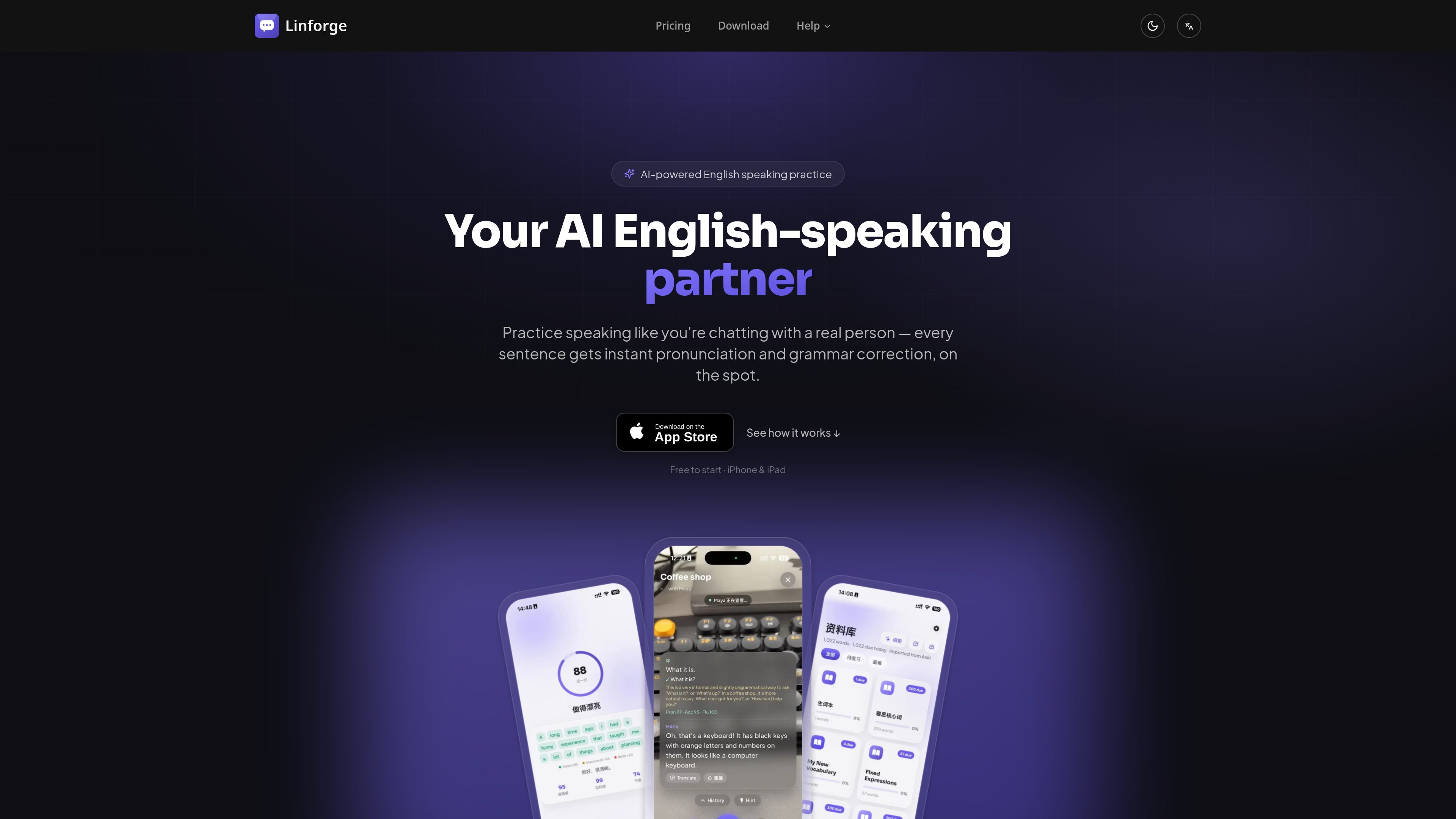
Linforge is an AI English-speaking practice app for iPhone and iPad. It is built around live conversation and spoken practice rather than flashcards, with an emphasis on correcting pronunciation and grammar as you speak.
The product combines scenario-based voice chats, read-aloud practice, and Anki integration so learners can turn study material into speaking practice. It also keeps a record of sessions and scores, letting users review progress over time through archived conversations and ability tracking.
Hold voice conversations with a portrait-style AI partner across everyday situations such as coffee shops, interviews, and hotel check-ins.
Receive Azure phoneme-level pronunciation scoring, grammar correction, and natural-phrase rewrites immediately after you speak.
Read AI-generated articles aloud line by line, with scoring and highlighted weak sounds to guide pronunciation practice.
Connect Anki decks so the words you are studying can become conversation prompts, articles, and example sentences.
Review archived conversations and read-aloud sessions to see grammar corrections, pronunciation scores, streaks, level, XP, and ability radar over time.
Use the camera-based vision mode, which the site says runs on-device for privacy, to talk about what the camera sees.
Practice ordering coffee, checking into a hotel, or handling interview questions with an AI partner that responds in real time.
Read generated articles aloud when you want focused pronunciation practice and a sentence-by-sentence score.
Turn vocabulary from your Anki deck into spoken practice so study words become sentences you can actually say.
Use the camera mode when you want to describe and discuss what is in front of you during a conversation.
Review archived sessions to see which pronunciation issues, grammar corrections, and skill areas are improving over time.
Linforge is designed for iPhone and iPad. The download page says it runs natively on iOS and is intended for everyday speaking practice.
Every new account starts with 150 free credits. After that, subscriptions are purchased and managed through your Apple Account inside the app.
The source describes AI scenario conversations, instant pronunciation and grammar correction, read-aloud practice, Anki sync, and learning history. It does not describe a team or classroom mode.
The download page says real-time AI conversations and voice generation require a network connection. It also notes that the camera vision model runs on-device for fast, private visual conversations.
The pricing page lists Basic and Pro subscriptions. Basic includes daily speaking practice with full feedback, while Pro adds more room for longer sessions and priority access to new voices and scenarios.

LangPanda is a browser extension for learning languages from streaming video and other supported sites. It combines instant subtitle lookup, flashcard creation, vocabulary tracking, and spaced-repetition review for 36 languages.

ProWritingAid is a writing assistant for storytellers that offers grammar checking, style editing, paraphrasing, and story analysis inside popular writing apps. It includes a free plan, paid tiers, and tools for chapter critique, manuscript review, and collaborative editing.

Asụsụ Ọma is a free guided Igbo learning app for beginners, with short lessons, native-speaker audio, memory practice, games, and speaking rehearsal. It is designed for adult and young-adult learners, diaspora learners, children, and families studying Igbo at home or abroad.

Teloframe is an AI-powered football coaching platform for building tactics, editing drills, planning sessions, and managing player development in one workspace. It includes a Free tier plus Pro and Club plans for coaches and analysts who need more collaboration and team features.

LeanUp is an AI calorie tracker and meal-planning app for logging meals, tracking macros, and getting personalized nutrition guidance. It supports barcode scanning, photo-based food recognition, manual search, and recipe reuse.

TrakMac is a voice-first macro tracking app for fitness-focused users on iOS. It estimates calories and macros from spoken meal descriptions, then helps users log food and stay aligned with their training goals.