
Visual slideshow editor
Build slides on a pixel-based canvas with panes, blocks, and elements instead of a fixed template. The editor supports drag-and-drop layout, live playback, and selection controls for editing content directly in the project.

PaneFlow is a visual slideshow builder for animated presentations, interactive sections, and embed-ready page elements. It supports exports to code, video, images, PDF, and embeds, and includes an MCP server for AI-assisted editing.
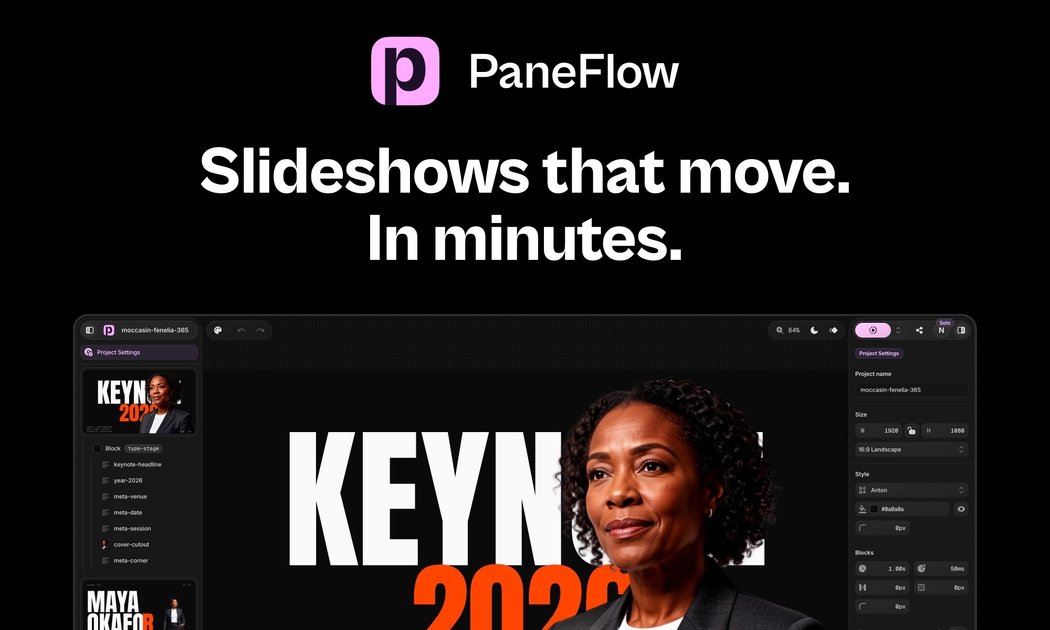
PaneFlow is a visual slideshow builder for animated presentations, interactive sections, and embed-ready page elements. It uses a fixed canvas in pixels and a block-based editor so you can arrange text, media, shapes, charts, and other content visually before exporting it to code or media files.
The product is aimed at people who want polished slideshow-style experiences without rebuilding them by hand in code. It supports exports to HTML, React, Vue, Svelte, video, images, PDF, CDN embeds, and iFrame, and it also includes an MCP server for AI assistants that can create and edit projects from natural language prompts.
Build slides on a pixel-based canvas with panes, blocks, and elements instead of a fixed template. The editor supports drag-and-drop layout, live playback, and selection controls for editing content directly in the project.
Create slides with text, images, video, shapes, charts, code blocks, and 3D models. The docs also call out backgrounds, positioned media, fonts, sizing, alignment, text effects, and looping media controls.
Animate elements and transitions across panes, with support for entrances, loops, staggering, and automatic morphing between slides. The homepage and docs both emphasize live preview while you work.
Generate images, edit them with prompts, and remove backgrounds without leaving the project. The homepage says these tools use AI credits.
Export the same slideshow to HTML, React, Vue, Svelte, video, images, and PDF, or publish it through CDN and iFrame embed formats. The developer page also positions the output as clean component code rather than an iframe wrapper.
Connect an AI assistant through PaneFlow's MCP server so it can create, edit, animate, and screenshot real projects. The docs say it works with MCP-capable clients and signs in through standard OAuth.
Design animated pitch decks, product launches, and campaign slides in a visual editor, then export the finished work as code or media for sharing and publishing.
Create slideshow-style sections or interactive blocks for websites, then export clean React, Vue, or Svelte components for direct use in a codebase.
Assemble lessons, explainers, or walkthroughs with polished transitions and paced content so an audience can follow ideas step by step.
Use the MCP server to let an AI assistant build a deck, reorder slides, add content, and refine animations from a prompt while keeping the result as a real PaneFlow project.
Generate images, remove backgrounds, and fine-tune visuals inside the same project when you do not want to switch to another tool for asset prep.
Yes. PaneFlow is designed as a visual builder, and the docs say you can work without code. You can also export the result to HTML, React, Vue, Svelte, video, images, or PDF.
PaneFlow exports slideshows as clean HTML and as React, Vue, and Svelte components. The site also says you can publish via CDN and iFrame, and export to video, images, and PDF.
The docs describe PaneFlow as a visual builder that uses a fixed canvas in pixels and exports a result that scales fluidly to any container.
The MCP server is available through a paid PaneFlow plan. It connects to MCP-capable clients over a remote HTTP endpoint at https://paneflow.com/mcp.
The MCP page says the server works with MCP-capable clients such as Claude Code, Claude desktop and web apps, Cursor, VS Code, and others.

ByteAsk is a terminal-first AI coding agent for C and C++ that edits repositories and verifies changes with the real compiler, debugger, sanitizers, and tests before showing a diff. It offers a free tier plus paid plans, with editor connectors and zero-retention handling described in the source.

Epherem is a static security scanner for web apps built with AI coding tools such as Lovable, Bolt, v0, Replit, Cursor, and Claude Code. It checks source files and dependencies for common security mistakes, then provides categorized findings and suggested fixes without running the app.

CreateOS Sandbox is an isolated compute environment for running code and agent workloads inside Firecracker micro-VMs. It is designed for workflows that need machine-level isolation, private networking between sandboxes, and programmatic control through SDK, CLI, or MCP.

GitBot is a local browser-based workspace for creating reusable coding bots powered by Claude Code, Codex, or OpenCode. It helps developers run those agents across repository folders with persistent threads and configurable permissions.

hob is an independent workspace for coding agents that keeps agent sessions, terminals, history, and follow-up work organized around the tools and providers you already use. It is aimed at developers who want local control over routing, history, and workspace structure rather than a bundled model stack.

Ably Chat is a chat API platform for building custom realtime chat applications. It supports room-based messaging, typing indicators, presence, reactions, and message updates, with usage-based pricing options for different deployment stages.