
Identity-based payment addressing
Address a payment with a phone number, email, @handle, QR code, merchant, agent, or link instead of entering bank details or a wallet address upfront.

Payflip lets people send money using a phone number, email address, @handle, QR code, merchant, agent, or link instead of bank details. Recipients choose how to receive the funds, while unclaimed payments automatically return after the configured expiry period.
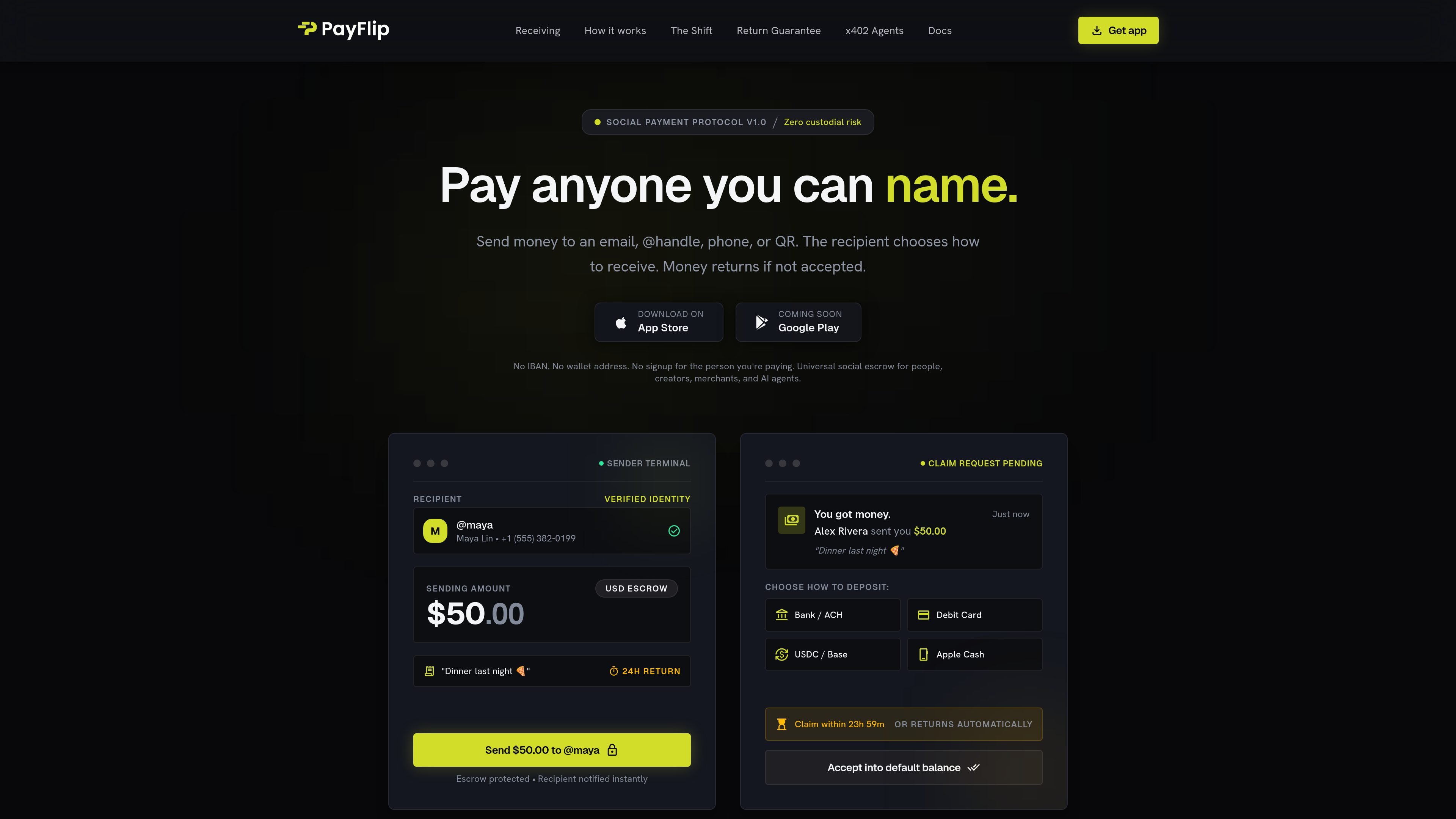
Payflip is a social payment protocol for sending money to a person or organization by a nameable identity rather than an IBAN or wallet address. A sender can specify a phone number, email address, @handle, QR code, merchant, agent, or link, add an amount and note, and send the payment into an escrow-based claim flow.
The recipient is notified and chooses how to receive the funds from the options presented. The site describes bank or ACH, debit card, USDC on Base, and Apple Cash examples. If the recipient does not claim the payment before its configured time-to-live expires, the funds automatically return to the sender. Payflip is presented for individuals, creators, merchants, and AI-agent payment scenarios, although the AI-agent functionality is marked as coming soon.
Address a payment with a phone number, email, @handle, QR code, merchant, agent, or link instead of entering bank details or a wallet address upfront.
The recipient selects a receiving method from the claim flow; examples shown include bank or ACH, debit card, USDC on Base, and Apple Cash.
Unclaimed payments remain in escrow until the configured time-to-live expires, then return automatically to the sender rather than becoming a manual recovery task.
Claim links can be delivered through SMS, iMessage, email, Instagram direct messages, Discord, and other browser-accessible contexts shown on the site.
The product describes a non-custodial escrow lifecycle with pending, claimed, settled, and returned states, plus a TTL timer described as verifiable on a public ledger.
The mobile app is presented as a way to send and receive payments, while the site also describes QR payments, chat bots, voice interactions, and future AI-agent payment support.
Send a friend money using a phone number, email, or @handle, add a note such as a shared meal expense, and let the recipient select how to receive it.
Creators and merchants can share a claim link through social or messaging channels so supporters or customers can receive or pay without exchanging bank details first.
Use browser links, SMS, email, Instagram messages, Discord, or QR codes to deliver a payment in the conversation or physical setting where the recipient is already present.
The site positions Payflip for gig, task, prize, bounty, settlement, and grant distributions where some recipients may not claim immediately; expiry-based returns limit unresolved balances.
A planned x402-oriented flow is intended to give AI agents human-readable payment identities, spending allowances, and human escrow, while allowing sellers to receive fiat payouts. This capability is marked coming soon.
Payflip lets a sender address a payment using a phone number, email address, @handle, QR code, merchant, agent, or claim link. The recipient receives a claim request and chooses an available way to receive the funds.
The recipient can choose from the receiving methods shown in the claim flow, including bank or ACH, debit card, USDC on Base, and Apple Cash. Availability may depend on the specific claim and recipient.
A sender can set an automatic return period for an unclaimed payment. The site demonstrates a 24-hour return option and states that funds return automatically when the time-to-live expires.
The recipient does not need a Payflip account, app, wallet, or IBAN to claim a payment according to the product site. Claims can be opened through a browser link delivered in channels such as SMS, email, direct messages, or Discord.
The site presents Payflip on iOS and Android, with stated compatibility of iOS 16 or later and Android 12 or later. It also describes browser-based claim links and payment flows in chats and direct messages.

MacSpoof cambia o randomizza l’indirizzo MAC Wi‑Fi su macOS: riconnettiti alle reti e limita la registrazione dell’identità su Wi‑Fi pubbliche.

DemoTV is an audience-ranked station for discovering and comparing independent product demos. Founders can submit videos, embed approved demos on their websites, collect viewer inquiries and optionally commission demo production or labelled promotion without buying ranking.

Ship It: Idle Dev Tycoon is an iPhone incremental simulation game about building apps, managing a software studio, and selling it for lasting progression benefits. It supports offline play, automated builds, adviser collection, and optional in-app purchases.

NomNak è un’app gratuita per iPhone per scoprire ristoranti grazie ai consigli degli amici, con spot salvati, food passport e ricerca città.

CAPTA is a mobile GPS waypoint app for quickly saving, organizing, and revisiting locations. It supports offline use, camera-based coordinate capture, optional cross-device synchronization, and GPX export for fishermen, explorers, and field professionals.

Ctrl+Shift+3 is a calm, text-first community platform with a chronological feed, profiles, RSS, and private groups called Clicks. It is built for reading, posting, and joining smaller communities without algorithmic ranking or vanity counts.