
Tap-to-read word lookups
Tap a Japanese or Chinese word to see how to read it and what it means. The app also shows furigana, pinyin, and conjugation breakdowns as part of the lookup flow.

Toku Reader - 読 is an iPhone app for reading Japanese and Chinese with tap-to-define lookups, reading support, and study tools. It works across texts, websites, videos, and podcasts, with offline core features and a free plan that includes 50 word lookups per day.
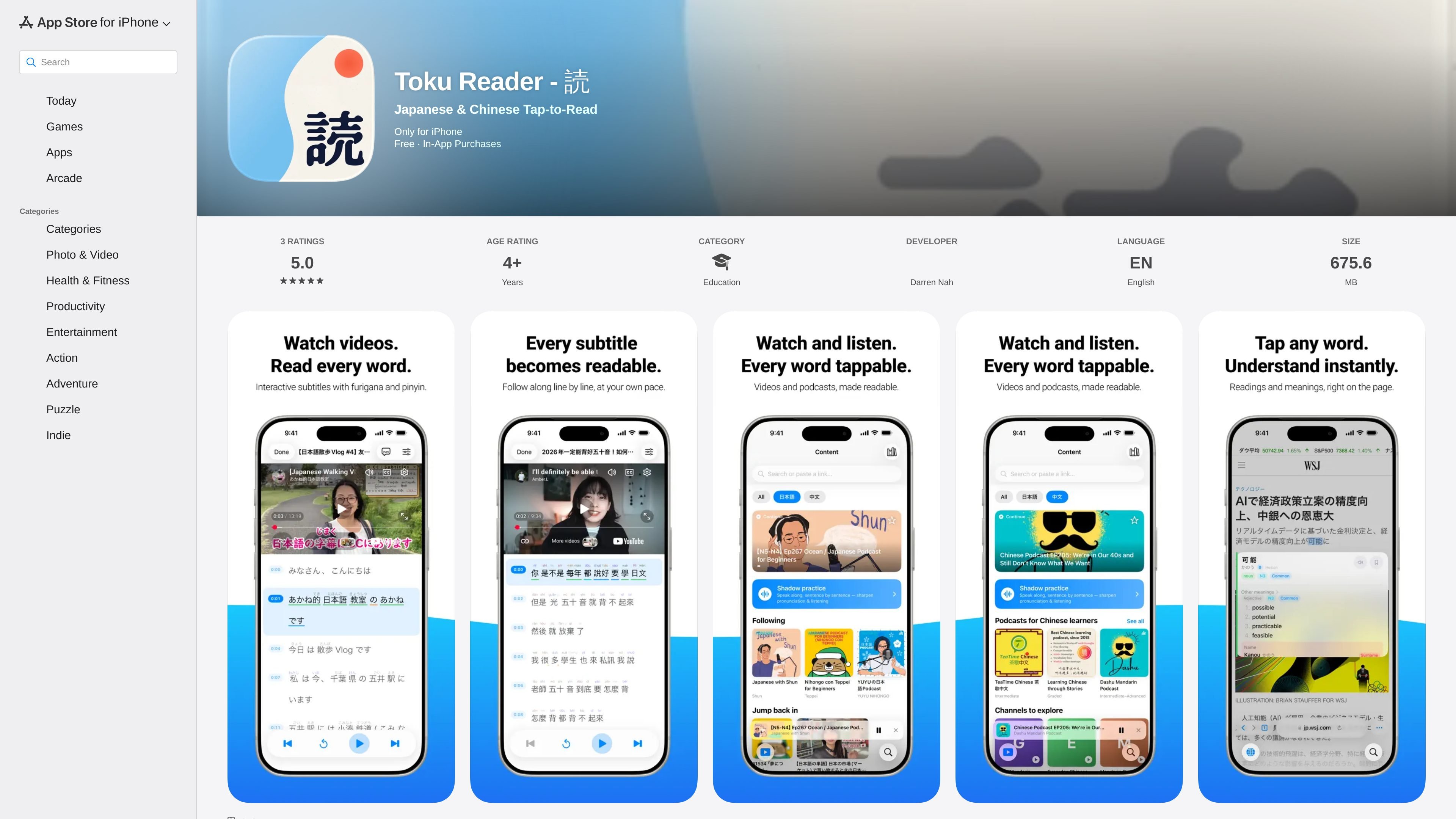
Toku Reader - 読 is an iPhone app for reading Japanese and Chinese with tap-to-define lookups, reading support, and study tools built around text, web pages, videos, and podcasts. It is listed on the App Store as free with in-app purchases.
The app’s main job is to let readers tap any word to see its reading and meaning, then continue without leaving the content they are studying. It supports furigana, pinyin, conjugation breakdowns, animated stroke order, radical breakdowns, and a dictionary tab with handwriting input and reverse search.
Toku also goes beyond single passages. The source says you can paste or import texts, PDFs, and multi-chapter EPUBs; browse websites with readings added in place; watch videos with interactive subtitles; and listen to podcasts with a tappable transcript.
The app emphasizes local processing. The page says tokenization, dictionaries, OCR, and reviews run on-device, and that the core experience works offline. It also states that reading, watching, and listening are free, with a free plan that includes 50 word lookups per day and an upgrade option for unlimited lookups.
Tap a Japanese or Chinese word to see how to read it and what it means. The app also shows furigana, pinyin, and conjugation breakdowns as part of the lookup flow.
Import or paste text, including PDFs and multi-chapter EPUBs, and continue reading with per-chapter progress on long books.
Open real websites in a browser view that adds readings to the page, with tabs, history, and a distraction-free reading mode.
Watch videos with interactive subtitles that can be searched and tapped line by line, with reading support built into the subtitle flow.
Listen to podcasts with tappable transcripts, episode downloads, background play, sleep timer, skip silence, chapters, and a downloads manager.
Use the built-in dictionary, handwriting input, English reverse search, Anki import, WaniKani sync, and spaced-repetition review deck to study words over time.
Paste a sentence, import a PDF, or open a multi-chapter EPUB and tap words as you go. Per-chapter progress and fast lookups make it suitable for long-form reading sessions.
Read articles in a browser view that adds readings directly onto the page. Tabs, history, and a clean reading mode help when you want to work through real websites instead of isolated snippets.
Watch videos with interactive subtitles that can be tapped line by line. This is useful for learners who want to follow along, check meanings on the spot, and practice with subtitle-based reading support.
Listen to podcasts with a tappable transcript, then use shadowing tools such as auto-pause, replay, and slow playback to practice speaking along with the audio.
Save unfamiliar words to the built-in review deck, import an Anki deck, or connect WaniKani so study progress stays organized inside a single reading app.
The app lets you tap Japanese or Chinese words to see readings and meanings. It also includes furigana, pinyin, conjugation breakdowns, stroke order, a dictionary tab, review decks, and support for web pages, PDFs, EPUB books, videos, and podcasts.
The source says the core experience works offline, including tokenization, dictionaries, OCR, and reviews. Reading, watching, and listening are free, with the free plan allowing up to 50 word lookups per day and an upgrade option for unlimited lookups.
The app supports pasting text, importing texts, PDFs, and multi-chapter EPUBs, browsing websites with readings added to the page, watching videos with interactive subtitles, and listening to podcasts with tappable transcripts.
Yes. The source says you can save words to a built-in spaced-repetition review deck, import an existing Anki deck while keeping scheduling history intact, and connect a WaniKani account so progress stays in sync.
The App Store page lists the app as free with in-app purchases. The pricing details are not shown in the provided source, so only the presence of a free tier and upgrade option can be confirmed.

LangPanda is a browser extension for learning languages from streaming video and other supported sites. It combines instant subtitle lookup, flashcard creation, vocabulary tracking, and spaced-repetition review for 36 languages.

Asụsụ Ọma is a free guided Igbo learning app for beginners, with short lessons, native-speaker audio, memory practice, games, and speaking rehearsal. It is designed for adult and young-adult learners, diaspora learners, children, and families studying Igbo at home or abroad.

Talkpal is an AI-powered language learning web and mobile app for practicing speaking, listening, writing, and pronunciation. It offers guided courses, roleplays, and call-style conversation practice across 130+ languages.

Microsoft Translator is a Bing translation web app for translating short text between English and more than 100 languages. It also supports image capture translation and basic output actions like listen and copy.

YABAI is a 308-word Japanese slang and culture dictionary that explains meanings, social tone, example usage, and word histories across eight categories. It helps Japanese learners and readers understand how expressions sound and when they fit, with a paid Android app offering 13 languages and device read-aloud support.

Lingofable is a story-based language learning app that helps learners practice reading at an appropriate level and review new vocabulary in context. It currently supports Spanish, with Android listed as coming soon.