Bricks icon

Bricks

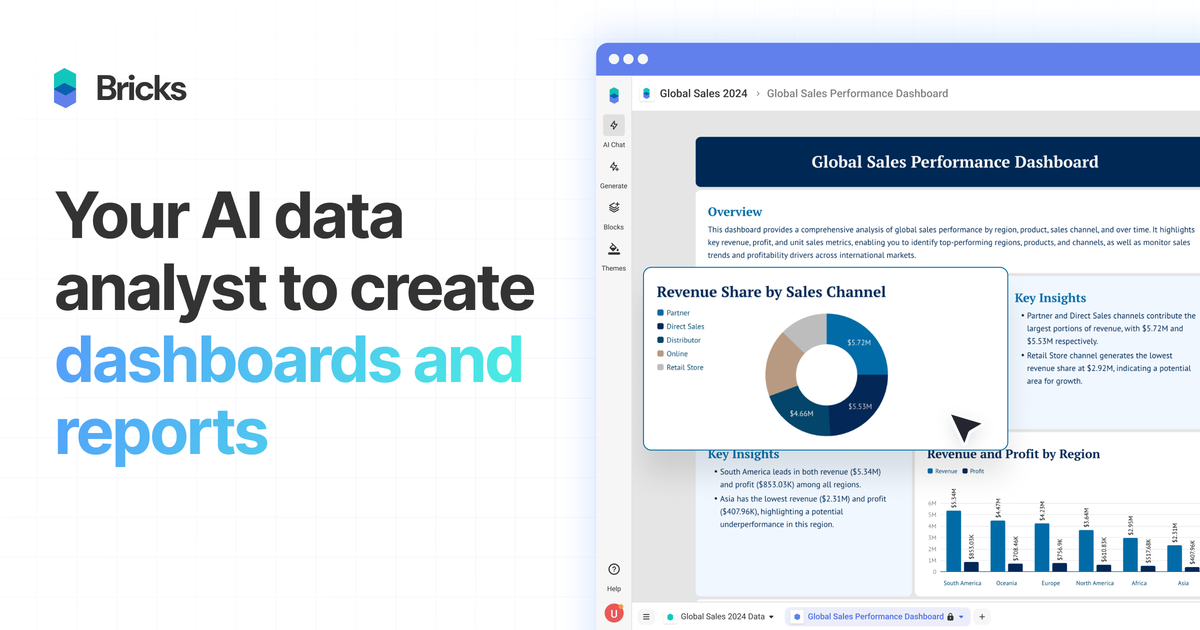
Bricks is a web-based AI data analyst for turning CSV, Excel, PDF, and PNG data into dashboards and reports. It supports automatic chart generation, manual editing, sharing, and export for individuals and teams.

Bricks

Overview

Bricks is an AI data analyst for turning spreadsheet-style data into dashboards and reports. The product is positioned for people who want polished visual reporting without building each chart and layout by hand in Excel, Canva, or a heavier BI tool.

Users upload data such as CSV, Excel, PDF, or PNG files, and Bricks automatically creates dashboards with charts, tables, and insights. It also supports manual editing, natural-language changes, team collaboration, sharing, and export so the dashboard can be refined and reused after the initial AI draft.

What Bricks does

AI dashboard and report generation

Upload spreadsheet or report files and let Bricks generate dashboards, charts, tables, and written insights automatically.

Full manual and AI customization

Edit dashboards with natural language prompts or by dragging tiles, changing colors, updating text, and moving blocks around manually.

One-click refresh with new data

Update the underlying data and regenerate the dashboard while keeping the layout intact.

Interactive filtering

Click into a data point to filter the rest of the dashboard and explore patterns across the same view.

Reusable templates

Save a dashboard layout as a template and reuse it with new data for repeat reporting workflows.

Flexible data input

Import data from Google Sheets or databases, and upload CSV, XLSX, PDF, or PNG files as source inputs.

Common ways teams use Bricks

  • Monthly reporting dashboards

    Turn monthly spreadsheets into dashboards for performance reporting, with charts and insights generated automatically and then refined for the final audience.

  • Business data analysis

    Upload CRM, sales, finance, or operations files and build a dashboard that highlights trends, filters data points, and can be refreshed when new files arrive.

  • Template-based reporting

    Create repeatable report layouts for recurring work, then reuse the same template with fresh data instead of rebuilding the dashboard each cycle.

  • Team collaboration on reports

    Share dashboards with teammates, control access levels, and use the same workspace to review reporting outputs together.

  • Stakeholder sharing and presentation

    Export finished dashboards to PDF or PPTX, create a public link, or present them directly inside Bricks for stakeholders.

Pros and Cons

Pros

  • Generates dashboards and reports automatically from common file-based data sources.
  • Supports both AI-assisted and manual editing, so users can refine layouts after generation.
  • Includes reusable templates and one-click refresh for recurring reporting.
  • Offers sharing, export, and team collaboration options across plans.
  • Positions itself as easier than traditional BI tools for users who do not want a technical setup.

Cons

  • Best suited to small and medium-sized datasets rather than large-scale data infrastructure.
  • Advanced BI use cases that depend on deep database modeling or SQL-style workflows are not the focus.

FAQ

What is Bricks used for?

Bricks is an AI data analyst for creating dashboards and reports from uploaded CSV, Excel, PDF, and PNG files. It automatically generates charts, tables, and insights, and lets you edit and customize the result manually or with natural-language prompts.

Does Bricks offer a free plan or trial?

Yes. The pricing page says the Free plan includes 20 AI messages per month, Premium adds 500 AI messages per month and larger team collaboration, Pro includes unlimited AI messages, and Enterprise is for larger teams with priority support.

How can I share or export a dashboard?

Yes. The pricing page says you can export dashboards or reports to PDF or PPTX, create a public share link, or present directly within Bricks.

What kind of data works best with Bricks?

Bricks is designed for small to medium-sized datasets, such as spreadsheet data, CRM exports, sales reports, marketing analytics, financial data, survey results, and operational metrics.

Can teams use Bricks together?

Yes. Bricks supports team collaboration on all plans, with team sizes and access levels varying by plan.

Quick Facts

Category
AI data analyst / dashboard builder
Primary use
Create dashboards and reports from CSV, Excel, PDF, and PNG data
Platform
Web app
Data input
Google Sheets, databases, and uploaded files
Export
PDF, PPTX, public share link, in-app presentation
Source domain
thebricks.com

Bricksの代替品

Bricks icon

Bricks

Bricks is an AI data analyst that turns CSV, Excel, PDF, PNG, Google Sheets, and database data into dashboards and reports. It helps people create, refresh, share, and present visual reporting without manual chart building.

PromptScout icon

PromptScout

PromptScout tracks how ChatGPT, Gemini, Google AI Overviews, and Perplexity mention your brand or competitors, then pairs those results with source analysis and website audits. It helps teams decide what to fix in content, positioning, or site readiness next.

SaveMRR icon

SaveMRR

SaveMRR is a Stripe retention tool for SaaS teams that scans billing data for churn and MRR leaks, then automates recovery through dunning, cancel-save offers, win-back emails, and onboarding nudges. It is built for founders and bootstrapped teams using Stripe.

Hype icon

Hype

Hypeは、カテゴリ・期間・スコア基準で急上昇中のYouTubeトピックを見つけるWebツール。クリエイターが注目のアイデアを素早く把握し、元動画を確認して次の企画を判断できます。

Sleek Analytics icon

Sleek Analytics

Sleek Analytics is a privacy-friendly web analytics tool with real-time visitor tracking, Core Web Vitals, and revenue attribution. It helps site owners understand traffic and conversions without cookie banners or a heavy setup.

Struere icon

Struere

Struere is an AI-native platform for turning spreadsheet data into structured operational software with dashboards, alerts, and automations. It is aimed at teams that want to replace manual spreadsheet workflows without building custom tools from scratch.