

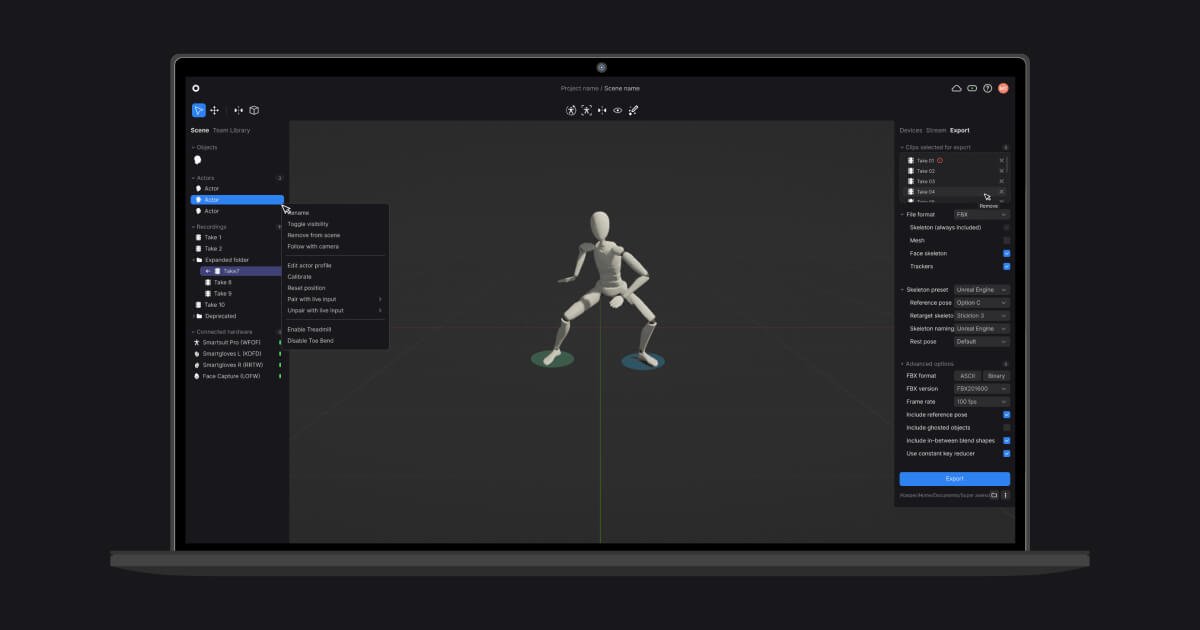
Hardware capture management
Connect Rokoko hardware such as the Smartsuit Pro II, Smartgloves II, Face Capture, and Coil Pro to view diagnostics and receive firmware updates in Studio.
Rokoko Studio is the software hub in Rokoko’s motion capture ecosystem. It receives data from Rokoko body, finger, and face capture tools, then visualizes, cleans up, records, and exports the motion for use in 3D animation pipelines.
The product is aimed at creators who need mocap for character animation, live streaming, or transfer into other software. The site also positions Rokoko tools for robotics and research workflows, including high-fidelity hand and body tracking for teleoperation and AI training data.
Connect Rokoko hardware such as the Smartsuit Pro II, Smartgloves II, Face Capture, and Coil Pro to view diagnostics and receive firmware updates in Studio.
Record unlimited mocap takes, keep them organized in folders, and work from the recorded data later instead of only live sessions.
Use real-time visualization to review motion capture with low latency, which helps with immediate feedback during performance capture.
Apply filters and editing tools such as root locking, foot locking, elevation tracking, knee pop smoothing, pose correction, retargeting, and custom character import.
Stream mocap data live to supported 3D tools including Unreal Engine, Unity, Blender, Maya, Cinema 4D, Houdini, MotionBuilder, and iClone.
Export finished animation to FBX, BVH, or CSV, with skeleton presets and mesh export options for downstream production workflows.
Capture full-body motion with the Smartsuit Pro II, finger tracking with Smartgloves, and face capture in the same workflow for character performances.
Stream live mocap data into tools such as Unreal Engine, Unity, Blender, Maya, Cinema 4D, Houdini, MotionBuilder, or iClone for animation work in a separate 3D pipeline.
Clean up recorded takes with filters like foot locking, root locking, and elevation tracking before exporting to FBX, BVH, or CSV.
Use the robotics-oriented workflow for high-fidelity hand and body tracking in teleoperation, dexterous manipulation, and AI training data collection.
No. The source says Rokoko Studio is the software layer that receives raw data from the Smartsuit Pro, Smartgloves, and Rokoko Face Capture, processes it with real-time algorithms and filters, and can then stream the result to other 3D tools.
The source says Rokoko Studio is designed to run on laptops, and that most modern computers are sufficient. The site points to recommended specs for more detail.
Rokoko Studio supports export to formats including FBX, BVH, and CSV, with skeleton and mesh options. The site also mentions export overrides and skeleton presets such as Human IK and Mixamo.
The pricing page shows a Starter free tier, paid Starter, Basic, Plus, and Pro plans, plus an Enterprise option with custom pricing and contact sales flow. Annual and monthly billing are both shown.
Yes. The site says Rokoko Studio can stream in real time to tools including Unreal Engine, Unity, Blender, Maya, Cinema 4D, Houdini, MotionBuilder, and iClone through native integrations.

MacSpoof로 macOS Wi‑Fi MAC 주소를 변경하거나 랜덤화하세요. 네트워크 재접속 및 공용 Wi‑Fi에서 기기 식별 기록을 줄이는 데 도움.

NomNak은 친구 추천으로 맛집을 찾는 iPhone 무료 앱입니다. 저장한 장소, 푸드 패스포트, 도시 검색으로 친구들의 식당 지도를 확인하세요.

TyeGit은 Rust와 Tauri로 만든 네이티브 Git 클라이언트로, 스테이징, 커밋, 브랜치, 원격 저장소를 빠르고 정밀하게 제어할 수 있습니다. Windows, macOS, Linux를 지원합니다.

Loomal is a payments layer for agentic commerce that lets developers add paywalls to APIs, MCP tools, or hosted files. It settles agent payments in USDC on Base and is aimed at services that want per-request payment from AI agents.

idmly converts self-contained HTML designs into editable Adobe InDesign (.idml) files. It is built for designers and teams that need browser-made or AI-generated layouts turned into InDesign without rebuilding them by hand.

A native macOS Hacker News client built with SwiftUI and distributed through GitHub Releases. It can be installed from a DMG, or built from source in Xcode 26+.