
Mission event countdowns
Shows live countdowns to major Artemis II mission events, including the lunar flyby and return milestones described in the source.

Artemis II Lunar Countdown is a macOS menu bar app with live Artemis II countdowns, mission phases, MET, crew info, and a timeline view.
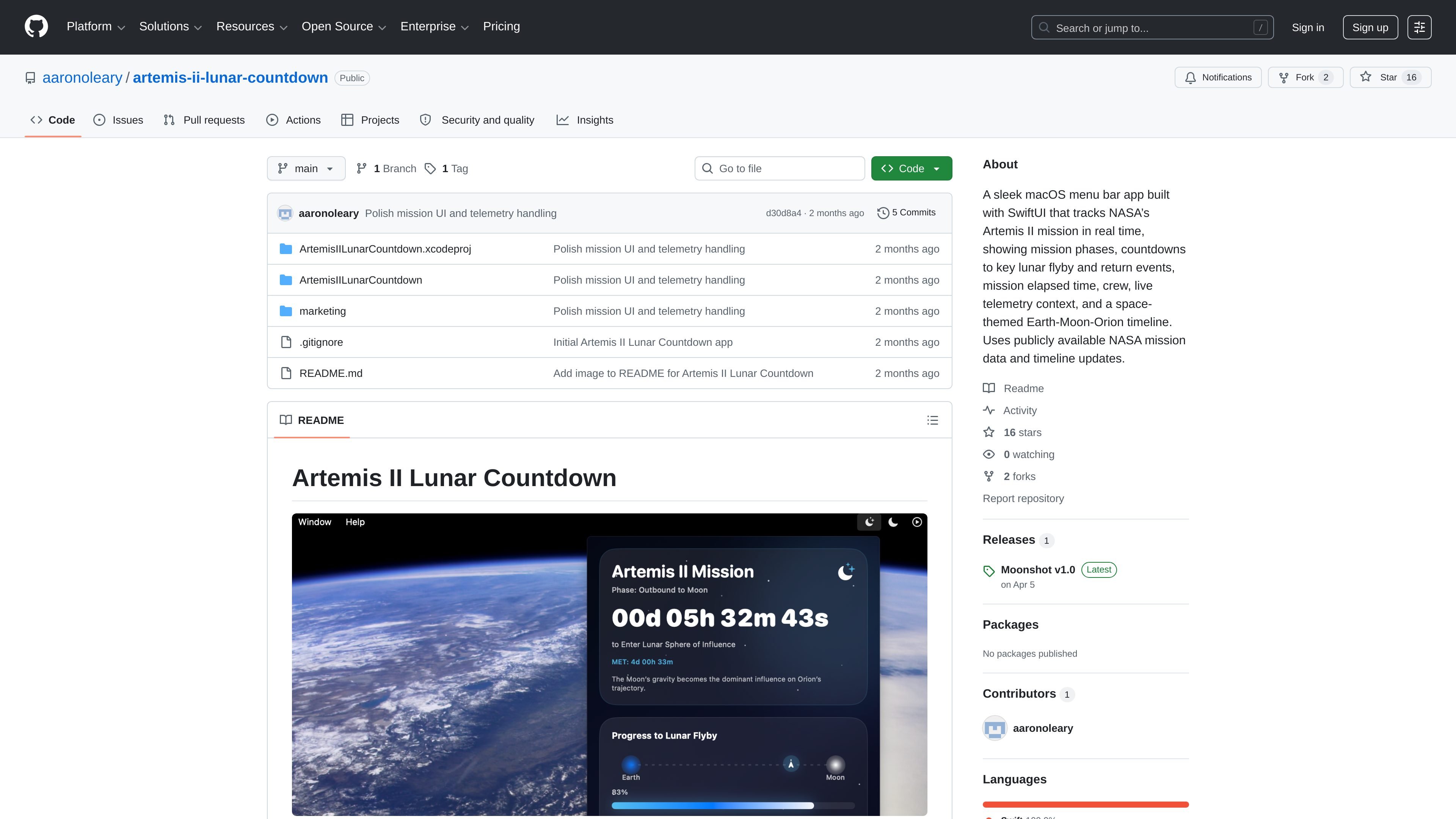
Artemis II Lunar Countdown is a macOS menu bar app for following NASA’s Artemis II mission in real time. It combines live countdowns, mission phase tracking, mission elapsed time, crew information, and a space-themed Earth-Moon-Orion timeline in a compact desktop utility.
The app is built with SwiftUI and uses publicly available NASA mission pages and updates as its data source. According to the release notes and README, it is self-distributed for macOS, with source build instructions available in the Xcode project for users who want to run it locally.
Shows live countdowns to major Artemis II mission events, including the lunar flyby and return milestones described in the source.
Summarizes the current Artemis II phase, including outbound, lunar flyby, return leg, re-entry, and splashdown.
Displays mission elapsed time so users can see how far the mission has progressed since launch.
Includes the Artemis II crew roster and mission context directly in the menu bar view.
Uses a space-themed Earth-Moon-Orion progress view to present the mission timeline visually.
Built as a menu bar-only macOS app with SwiftUI for quick at-a-glance checking.
Keep the mission visible while working on a Mac, with countdowns and phase status available from the menu bar instead of a separate full-screen app.
Check the next lunar flyby or return milestone quickly without opening multiple NASA pages or mission trackers.
Use the repository and Xcode project to inspect the app, run it locally, or adapt it for your own workflow.
Rely on the NASA-sourced update links and mission context when you want a compact reference for the latest public Artemis II information.
The app is a self-distributed macOS menu bar app built with SwiftUI. The README says to download the latest macOS release, and the source build instructions require opening the Xcode project in Xcode and running it on My Mac.
The source notes list macOS 13 or later as the requirement, and the README recommends Xcode 15 or later for building from source.
It tracks NASA’s Artemis II mission using publicly available mission pages and updates, including mission coverage announcements, live updates, the Artemis II mission page, and the Track Artemis page.
The release notes say macOS may block the app on first launch because it is self-distributed and not signed with an Apple Developer certificate. The README gives the standard Open/Allow Anyway and quarantine-flag removal steps if needed.
Yes. The app is described as a macOS menu bar-only app, so it is intended for Apple desktop systems rather than mobile or web use.
Timeslicer is a time tracking and distraction-blocking app that infers tasks from visible browser and desktop content, with activity data stored locally.

DockAMP is a Docker image for browser-based management of Apache or Nginx, PHP, MySQL, MariaDB, PostgreSQL, and proxy containers, plus files, backups, updates, and status tools.

Notwen is a freelance finance tool that tracks earnings, tax reserves, and safe spend, with AI for invoicing, contracts, and follow-ups.

ClipStudios is a web-based AI video platform for creating clips from prompts or images, with built-in audio, lip sync, stitching, and model selection tools. Free tier available; paid plans from €20/month.

drifty is a Mac AI time tracker that captures app, site, and session context in the background, then classifies activity as focus, neutral, or drift.

Sumora is an autonomous outreach agent for LinkedIn and Instagram that finds, qualifies, warms, and books leads, with replies managed in one inbox and final sends under review.