

Backplanes Spotlight
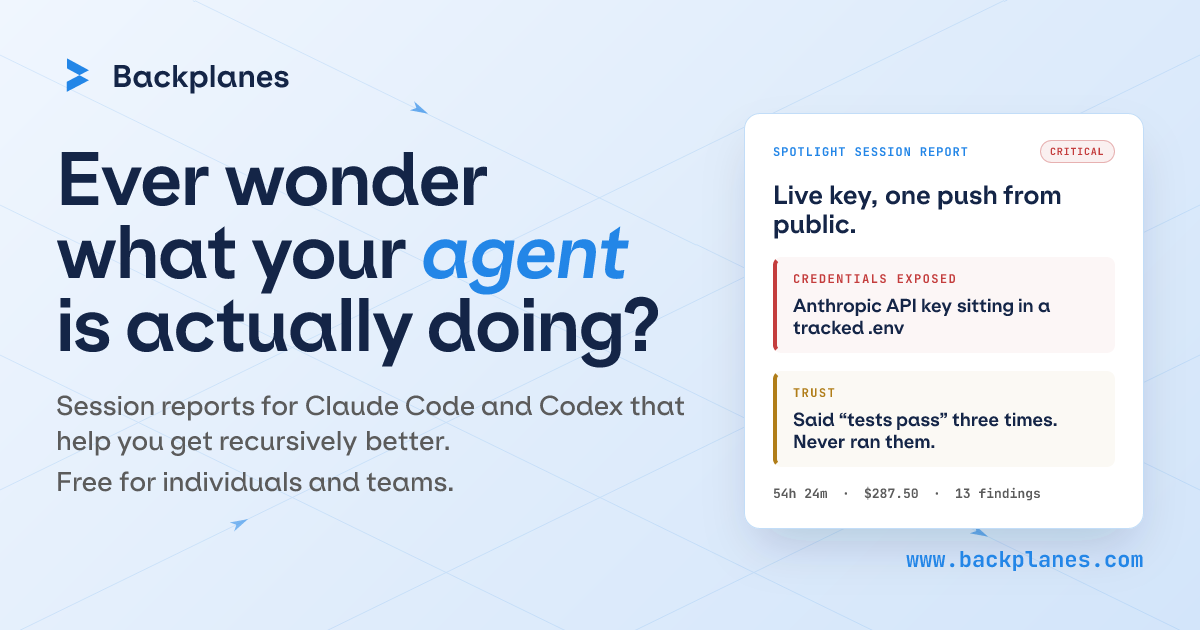
Backplanes Spotlight automatically turns completed Claude Code and Codex sessions into reports showing what an AI agent did, what it touched, and what may need review.
What is Backplanes Spotlight?
Backplanes Spotlight is a developer tool that automatically reads completed Claude Code and Codex sessions and turns them into session reports. Its purpose is to help individuals and teams inspect what an AI agent actually did, rather than relying on memory or a rough summary.
Spotlight captures sessions after they end, applies local redaction before anything leaves the laptop, and presents reports that highlight actions, reasoning, external services, and items that may need review. It is available for macOS, Linux, and WSL 2, and the site describes it as free for individuals and teams.
Key Features
- Automatic session capture for Claude Code and Codex runs, so reports are generated without manual note-taking.
- Session summaries that include task context, actions taken, reasoning, files touched, commands run, and external services used.
- Review-oriented reporting that flags sessions or findings that may need attention, such as suspicious file access or unusual scope.
- Local redaction of PII and credentials before data leaves the laptop, based on the product description.
- Browser-based authentication and team account creation during CLI setup, which keeps onboarding tied to the install flow.
- Support for macOS, Linux, and WSL 2, making it usable across common developer environments.
How to Use Backplanes Spotlight
Install the CLI from the provided shell command, then authenticate in your browser and let it create or connect your team account. After that, keep working as usual: Spotlight captures each session when it ends and automatically generates a report.
Once reports appear, review the ones marked as needing attention and skim the ones labeled as routine. The product is designed around a simple loop of install once, keep coding, and inspect the report after the next completed session.
Use Cases
- Reviewing what an AI agent changed during a long coding session while you were away from the keyboard.
- Checking whether a Claude Code or Codex session stayed within task scope and used the expected files or services.
- Auditing agent work for signs that it touched sensitive paths or credentials, so a developer can follow up quickly.
- Skimming routine sessions such as clean migrations or small UI updates to separate low-risk work from items needing review.
- Rolling the tool out to a team that wants shared visibility into AI-assisted coding sessions without counting seats individually.
FAQ
Does Spotlight read sessions live while the agent is running? No. The site says the CLI reads sessions after they end, not through live OAuth access to Anthropic or OpenAI.
What platforms are supported? The page says Spotlight works with macOS, Linux, and WSL 2.
Is it only for individual developers? No. The page says it is free for individual developers and the teams they work on, and also mentions org rollouts with attribution, volume, or specific controls.
What does a report include? The examples show task context, reasoning, files changed, commands run, external services used, and notes about anything unusual or worth review.
Does the product mention pricing limits or seats? The site says it is free for individuals and teams and explicitly notes there are no seats to count or trial clock, but it does not provide more detailed pricing tiers.
Alternatives
- Manual AI session reviews: a developer can inspect chat logs, terminal history, and diffs directly, but that requires more effort and does not create a structured report automatically.
- General developer observability tools: these may track broader system or application activity, while Spotlight is focused on AI coding sessions and post-session reports.
- Source control and code review alone: Git history and pull requests show resulting changes, but they do not capture the agent’s reasoning, commands, or external service usage during the session.
- Other AI coding workflow tools: products in this category may focus on the coding experience itself, whereas Spotlight is positioned around visibility into what happened after the session ends.
Alternatives

Devin
Devin is an AI coding agent that helps software teams complete code migrations and large refactoring by running subtasks in parallel.

imgcook
imgcook is an intelligent tool that converts design mockups into high-quality, production-ready code with a single click.

Pi Coding Agent
Pi Coding Agent is a terminal-based coding agent for developers who want coding help from the command line. Find docs, GitHub, and Discord for setup, feedback, and discussion.
Assemble by Cohesium AI
Assemble by Cohesium AI lets you orchestrate multiple AI specialist roles with a configuration setup across coding platforms from one place.

FixMyCWV
FixMyCWV audits Core Web Vitals, identifies LCP, INP, and CLS issues, and delivers code-level fixes for developers and teams.

Ably Chat
Ably Chat is a chat API and SDKs for building custom realtime chat apps, with reactions, presence, and message edit/delete.