
Schema-driven extraction
Define the JSON shape you need and send a URL. Tabstack enforces the schema on the server side and returns output that matches it, even when the source page changes.

Tabstack’s Structured Data Extraction API turns a URL into schema-matched JSON, with an instruction-based flow for reasoning tasks.
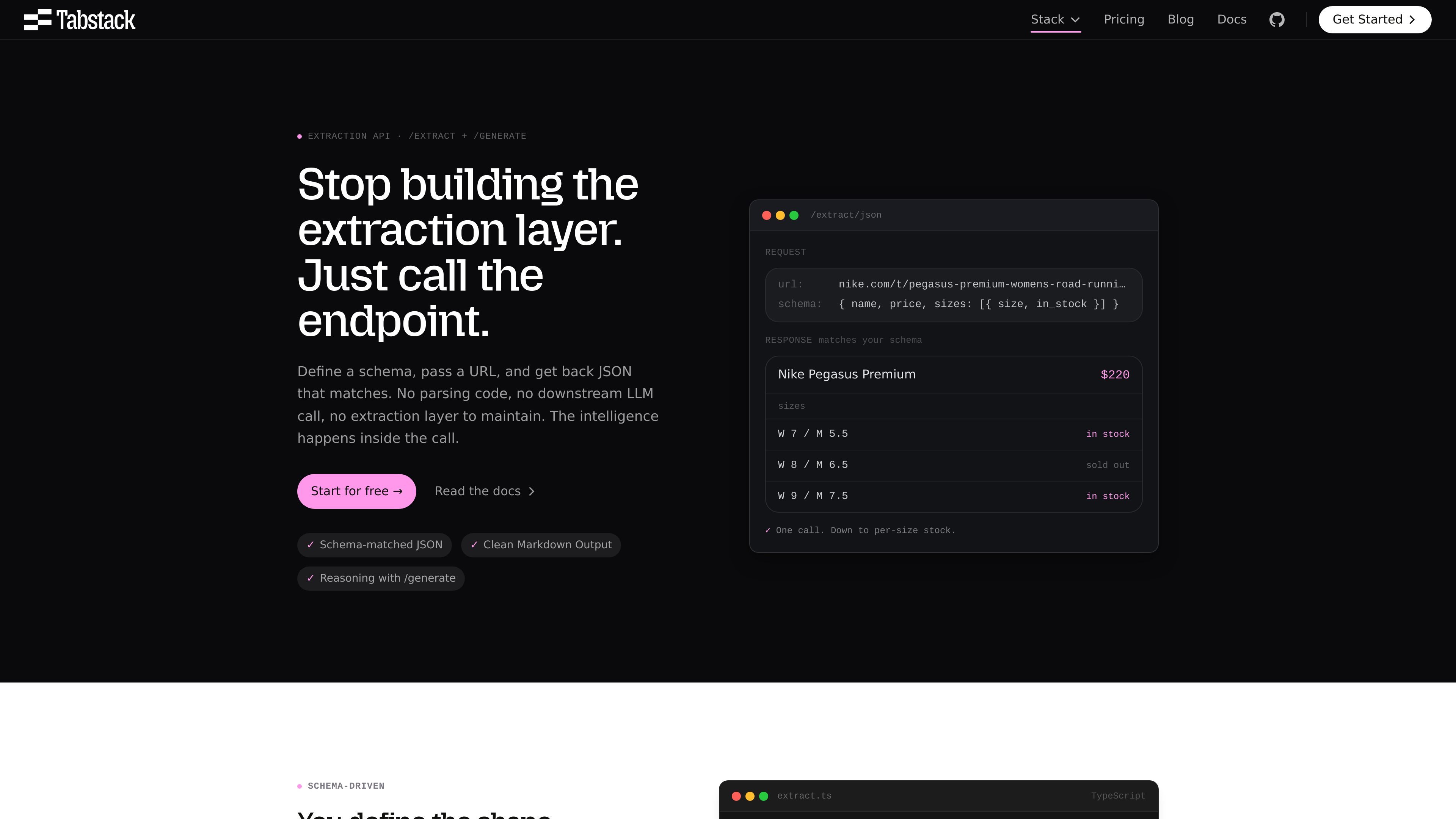
Tabstack’s Structured Data Extraction API turns a URL into JSON that matches a schema you define. The product is built for teams that need consistent structured output from web pages without maintaining their own parsing logic, browser pipeline, or downstream LLM orchestration.
The pages on the site show two closely related workflows: `/extract/json` for direct schema-matched extraction, and `/generate/json` for cases where instructions and reasoning are needed on top of the page content. The same platform also exposes Markdown output, research with citations, and browser automation, but this page is focused on the structured extraction use case.
Define the JSON shape you need and send a URL. Tabstack enforces the schema on the server side and returns output that matches it, even when the source page changes.
Use `/extract/json` for fixed-shape data, `/extract/markdown` for page text, and `/generate/json` when you want instructions layered on top of the source page.
The site says extraction works on server-rendered, client-rendered, and JavaScript-heavy pages, so the workflow is not limited to static HTML.
`/generate/json` adds instructions to the URL-based workflow, making it useful when the task requires interpretation rather than a direct field pull.
Control freshness and retrieval behavior with `nocache`, `effort`, and `geo_target`, including fresh fetches and country-specific views.
A TypeScript SDK is shown in the product examples, and the pricing page also lists Python SDK, MCP, and CLI as access options for the broader platform.
Pull pricing tables, product specs, inventory states, or other page data into a fixed JSON shape for dashboards and downstream systems.
Turn a domain or product page into normalized company, product, or contact data for enrichment pipelines.
Feed product pages, docs, and articles into retrieval or indexing pipelines using structured JSON or Markdown instead of custom scraping code.
Use `/generate/json` when the page alone is not enough and the result needs a structured interpretation, such as explaining what a pricing page implies about segmentation.
For teams that need adjacent workflows, the same platform also supports cited web research and browser automation on live pages.
Yes. The source pages show a TypeScript SDK and example calls for the extraction and research endpoints, along with API endpoints documented for `/extract/json`, `/extract/markdown`, `/generate/json`, `/research`, and `/automate`.
The structured extraction workflow is designed for a URL plus a JSON schema. Tabstack returns JSON that matches the schema, and the site also shows a related `/generate/json` flow for instructions-based structured output.
The home page shows extraction working on server-rendered, client-rendered, and JavaScript-heavy pages. It also mentions clean Markdown output when needed.
Pricing is shown publicly on the site: there is a free trial with 10,000 credits, an Individual plan, Team and Pro plans with included credits, and an Enterprise plan with custom pricing.
The source materials do not describe a published list of SDKs, authentication methods, or output formats beyond the examples shown on the pages. The clearest documented outputs are schema-matched JSON, clean Markdown, cited research answers, and completed browser tasks.

Happenstance is an AI-powered network search tool to find people, mutual connections, and warm introductions across connected accounts, with API, MCP, Slack, and team integrations.

Geekflare Web Scraping API extracts dynamic web content in Markdown, HTML, JSON, or plain text with browser rendering, CAPTCHA handling, and proxy support.

nolainocr is an AI OCR tool that extracts structured data from PDF invoices, receipts, forms, contracts, and bank statements into Excel, Google Sheets, JSON, or CSV.

Octen is a search infrastructure for AI apps needing live web context, structured answers, and retrieval tools via API, SDKs, Skills, MCP, and CLI.

Skayle researches topics, publishes structured CMS content, and tracks AI search citations for teams needing one system for visibility.
司马阅 is an AI document agent platform for enterprises, turning scattered document knowledge into structured capabilities for Q&A, search, writing, and review.