

BetterGA
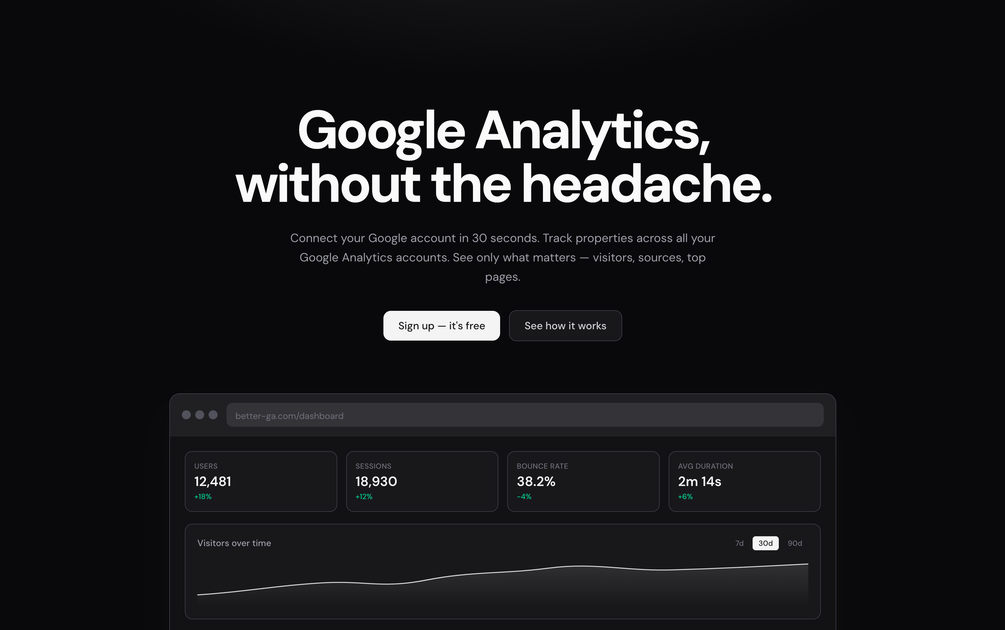
BetterGA is a simplified, read-only GA4 dashboard connected to your Google account for users, sessions, top pages, sources, and countries.
What is BetterGA?
BetterGA is a simplified, faster way to view Google Analytics 4 (GA4) data. It connects to a user’s Google account, lets you select GA4 properties across multiple accounts, and presents key metrics—like users, sessions, top pages, traffic sources, and top countries—in a single dashboard view.
Instead of navigating GA4’s dense interface for basic reporting, BetterGA focuses on one core workflow: answering common traffic questions quickly using read-only access to GA4 reports.
Key Features
- Read-only access to GA4 reports: BetterGA requests the minimum OAuth scope needed to read reports (analytics.readonly) and does not write to, modify, delete, or change GA4 data.
- One dashboard for core metrics: Shows users, sessions, top pages, top sources, and top countries together in a single view to reduce back-and-forth across GA4 sections.
- Multi-account, multi-property tracking: During onboarding, you can import and track GA4 properties that your Google account can access and manage them from one workspace.
- Instant switching between properties: Once properties are selected, you can view reporting for different properties without re-logging or tab-hopping.
- Email digests of property performance: Optionally deliver weekly or monthly summaries straight to your inbox, including metrics plus top pages and traffic sources.
- GA4-only focus: BetterGA is built exclusively for GA4 (not Universal Analytics), aligning the product workflow with GA4’s modern API.
How to Use BetterGA
- Sign in with Google and connect your account.
- Select GA4 properties from the accounts your Google login has access to.
- View the dashboard for the selected properties, using the single-screen metrics view for users, sessions, top pages, and sources.
- (Optional) Enable email digests to receive weekly or monthly summaries for your properties.
Use Cases
- Quick traffic check for a single site: Open BetterGA to review users, sessions, top pages, and top sources without building custom explorations in GA4.
- Monitor multiple client properties: Select GA4 properties across multiple Google Analytics accounts (e.g., several client sites) and switch between them from one workspace.
- Compare recent performance trends: Use the property dashboard view to review visitor activity over time and identify which sources and pages are driving traffic.
- Regular reporting via email: Set up weekly or monthly digests so stakeholders receive recurring summaries that include metrics, top pages, and traffic sources.
- Replace time-consuming GA4 navigation: Use BetterGA when GA4’s menu depth and report building feel excessive for basic pageview and engagement questions.
FAQ
-
Is BetterGA free? Yes. BetterGA is described as free to use, with no credit card required.
-
Does BetterGA work with GA4 or Universal Analytics (UA)? BetterGA is built exclusively for GA4. Universal Analytics (UA) is not supported, as BetterGA focuses on the GA4 API.
-
Do I need a Google Analytics account? You need existing GA4 properties. BetterGA reads from your existing GA4 data; if you don’t have GA4 set up yet, you’ll need to configure GA4 on your site first.
-
Can BetterGA connect multiple properties or accounts? Yes. During onboarding, BetterGA can import GA4 properties from any GA4 accounts your Google account has access to, and you can manage them from one workspace.
-
What data access does BetterGA request, and is my data safe? BetterGA requests read-only OAuth scopes to read GA4 reports. The site states it never writes to, modifies, deletes, or changes GA4 data, and that Google credentials are not stored on BetterGA servers.
Alternatives
- Google Analytics 4 (GA4) core reporting and Explore: Use GA4’s built-in reports or create custom explorations when you need more than the simplified dashboard view.
- Data visualization/BI tools connected to GA4 exports: If you require customized dashboards beyond GA4’s default layouts, you can use BI tools to aggregate and visualize metrics, typically with a more configurable workflow.
- Automation and reporting via GA4 API: For teams that want tailored reporting pipelines, building internal reporting around the GA4 API can provide flexibility, though it generally requires more setup than a read-only dashboard app.
Alternatives

PromptScout
PromptScout tracks how your brand is mentioned, which competitors are recommended, and what sources are cited in AI answers—plus website audits.

SaveMRR
SaveMRR scans Stripe billing data to find SaaS MRR leaks and help recover failed payments, save cancellations, and win back churn—60-sec Free Revenue Scan.

Sleek Analytics
Lightweight, privacy-friendly analytics with real-time visitor tracking—see where visitors come from, what they view, and how long they stay.

Struere
Struere is an AI-native operational system that replaces spreadsheet workflows with structured software—dashboards, alerts, and automations.

ClayHog
ClayHog tracks AI Search Visibility & GEO—see what ChatGPT, Gemini, Perplexity, Claude, and Google AI Overviews say about your brand, incl. citations and sentiment.

beehiiv
beehiiv is an all-in-one newsletter and website platform with publishing, growth, analytics, and monetization tools for creators and brands.