

Clipchamp AI Voice Over Generator
Clipchamp AI Voice Over Generator is an online text-to-speech tool to create realistic voiceovers for videos. Choose languages, speed & emotion.
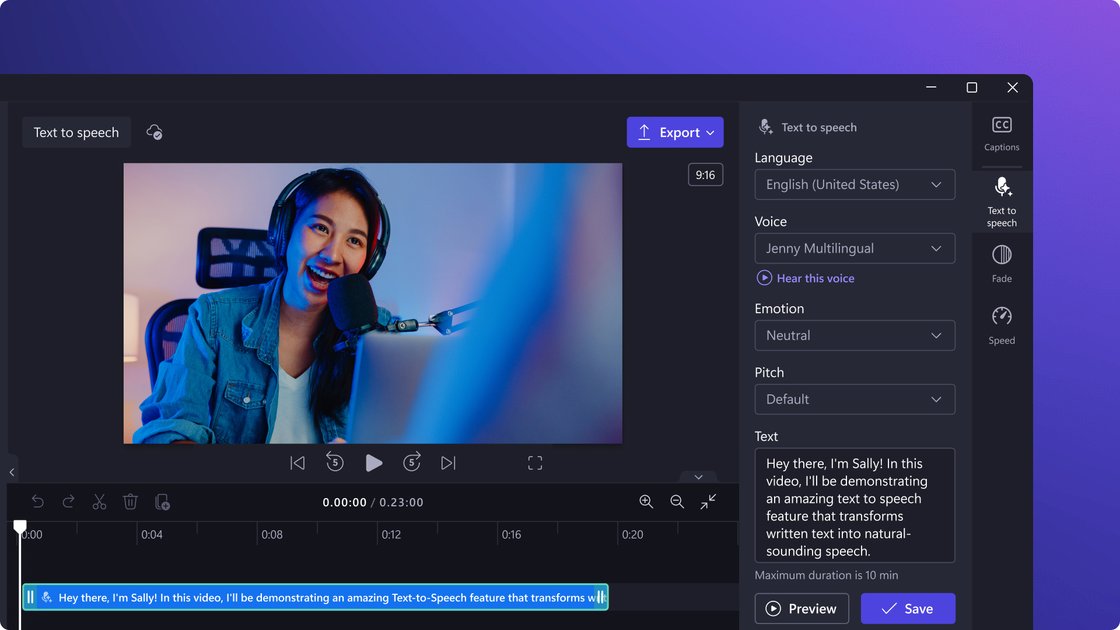
What is Clipchamp AI Voice Over Generator?
Clipchamp AI Voice Over Generator is an online text-to-speech (TTS) tool. Input your script to generate realistic voiceovers/narration for videos. It lets users create ready-to-use voice tracks faster without downloading an app.
After generation, users can select languages and voice types, and adjust preview effects via pitch or emotion, speed, and volume. It also pairs with AI captions to boost video accessibility and comprehension.
Key Features
- Online text-to-speech voiceover generation: Input script in the text box to generate voiceovers—no app download needed.
- Up to 400 voices to choose from: Switch between voices and match content style via pitch or emotion.
- Adjustable speed (0.5x–2x): Control narration rhythm with slower or faster speeds.
- Multi-language & accent support (text-to-speech): Page lists languages like Chinese, English, Spanish, Japanese, Hindi, Italian, Arabic, German, French; full list in FAQ.
- Text controls for pauses & emphasis: Use three dots/ellipses (…) for long pauses; exclamation marks (!) to emphasize content.
- "Phonetic spelling" to fix words: For incorrect pronunciation, adjust with "spell by sound"; try Chinese readings for numbers (e.g., 1998 →“一九九八”).
How to Use Clipchamp AI Voice Over Generator
- Open the text-to-speech generator in Clipchamp.
- Select target language, voice, tone/emotion, and speed.
- Type script directly or copy-paste into the text box.
- Preview the output and tweak tone/emotion, speed, etc., as needed.
- Add the generated voiceover to your video project; add AI captions simultaneously for better accessibility.
Text input tips (to control delivery):
- For longer pauses, add three dots/ellipses (…) in sentences.
- For emphasis, add exclamation marks (!) in text.
- For off pronunciations, try "spell by sound"; write numbers in Chinese readings (e.g., 1998 as “一九九八”).
Use Cases
- Social media short video voiceovers: Add narration to vlogs, reaction/meme videos, or gameplay to match platform pacing.
- YouTube long video narration boost: Use AI voiceovers to enhance long-form quality and comprehension with smoother delivery.
- Business & product demo videos: Create multi-language narration for demos to reach global audiences.
- Tutorials & screen recordings: Add step-by-step voiceovers for clearer pacing and understanding.
- Education & virtual learning: Pair voiceovers with captions in learning videos for better accessibility.
FAQ
1. Is Clipchamp's text-to-speech generator free?
Yes, per the page: Clipchamp offers an online editor to convert text to realistic AI voiceovers for free.
2. Which languages are supported for AI text-to-speech?
Includes Arabic, Chinese, English, Spanish, Japanese, Hindi, Italian, German, French; full list in FAQ.
3. Can I fix incorrect word pronunciation?
Yes. Adjust word spelling with "spell by sound"; try full Chinese readings for numbers (e.g., 1998 →“一九九八”).
4. How to create pauses or emphasize in voiceovers?
- Pauses: Add three dots/ellipses (…) in sentences.
- Emphasis: Add exclamation marks (!). Also select emotion/tone settings during generation.
5. Can I adjust volume on free AI voiceovers?
Yes. Page notes volume control in the "Audio" tab of the properties panel via slider.
Alternatives
- General online text-to-speech (TTS) tools: Core "text-to-audio" input, but you may need to import audio into a separate video editor.
- Video editors with built-in TTS/narration & captions: For all-in-one voiceovers and captions in one editor.
- Standalone caption generators/editors (accessibility-focused): Prioritize for captions, then add voiceover tracks separately.
Alternatives

CAMB.AI
Turn a single live stream into a multilingual broadcast with real-time AI audio dubbing for YouTube, Twitch, X and more.

蓝藻AI
蓝藻AI is an intelligent voice-over product that converts text to speech online, supporting voice cloning and a variety of AI voice options.

LOVO
LOVO is an AI voice generator and text-to-speech tool that creates realistic voiceovers in 100+ languages with an online video editor.

FlexClip
FlexClip is an AI-powered online video maker and editor with templates and built-in tools. Generate videos, subtitles, translation & more faster.

Ondoku
Ondoku is a text-to-speech software that allows free reading of up to 5000 characters and offers paid plans to support reading more characters.

Typecast
Typecast is an online AI voice generator that turns your text into life-like, hyper-realistic speech with emotional text-to-speech and voice options.