
Coddo
Coddo desktop app combines a Kanban task board, integrated Claude Code chat, and automatic Git branch management to track progress in one place.
What is Coddo?
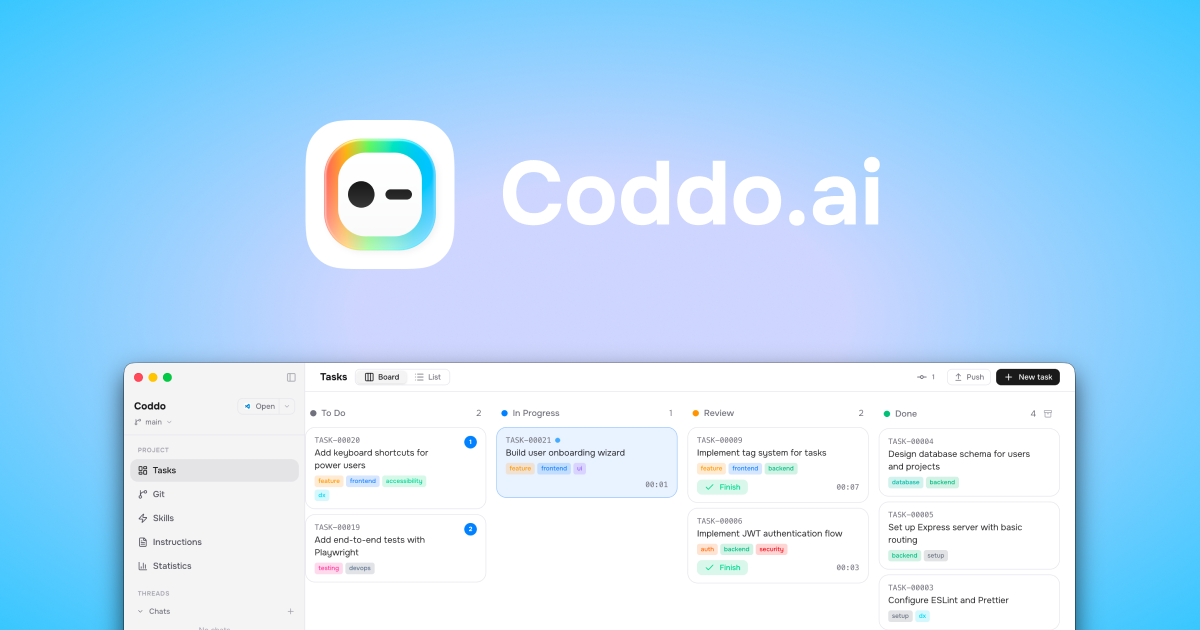
Coddo is a desktop application that combines a Kanban task board with an integrated chat interface for Claude Code, alongside Git automation for creating branches and moving work items through a project workflow. Its core purpose is to let you delegate code tasks to an AI agent while keeping task status visible in one place.
Instead of managing work only in chat, Coddo represents tasks as cards on a board (To Do, In Progress, Review, Done). As Claude Code works, you can watch the task progress across columns and see code-related activity tied to the task.
Key Features
- Kanban board with real-time task tracking: Tasks appear on columns such as To Do, In Progress, Review, and Done, helping you monitor how work moves through the workflow.
- Multiple board views (board and list): You can view tasks in a board layout or switch to a list view for faster scanning.
- “Create task” flow with minimal manual steps: You describe what you need, select a branch, and create the task; Coddo then picks up the task, writes code, and advances the task card without manual intervention.
- Dedicated Git branch per task with commits and merges: For each task, Coddo creates a branch, records changes through commits, and supports merge validation “with one click,” with branch and commit history presented in the app.
- Integrated Claude Code chat with streaming and tool visibility: Coddo includes a native chat interface that supports streaming responses, shows tool use visibility, and allows mode selection.
- Project onboarding that detects a Git repository: When you open a folder, Coddo detects the Git repo and sets up the Kanban so you can begin creating tasks.
How to Use Coddo
- Download and install Coddo on your Mac or Windows computer (no account is required, per the site).
- Install Claude Code via npm and authenticate with your Anthropic account.
- Connect Claude Code to Coddo from within the app.
- Select or open a project folder; Coddo detects the Git repository and initializes the Kanban workflow.
- Create your first task by describing the work, optionally using tags, and selecting a destination branch; then start the task and monitor it as it moves across the board.
Use Cases
- Feature development tracked as tasks: Break down a feature into multiple task cards, then delegate each card’s code changes to Claude Code while tracking progress through To Do → In Progress → Review → Done.
- CI/CD updates as a review workflow: Create a task for pipeline setup or adjustments, then use the board’s Review stage to keep the work structured before moving it to Done.
- Authentication or navigation fixes with Git visibility: For bug-fix tasks (e.g., login redirect or auth refresh issues), rely on Coddo’s per-task branches and commit history to validate changes before merge.
- Batching repetitive coding requests: Use tags and consistent branch/destination selections to organize similar request types (such as rate limiting configuration or UI toggles) across multiple tasks.
- Interactive code assistance within the same workspace: Use the integrated chat to read files and make edits with streaming output, while still reflecting task progress on the Kanban board.
FAQ
What is the relationship between Coddo and Claude Code?
Coddo uses Claude Code as its engine for tasks. You install and authenticate Claude Code, then connect it to Coddo so the AI can read, write, and execute code.
Does Coddo require an account or subscription?
The site states that downloading Coddo requires no account. It also indicates Coddo is free, but it does not provide details here about Claude Code subscription requirements, so those can’t be confirmed from the provided content.
Is Coddo really free?
The page promotes Coddo with “Download for free,” but it does not list pricing tiers or limitations on this page.
What platforms does Coddo support?
The site states Coddo is available as a desktop app for Mac or Windows.
Can I customize the interface?
The provided content references a dark mode toggle within the app, indicating at least some interface customization.
Alternatives
- Other AI coding agents with chat-only workflows: These tools focus on conversation for code generation and editing, but may not provide an integrated Kanban board that visualizes task progress across stages.
- Git-focused automation tools or CI pipeline helpers: These can manage branches and automation around builds/tests, but typically do not include an integrated Claude Code chat plus a Kanban task board for tracking AI-driven work.
- Project management tools with AI integrations: Tools like generic Kanban/project trackers can model To Do/In Progress/Review/Done workflows, but may require separate coding and branch management rather than per-task Git branch automation inside the same app.
Alternatives

GitBoard
GitBoard is a native macOS menu bar app for GitHub Projects to view your kanban board, filter by status, search issues, and create or assign.
Assemble by Cohesium AI
Assemble by Cohesium AI lets you orchestrate multiple AI specialist roles with a configuration setup across coding platforms from one place.

Polsia
Polsia is an autonomous AI system that plans, codes, and markets your company on a daily cadence while you sleep.

Biji
Biji is a versatile platform designed to enhance productivity through innovative tools and features.

ClawTick
ClawTick is a CLI-first AI agent automation platform for scheduling webhook tasks on cron with monitoring, alerts, retries, and execution logs.

Falconer
Falconer is a self-updating knowledge platform for high-speed teams to write, share, and find reliable internal documentation and code context in one place.