
CtrlOps
CtrlOps is a local-first desktop app for managing Linux servers over SSH with an AI-assisted terminal, file manager, and deployment tools.
What is CtrlOps?
CtrlOps is a desktop application for managing Linux servers over SSH with an AI-assisted terminal, file management, deployment workflows, and fleet-level server organization. It is designed as a local-first tool, so SSH keys and other credentials stay on the user’s machine rather than being uploaded to a cloud service.
The product combines server access, troubleshooting help, and operational tasks in one interface. According to the site, it works without agents on the servers and supports native apps for macOS, Windows, and Linux.
Key Features
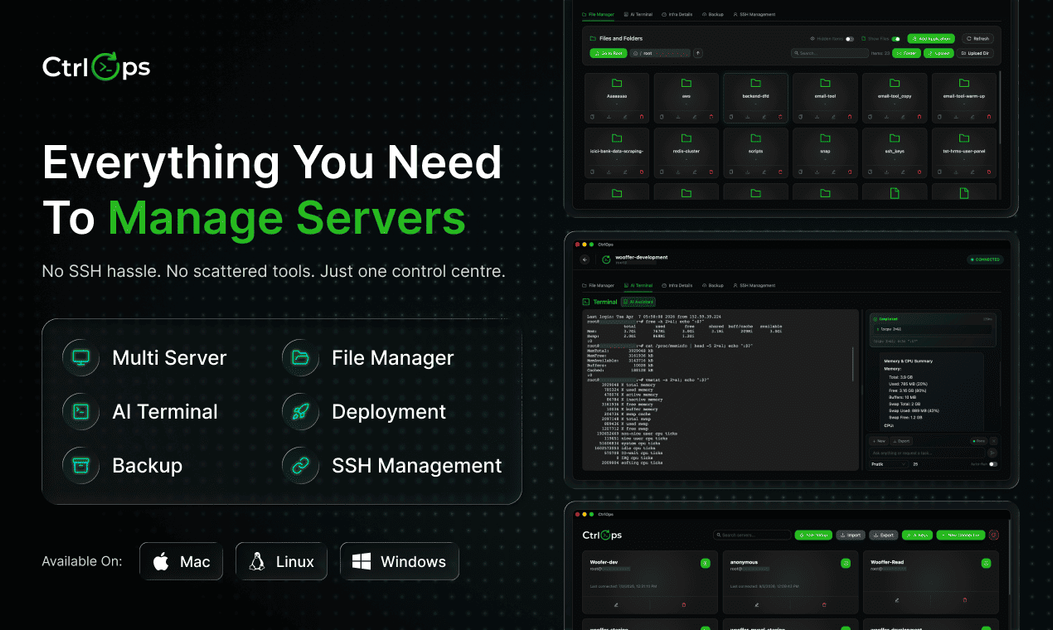
- AI-assisted terminal — Lets users describe what they need in natural language and get bash commands, command suggestions, plain-English explanations of output, and help diagnosing errors.
- File manager and script directory — Provides a GUI for browsing files and organizing scripts alongside terminal-based work.
- Multi-server management — Organizes servers as named hosts with tags and folders, making it possible to work across a fleet from one dashboard.
- SSH-based, agentless access — Connects directly to Linux servers over standard SSH without installing software on the remote machines.
- Deployment and backup actions — Supports one-click deployments and backup execution from the desktop app.
- Local-first security model — Stores SSH keys, server IPs, and credentials only on the local device and does not require cloud provider credentials.
How to Use CtrlOps
A typical workflow starts by downloading the desktop app for macOS, Windows, or Linux and connecting it to a Linux server over SSH. Users can then add hosts, organize them into folders or tags, and use the terminal, file manager, and deployment tools from one interface.
When an issue appears in the terminal, the AI assistant can suggest commands, explain logs, or help interpret errors. For larger environments, users can switch between servers and run operational tasks without opening separate tools.
Use Cases
- Managing a small server fleet — An operator can keep several Linux hosts in one place, connect to them by name, and avoid juggling separate SSH and file transfer tools.
- Troubleshooting command-line errors — A developer can paste or inspect terminal output and use the AI assistant to explain errors or suggest likely fixes.
- Deploying updates to remote servers — A user can trigger deployments from the app instead of running every step manually in multiple terminal sessions.
- Reviewing and editing server files — An admin can browse remote files through the built-in file manager while staying in the same desktop workflow.
- Working with privacy-sensitive infrastructure — Teams that want to keep SSH credentials and server details off cloud services can use the local-only storage model.
FAQ
Does CtrlOps require an agent on each server? No. The product is described as agentless and connects through SSH.
Which operating systems can run CtrlOps? The desktop app is listed for macOS, Windows, and Linux.
Does CtrlOps store SSH keys in the cloud? No. The site states that SSH keys and credentials remain on the local machine and are not uploaded to a cloud service.
Can it manage more than one server? Yes. The site says users can manage unlimited servers and organize them as named hosts.
Does it work only with one cloud provider? No. The site says it connects to any Linux server with SSH enabled, including servers on AWS, Google Cloud, Azure, DigitalOcean, or other VPS providers.
Alternatives
- Traditional SSH clients — Tools like standard terminal-based SSH workflows or desktop SSH clients focus mainly on remote access and file transfer, without the broader AI and deployment workflow shown here.
- Web-based server dashboards — Cloud-hosted server management panels can centralize operations, but they rely on a web interface and cloud dependency rather than a local desktop app.
- DevOps automation platforms — More comprehensive infrastructure platforms may emphasize pipeline automation or team workflows, while CtrlOps is positioned as a local SSH-centered desktop tool.
- Combined terminal and file transfer utilities — Products in this category can cover access and file browsing, but may not include AI-assisted troubleshooting or one-click deployment features.
Alternatives

ClawTick
ClawTick is a CLI-first AI agent automation platform for scheduling webhook tasks on cron with monitoring, alerts, retries, and execution logs.

OpenFlags
OpenFlags is an open source, self-hosted feature flag system with a control plane and typed SDKs for progressive delivery and safe rollouts.

MakerLoft
MakerLoft is an AI app builder for non-developers that connects to your GitHub repo to generate working apps with auth, payments, files, jobs.

Rectify
Rectify is an all-in-one operations platform for SaaS, combining monitoring, analytics, support, roadmaps, changelogs, and agent management—via conversation.

PromptScout
PromptScout tracks how your brand is mentioned, which competitors are recommended, and what sources are cited in AI answers—plus website audits.

Sleek Analytics
Lightweight, privacy-friendly analytics with real-time visitor tracking—see where visitors come from, what they view, and how long they stay.