
DynamicLake
DynamicLake for Mac brings a Dynamic Island-style interface for calls, message alerts, timers, weather/schedule updates, drag-and-drop actions & sharing.
What is DynamicLake?
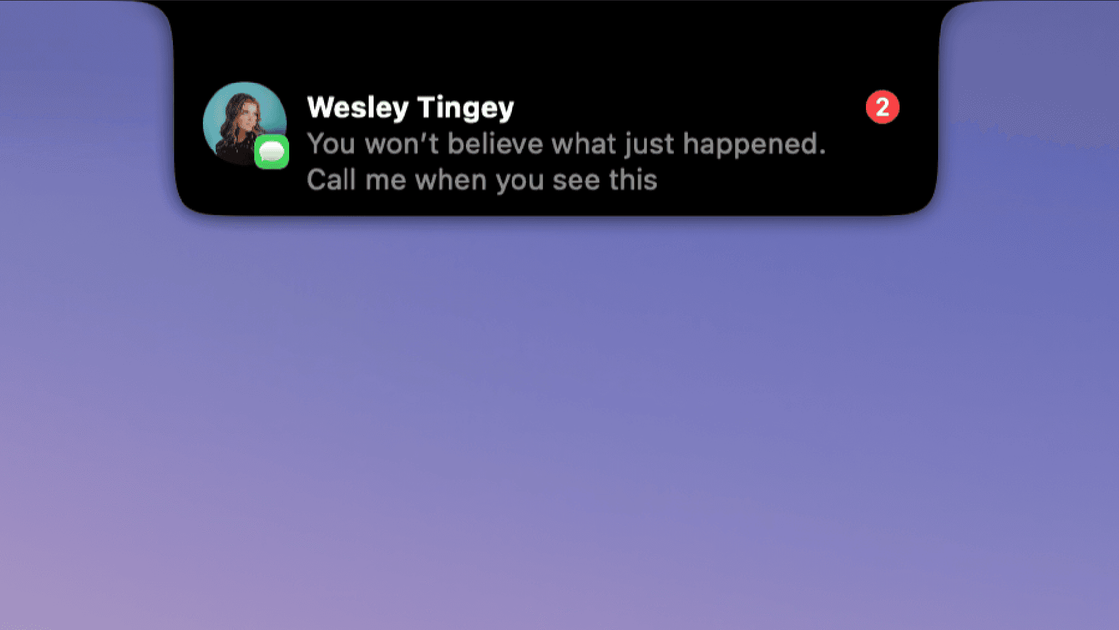
DynamicLake is a macOS app designed to show a “Dynamic Island”-style interface for everyday actions and live status updates. The app surfaces information and shortcuts in a compact UI so you can monitor items like notifications, timers, and calls while continuing your workflow.
Based on the available page content, DynamicLake Pro includes multiple modules for music control, message/app alerts, drag-and-drop actions, file management, timers, and Bluetooth/AirPods connection notifications, along with additional features referenced by name on the site.
Key Features
- Dynamic Island-style notifications (“DynaGlance”): shows real-time updates for your schedule and the weather.
- Calls alerts (“Calls”): provides alerts for FaceTime & iPhone calls.
- Message and app notifications: delivers real-time notifications from iMessage, WhatsApp, Telegram, and Slack.
- Drag-and-drop quick actions (“DynaDrop”): supports drag & drop workflows such as generating a shareable link and converting files.
- File management (“DynaClip”): offers tools to move between folders and share instantly, including AirDrop-related sharing.
- Timers (“Timer”): lets you control timers from within the Dynamic Island interface.
- Bluetooth/AirPods connect & disconnect alerts (“DynaConnect”): notifies you when compatible Bluetooth devices or AirPods connect or disconnect.
- Liquid Glass-inspired design: the UI is described as “Inspired by Apple Liquid glass.”
How to Use DynamicLake
- Install and enable DynamicLake Pro (the site references activation for multiple devices and app updates, but does not provide a step-by-step walkthrough).
- Use the Dynamic Island-style UI for status and alerts, including calls and message notifications.
- Trigger actions via drag & drop to perform tasks like creating a shareable link or converting supported files.
- Manage files through the in-app file management module, including quick sharing actions such as AirDrop.
- Set and monitor timers and watch connection events through the relevant DynamicLake modules.
Use Cases
- Stay informed without switching apps: you can monitor weather and schedule updates in the Dynamic Island-style interface while working.
- Receive call and chat alerts: you can get alerts for FaceTime/iPhone calls and real-time notifications from iMessage, WhatsApp, Telegram, and Slack.
- Convert or share content quickly: drag and drop files to generate shareable links or convert files without manually opening multiple tools.
- Share files fast during collaboration: move between folders and share instantly using the app’s file management features, including AirDrop.
- Track device connection changes: receive alerts when Bluetooth devices or AirPods connect or disconnect.
FAQ
-
What is DynamicLake Pro? DynamicLake Pro is referenced as the app’s version/module in the FAQ, but the page content provided does not include a full definition beyond the modules listed (music, calls, notifications, drag-and-drop actions, file management, timers, and Bluetooth alerts).
-
Which macOS versions are supported? The FAQ includes a question about macOS support, but no specific macOS version details are present in the provided content.
-
Does DynamicLake Pro support non-notch MacBooks? The FAQ includes this question, but the provided content does not state whether non-notch models are supported.
-
Can I try DynamicLake Pro before purchasing? The FAQ includes this question, but the page content provided does not mention a trial or its terms.
-
How does DynamicLake handle notifications? The page states that it can deliver real-time notifications from iMessage, WhatsApp, Telegram, and Slack, and it also includes modules for calls alerts and Bluetooth/AirPods connect/disconnect alerts.
Alternatives
- macOS Notification Center / Focus modes: provides native alerts and scheduling-related information, but typically without a Dynamic Island-style surface.
- Third-party notification and status widgets: alternative apps that show notifications or live statuses in a compact overlay; workflows differ depending on whether they focus on notifications, weather/schedule, or quick actions.
- File conversion and sharing utilities: dedicated tools that handle conversions and sharing workflows; compared to DynamicLake, these may require opening separate apps instead of using drag-and-drop actions in the Dynamic Island UI.
- Bluetooth device monitoring apps: utilities focused on connection/disconnection events; these may differ by offering different notification channels or device/event coverage.
Alternatives
MealTime
MealTime is your personal, offline-first recipe companion designed to help you save, organize, plan meals, and generate smart grocery lists, all while keeping your data private.

Side Reminder
Side Reminder brings Apple Reminders to your screen edge with keyboard/voice capture, focus timer, inline link previews, and optional Claude Code AI execution.

Biji
Biji is a versatile platform designed to enhance productivity through innovative tools and features.

Gemma AI
Gemma AI is a smart application that calls you directly with personalized, intelligent voice reminders to ensure you never miss important tasks, appointments, or deadlines.

Spotit
Spotit is a macOS app that reads your screen and highlights exactly where to click, using voice questions and on-screen guidance.

Decision Jar
Create virtual jars of options with Decision Jar—shake your phone to pick instantly, use AI suggestions, and view decision logs over time.