
Side Reminder
Side Reminder brings Apple Reminders to your screen edge with keyboard/voice capture, focus timer, inline link previews, and optional Claude Code AI execution.
What is Side Reminder?
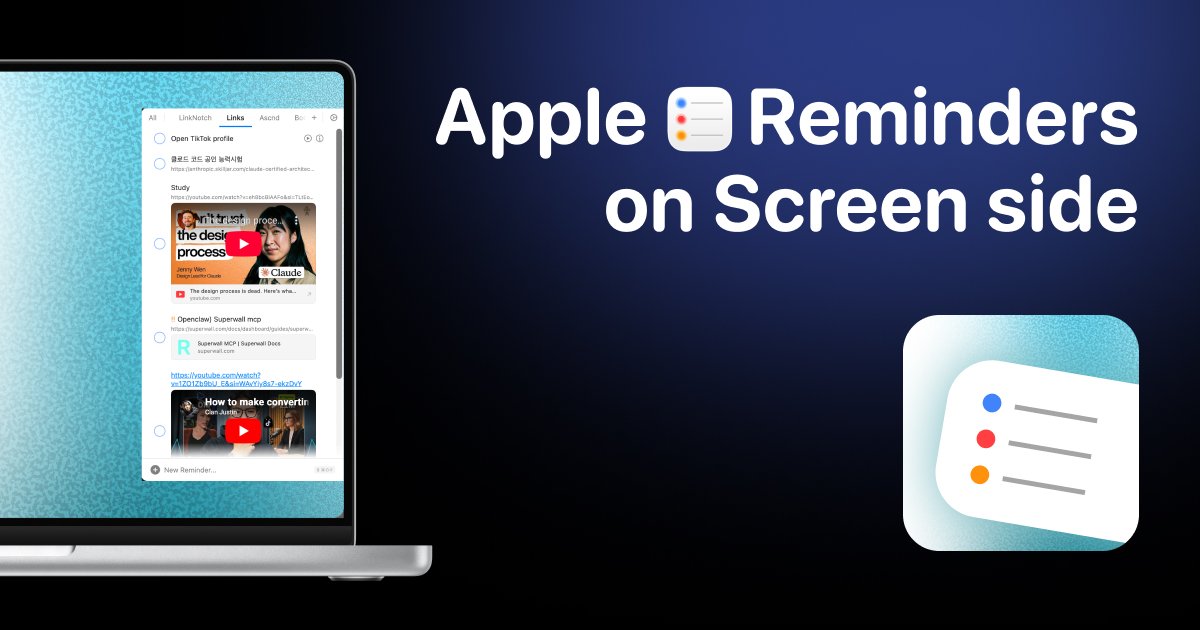
Side Reminder is a macOS app that brings Apple Reminders to the edge of your screen. Instead of switching apps or clicking through menus, you move your mouse to the screen edge to view reminders and move away to hide them.
Beyond quick access, Side Reminder adds keyboard-first and voice-based capture, a floating focus timer tied to specific reminders, inline video previews for links, and kanban-style organization per reminders list.
Key Features
- Screen-edge reminder view: Move the mouse to the screen edge to slide reminders in instantly; move away to make them disappear, avoiding app switching.
- Voice input for reminders: Use Cmd+Shift+V to speak a reminder; the site states voice is processed entirely on-device on your Mac using on-device AI, with no server sending.
- Focus timer per reminder: Start a floating timer from a selected reminder and keep it on-screen while you work, with controls to pause, resume, or mark complete.
- Drag-and-drop organization: Reorder reminders with drag and drop and switch between lists with arrow keys.
- Inline rich link and YouTube playback: Add a YouTube link into a reminder to watch it inline, and other URLs show rich previews (title, image, and domain).
- Command line (CLI) for tasks: Manage reminders from the command line via a sidereminder CLI to list, add, and complete tasks.
- AI execution via Claude Code integration: Right-click a reminder (or use slash commands) to hand it off to Claude Code, launched with task context inside a built-in terminal, with real-time status and notification alerts when input is needed.
- Kanban board mode: Turn any reminders list into a kanban board by adding sections; drag cards between columns, reorder via workflow, and auto-complete moves checked reminders to Done.
- Keyboard-first controls: Add reminders with Return, navigate lists with arrow keys, and dismiss interactions with Escape.
- Sync across Apple devices and native Reminders data: The site states you can access reminders across Mac, iPhone, and iPad, using your existing Reminders data.
- Privacy by design (as stated): The website claims your data never leaves your device or your private iCloud; voice stays on your Mac.
How to Use Side Reminder
- Download and install Side Reminder on your Mac.
- Open reminders at the edge by moving your mouse to the screen edge; leave to hide them.
- Add reminders using the keyboard (Return) or voice capture with Cmd+Shift+V.
- Organize and work by reordering reminders with drag-and-drop or switching lists with arrow keys.
- Start a focus session by selecting a reminder and using the floating focus timer controls.
- Use kanban view for a reminders list by adding sections so you can drag cards between columns and track progress.
- Execute tasks with AI by right-clicking a reminder and selecting the option to run “Get Things Done with AI,” which launches Claude Code in the built-in terminal with the reminder’s task context.
- Manage tasks via CLI (optional) by running the sidereminder CLI to list, add, and complete tasks from your terminal.
Use Cases
- Quick capture while staying in flow: While working in another app, move the cursor to the screen edge to view your existing Apple Reminders and add new items without switching away.
- Deep work from a specific reminder: Pick a reminder (e.g., “Review PR #42”), start the focus timer, and use pause/resume plus completion when the work is done.
- Kanban workflow for engineering tasks: Convert your Work list into a kanban board (e.g., Backlog → In Progress → Done), drag task cards across columns, and use auto-complete to move finished items to Done.
- Inline reference links during planning: Store a YouTube link or other URL inside a reminder so you can view it directly in Side Reminder without opening a separate browser.
- Developer or AI-assisted task execution: Right-click a reminder to launch Claude Code with the reminder’s context inside Side Reminder’s built-in terminal, then monitor status and respond to prompts via macOS notifications when needed.
FAQ
-
Does Side Reminder replace Apple Reminders? No. The site states it uses your existing Apple Reminders data and works natively with the Reminders app.
-
Is voice input sent to a server? Side Reminder states that voice is processed entirely on your Mac using on-device AI, and nothing is sent to any server.
-
How does the screen-edge interface work? The app shows reminders when you move your mouse to the screen edge and hides them when you move away, without clicking or switching apps.
-
Can I start AI tasks without copying text? The website describes a workflow where right-clicking a reminder launches Claude Code with the task context, aiming to avoid copy-paste and window switching.
-
Can reminders be managed from the terminal? Yes. The site mentions a sidereminder CLI for listing, adding, and completing tasks.
Alternatives
- Native Apple Reminders (and Focus tools): For users who only need reminders and rely on Apple’s built-in UI. Side Reminder differs by providing screen-edge access, keyboard/voice capture, and inline previews.
- Todo managers with kanban views: General task apps that support kanban boards. Side Reminder’s distinction is its grounding in Apple Reminders as the source of truth and its edge-of-screen workflow.
- IDE/editor task runners with AI chat: Developer-focused workflows where tasks are handled inside an editor. Side Reminder differs by using the reminders list as the task intake and providing status/controls alongside the reminders interface.
- Clipboard/launcher + notes workflow: For users who quickly capture tasks via launcher hotkeys and notes. Side Reminder differs by integrating directly with Reminders data, focus timers, and (per the site) Claude Code execution from reminders.
Alternatives
MealTime
MealTime is your personal, offline-first recipe companion designed to help you save, organize, plan meals, and generate smart grocery lists, all while keeping your data private.

Biji
Biji is a versatile platform designed to enhance productivity through innovative tools and features.

LIAM
LIAM is an AI copilot that drafts email replies, organizes your inbox with auto-labels and prioritization, and schedules meetings from your calendar.

Gemma AI
Gemma AI is a smart application that calls you directly with personalized, intelligent voice reminders to ensure you never miss important tasks, appointments, or deadlines.

Tactiq
Tactiq is an AI meeting assistant that provides live transcription, AI summaries, action items, and custom AI prompts for Google Meet, Zoom, and Teams.

garden-md
Turn meeting transcripts into a structured, linked company wiki with local markdown and an HTML browser view. Sync from supported sources.