

FerrisPulse
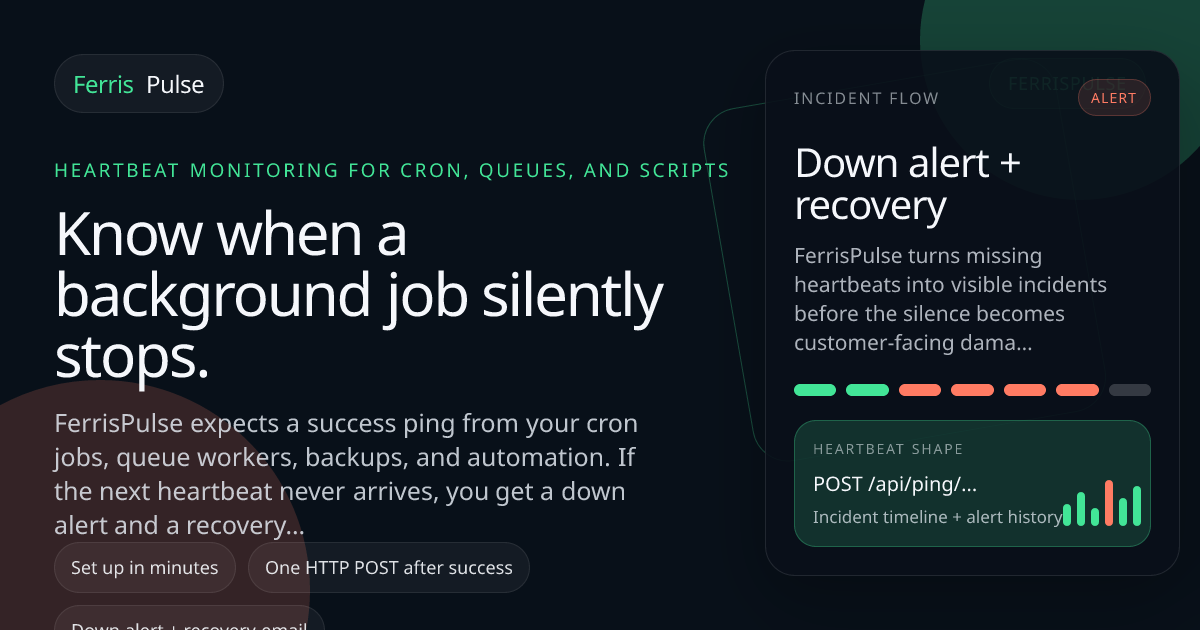
FerrisPulse monitors background jobs via success “ping” heartbeats and alerts you when cron/queue/backup runs stop, then emails recovery when they resume.
What is FerrisPulse?
FerrisPulse is a heartbeat monitoring service for background jobs and scheduled automation. Instead of checking whether an app responds to HTTP requests, it expects a success “ping” from your cron jobs, queue workers, backups, and other scripts.
If the next expected heartbeat does not arrive within the configured cadence, FerrisPulse sends a down alert and then automatically sends a recovery email when pings resume. The goal is to turn “silent failure” (a job that stops running while the rest of the system looks healthy) into a visible incident with an incident timeline.
Key Features
- Heartbeat monitoring for expected job cadences: FerrisPulse watches for an incoming success ping on a schedule (e.g., hourly or nightly), and treats missing pings as a down condition.
- Success-ping URL per monitor: you copy a monitor-specific ping URL and call it via HTTP POST only after the job finishes successfully, so “heartbeat” reflects completed work.
- Down alerts plus recovery emails: when a heartbeat is missing, FerrisPulse sends one down alert; when the next ping arrives, it sends a recovery email and closes the incident.
- Incident timeline and heartbeat history: the dashboard shows status, heartbeat history, and incident windows instead of requiring you to reconstruct failures from logs.
- Configurable cadence and grace period support: monitors include an expected interval and can include a grace period to account for runtime variability.
How to Use FerrisPulse
- Create a monitor for the job you want to track, set the expected interval (cadence), and add a grace period if needed.
- Copy the monitor’s ping URL.
- In your automation, send an HTTP POST to the ping URL only after the job completes successfully.
- Leave FerrisPulse running; it will detect missing heartbeats, send down alerts, and then send recovery emails when the pings resume.
Use Cases
- Cron job that should run hourly: Set an hourly monitor and ping the URL after the script finishes. If the script stops running quietly for several hours, FerrisPulse sends a down alert with the expected cadence and a dashboard link.
- Backup snapshot verification: For nightly backups, configure a daily monitor and emit the ping only after the backup completes successfully. This helps catch cases where the backup pipeline stalls without triggering broader application uptime alarms.
- Queue worker health (completed work, not just server health): When using queue workers, send the success ping after processing completes. FerrisPulse can alert when the expected cadence of successful work stops.
- Scheduled ETL/reporting pipeline: For hourly or daily billing syncs or reports, ping at the end of the workflow. FerrisPulse maintains an incident timeline so missed runs become a trackable event.
- Automation scripts triggered by scheduled infrastructure: Whether the schedule is internal or external, the workflow is the same—send a ping after the script completes successfully and let FerrisPulse detect silence.
FAQ
How do I notify FerrisPulse that a job ran?
You call a monitor-specific HTTP POST ping URL after the job finishes successfully. FerrisPulse expects pings on the configured cadence.
What triggers an alert?
An alert is triggered when the next expected heartbeat/ping does not arrive by the monitored cadence (with support for a grace period).
Does FerrisPulse alert repeatedly during an incident?
The page describes one down alert per incident and a separate recovery email when the ping returns, avoiding a duplicate alert storm.
Where can I see what happened?
FerrisPulse provides a dashboard view that includes status, heartbeat history, incident windows, and alert behavior in one place.
Which job systems does it support?
The site indicates it can be used with cron, systemd timers, and worker/scheduler ecosystems such as BullMQ, Sidekiq, Celery, GitHub Actions, plus languages/environments like Bash, Node.js, Python, and Ruby.
Alternatives
- Uptime/health check monitoring (HTTP endpoint checks): Useful for app availability, but it may miss “silent failure” where the web server is healthy while background jobs (cron/queues/backups) are not running.
- Log-based alerting: Alerts can be triggered by error messages after the fact, but it still may require actively checking logs and may not detect missing executions as directly as a heartbeat.
- Job scheduler notifications (built-in cron/systemd/GitHub Actions alerts): Some environments can notify on failures, but the workflow differs because FerrisPulse centers on an explicit success ping and monitors expected cadence.
- Queue monitoring tools focused on backlog/throughput: These track worker and queue behavior, but FerrisPulse specifically monitors the presence of success heartbeats at the time the work completes.
Alternatives

ClawTick
ClawTick is a CLI-first AI agent automation platform for scheduling webhook tasks on cron with monitoring, alerts, retries, and execution logs.

OpenFlags
OpenFlags is an open source, self-hosted feature flag system with a control plane and typed SDKs for progressive delivery and safe rollouts.

Rectify
Rectify is an all-in-one operations platform for SaaS, combining monitoring, analytics, support, roadmaps, changelogs, and agent management—via conversation.
PingPulse
PingPulse monitors AI agent workflows with real-time handoff tracking, workflow visualization, and configurable alerts for failures, stalls, and out-of-order execution.

Latitude
Latitude is open-source observability for Claude Code—monitor every agent turn with full session traces, failure detection, and cost/usage visibility.

PromptScout
PromptScout tracks how your brand is mentioned, which competitors are recommended, and what sources are cited in AI answers—plus website audits.