
Workspace and profiles
Manage accounts, transactions, categories, rules, budgets, and reports within a workspace, with separate profiles available for different financial contexts.

Fina is a modular finance tracker for individuals, freelancers, entrepreneurs, and small businesses, with budgets, reports, invoicing, and bookkeeping.
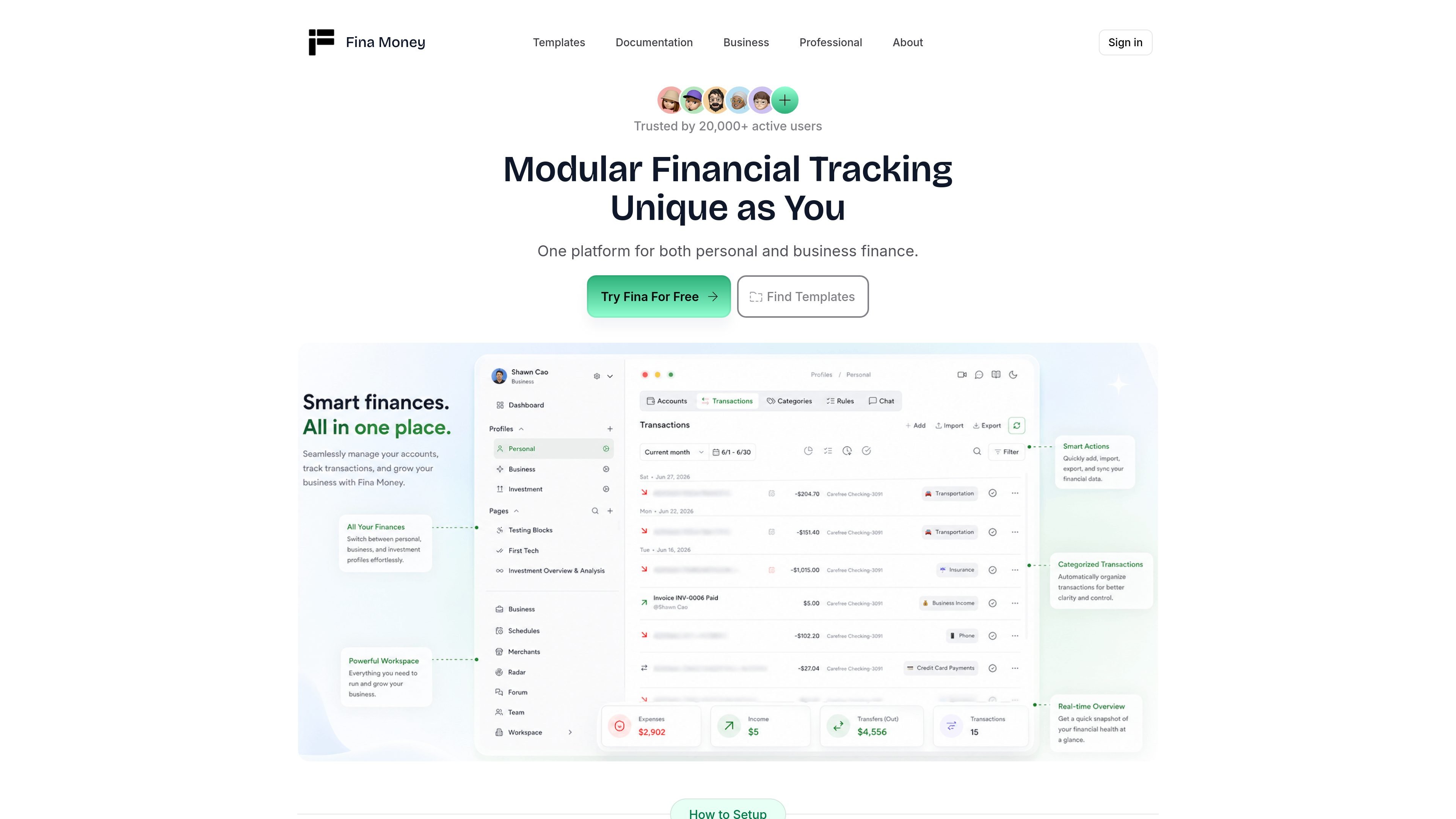
Fina is a modular financial tracking system for individuals, professionals, entrepreneurs, freelancers, and small-business operators. It combines account and transaction management with customizable pages for budgets, reports, metrics, charts, and other financial views.
The product uses a workspace-and-profile model: a workspace contains financial data, while separate profiles can keep contexts such as personal and business finances distinct. Users can manage records in the Console and analyze them through Pages assembled from configurable blocks, formulas, and templates. Higher-tier workflows add bank connections, collaboration, invoicing, Stripe payments, bookkeeping, and business reporting.
Fina also offers a professional workflow for advisory teams. That offering supports team seats, role-based access, client logins, configurable client views, and white-label branding, allowing firms to present a branded finance app while managing client access from a shared workspace.
Manage accounts, transactions, categories, rules, budgets, and reports within a workspace, with separate profiles available for different financial contexts.
Create Pages that function as living dashboards or documents, using tables, charts, text, metrics, and other configurable blocks.
Build custom metrics and calculations with arithmetic, logical, and text formulas, then use charts to show trends, comparisons, and distributions.
Start with pre-defined budget and report pages or create custom templates for recurring financial views and workflows.
Premium lists unlimited bank connections, multiple currencies, multiple portfolios, and partner collaboration; the Free plan includes transactions in Google Sheets and one personal finance portfolio.
The Business tier combines invoice creation, sending, tracking, reconciliation, Stripe payment collection, customer records, double-entry bookkeeping, and balance sheet and P&L reports.
Use profiles, accounts, categories, rules, budgets, and custom Pages to organize spending and inspect financial trends in a format tailored to your own priorities.
Keep business and personal finances in one workspace while maintaining separate profiles. Business users can add invoices, customer records, Stripe collection, bookkeeping, and balance sheet or P&L reporting.
Create reusable templates, custom metrics, formulas, and charts for recurring financial reviews, budget monitoring, or management reporting instead of rebuilding each view manually.
Set up seats, roles, client logins, simplified client views, and branded assets so an advisory team can provide clients with a focused finance application under its own identity.
Fina organizes data in a workspace. After signing up, a demo dataset is created automatically so new users can explore the interface. Its documentation describes a Console for managing accounts, transactions, categories, and rules, plus Pages for analysis and dashboards.
Users can create multiple profiles within one workspace. Each profile has its own accounts, transactions, categories, and rules, while accounts can be moved between profiles.
Fina Pages are built from blocks such as tables, charts, text, and metrics. Users can add, remove, and rearrange blocks, use formulas for calculations, and start from templates such as budgets and reports.
The pricing page lists bank connections, multiple currencies, multiple portfolios, and partner collaboration in the Premium plan. The Free plan lists transactions in Google Sheets and one personal finance portfolio; availability therefore depends on the selected plan.
The Business tier lists automated invoice management, Stripe payments, customer account tracking, double-entry bookkeeping, and balance sheet and P&L reports. The Professional offering is designed for advisory teams that need seats, role-based access, client logins, configurable client views, and white-label branding.

Timebook is a time tracking, invoicing, and bookkeeping app for freelancers and single-member LLCs. Track hours, send invoices, and keep books in one place.

Finchum helps users in the US and Canada aggregate accounts, forecast balances, and sync securely without sharing bank passwords.

KlutterAI is an AI expense tracker for iOS and Android to capture receipts, organize spending, track budgets, surface recurring charges, and export reports.

CashPylot finance software for startups and freelancers with invoicing, expense tracking, cashflow monitoring, budgets, and client management. 7-day free trial.

Finamie voice-based personal finance app to log expenses hands-free and get automatic financial insights. English and Spanish, free tier and Premium.

SimplyPortfolio is a manual portfolio tracker for stocks, ETFs, gold, and silver, with one dashboard, multi-currency reporting, cost-basis tracking, and CSV export.