

Jenni
Jenni is an AI workspace to read PDFs, draft essays and papers, and generate in-text citations in 2.6k+ styles.
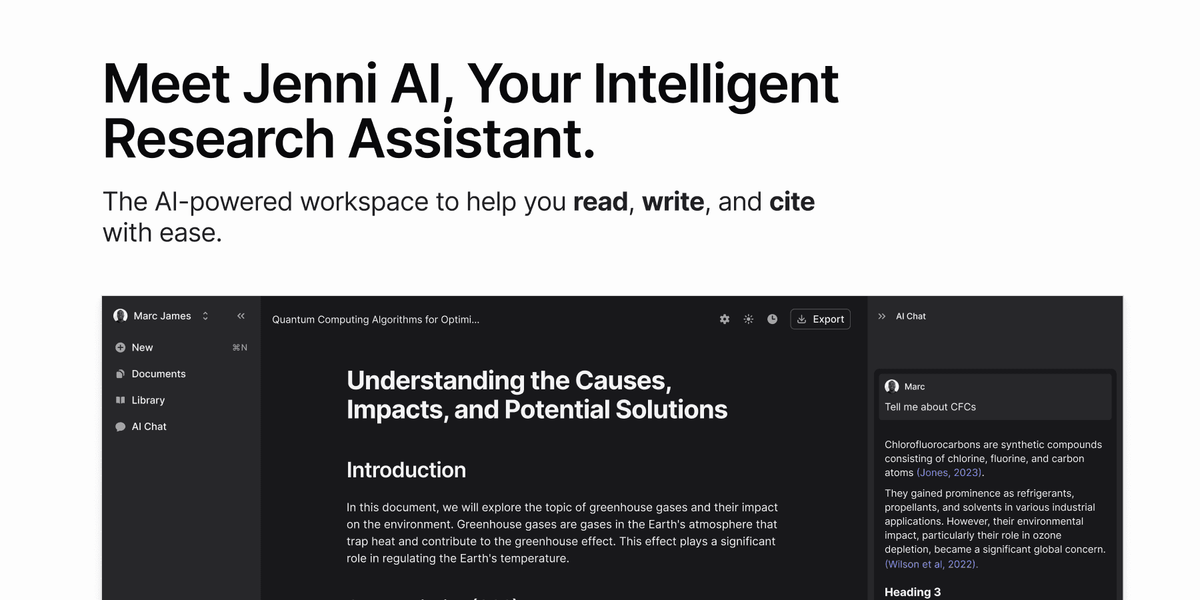
What is Jenni?
Jenni is an AI-powered workspace for students, researchers, and academics to read, write, and organize research. It focuses on academic workflows such as generating text from research materials, managing citations, and helping users draft and revise papers.
The product combines an editor and citation tools with an AI chat experience that can summarize papers and support research discovery, including pulling content from user PDFs.
Key Features
- Write, cite, and edit in one workspace: Supports drafting academic writing and incorporating citations while working on documents.
- In-text citations from your PDFs and current research: Jenni consults uploaded PDFs and provides in-text citation help.
- Cite in 2.6k+ citation styles: Lets you format citations in a wide range of citation styles, including style requirements from universities or journals.
- AI autocomplete for drafting: Autocomplete writes alongside you to help continue text and reduce writer’s block.
- Agentic AI chat for paper understanding and research search: Includes an AI chat assistant that can summarize research papers and help search for new research.
- Drag-and-drop PDF workflow and source-based generation: Users can upload PDFs and generate content “from your files,” with collection-level control.
- Traceable citations that link to exact PDF locations: Every citation links directly to the exact page and paragraph in source PDFs for quick verification.
- Export and document formatting options: Exports work in .docx, .tex, and .html formats.
- Import literature files into a library: Import .bib/.ris files to populate a library.
- Outline builder and multilingual support: Generates section headings from prompts and can respond in the user’s language.
- AI edit and translation: Offers editing features such as simplify, explain, or translate.
How to Use Jenni
- Start a writing session in the Jenni workspace and use AI autocomplete to draft text.
- Add sources by drag-and-dropping PDFs and/or importing .bib/.ris files into your library.
- Generate or extend sections using source-based generation and use the outline builder for section headings.
- Insert in-text citations in the required format; then use traceable citation links to verify page and paragraph references.
- Revise with AI edit (e.g., simplify/explain/translate) and export your document as .docx, .tex, or .html.
Use Cases
- Drafting an essay or paper from uploaded PDFs: Upload your research PDFs, generate sections based on those sources, and add in-text citations that link back to the exact page/paragraph.
- Formatting citations to a required journal style: Choose the correct citation style (from the supported 2.6k+ list) and update in-text citations accordingly.
- Summarizing and extracting relevance from research papers: Use the AI chat assistant to understand and summarize papers, then identify which papers are relevant to your question.
- Building a structured outline before writing: Enter a prompt and generate section headings, then use the editor and autocomplete to expand each section.
- Improving clarity, simplification, or translation of a draft: Use AI edit features to simplify or explain passages, or translate text, while continuing to manage citations in the document.
FAQ
-
Does Jenni support citations linked to specific PDF locations?
Yes. The page states that citations link directly to the exact page and paragraph in your source PDFs for one-click verification. -
Can Jenni format citations in different styles?
Yes. Jenni supports citing in over 2.6k citation styles. -
What file types can I export?
Jenni exports in .docx, .tex, and .html formats. -
Can I import references into a library?
Yes. You can import .bib and .ris files to populate your library. -
How does Jenni help with paper research beyond writing?
It includes an AI chat assistant for summarizing papers and searching for new research, and it supports analysis of documents via uploaded PDFs.
Alternatives
- General-purpose academic writing tools (document editors with citation features): These can help with drafting and basic citations, but may not provide the same source-linked verification from PDFs or the combined research + chat workflow described for Jenni.
- Reference managers (RIS/BIB-focused): Tools centered on organizing literature libraries and generating bibliographies can cover citation management, but may not include the in-context AI chat, autocomplete, and source-based generation workflow.
- PDF annotation and scholarly reading platforms: These focus on reading and notes inside PDFs; compared with Jenni, they may not offer the same writing, citation formatting, and export workflow.
- AI chat assistants for research Q&A: Chat-based tools can summarize and answer questions, but may require additional steps for citation formatting and traceability back to exact PDF page/paragraph locations.
Alternatives

Paperpal
Paperpal is an academic writing AI tool for research workflows—smart literature reading, English editing, rewriting, writing components, and pre-submission checks.

AI PDF Summarizer
An AI-powered tool that summarizes PDF documents quickly and efficiently, providing clear insights and allowing users to interact with the content.

ProWritingAid
ProWritingAid is a comprehensive writing assistant that helps writers improve their craft through grammar checking, style editing, and personalized feedback.

Sanota
Sanota turns your voice into clear, beautiful text—capture memories and ideas easily, then start for free.

Nolain OCR
Nolain OCR is an advanced Optical Character Recognition solution designed to accurately extract text and data from various document formats, streamlining document processing workflows.

PaperBetterAI
PaperBetterAI is an intelligent writing tool that generates academic papers and various writing materials in both Chinese and English using advanced AI technology.