
Lunagraph
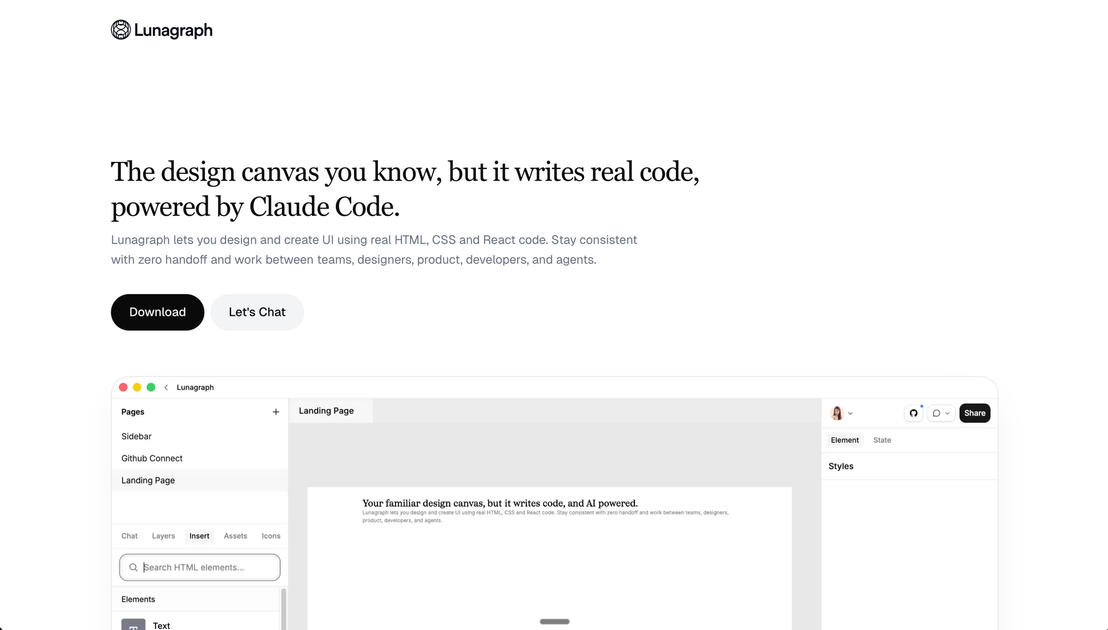
Lunagraph is a design canvas that writes real HTML, CSS, and React code with Claude Code—so teams keep UI design and implementation aligned.
What is Lunagraph?
Lunagraph is a design canvas for creating user interfaces using real HTML, CSS, and React code. The core purpose is to help teams design and implement UI in a way that keeps the design and the shipped code aligned, reducing “hand off” gaps.
Instead of treating the design as a separate deliverable that someone else must translate into components, Lunagraph positions the deliverable as the code itself, with AI assistance provided by Claude Code.
Key Features
- Design directly into real code (HTML, CSS, React): Your canvas work is reflected in actual markup and components, so the output corresponds to what will run.
- Zero handoff workflow for UI teams: The platform is designed to support consistency across designers, product, developers, and agents without requiring a translation step from design to implementation.
- Claude Code-powered context aware assistance: The AI partner is described as able to work with the full picture, including the canvas and existing codebase.
- Canvas + chat + local repo round trip: The chat can access your canvas and your local codebase, and the workflow includes implementing changes directly into a repository and previewing results.
- Live preview and screenshot comparison: The described workflow previews in a live iframe and uses screenshots from both the design and the output to compare.
- In-repo component updates from design changes: Examples shown include generating components such as
PricingCardand updating files like a feature comparison table component.
How to Use Lunagraph
- Start from a design canvas: Begin designing UI elements on the canvas.
- Use the integrated chat for implementation help: Ask for changes in a way that references the canvas and your repository context.
- Let the AI implement into your repo: The workflow described includes writing directly into your local codebase.
- Preview and verify: Use the live iframe preview and screenshot both the canvas/design and the resulting UI output for comparison.
- Iterate on components: Apply further updates by requesting refactors or feature adjustments (for example, splitting a sidebar into smaller components).
Use Cases
- Designer-to-implementation UI creation: A designer creates UI layouts on the canvas and ensures the resulting code uses real HTML/CSS/React rather than a separate design file.
- Team workflow without handoff friction: A mixed team (design, product, development, and agents) works in the same workflow so fewer translation steps are needed between roles.
- Refactoring complex components with AI assistance: When a component becomes too complex (e.g., a sidebar), the chat can help restructure it into smaller components and add behavior such as a collapse toggle.
- Updating existing pages from design intent: Use a screenshot or palette reference to update UI sections so the produced output matches an expected layout and styling.
- Build pricing/feature UI from canvas designs: Generate components for pricing cards and feature tables, then wire them into page layouts and update existing table markup.
FAQ
-
What code does Lunagraph generate or work with? Lunagraph is described as generating and working with real HTML, CSS, and React code.
-
Does Lunagraph rely on a separate design file handoff? The website emphasizes a “zero handoff” workflow, where the deliverable is the code itself rather than a design file that must be translated.
-
What does “powered by Claude Code” mean in this workflow? The content states that Claude Code acts as a creative design partner that considers the canvas and the local codebase, supporting implementation tasks through chat.
-
How do users verify that the design matches the output? The described workflow includes previewing in a live iframe and screenshotting the canvas and the rendered result for comparison.
-
Can the AI read from and write to a local repository? The page includes an example showing “AI File Access” with filesystem paths for reading/writing outside the project, suggesting local repo integration, but details beyond that are not provided.
Alternatives
- General-purpose design tools (Figma-style) + separate developer implementation: This keeps design and code in different tools and workflows, requiring translation from design files into components.
- Code-first UI builders (React component editors) without a design canvas: These focus on building directly in UI code, but may not provide a canvas designed to capture and communicate design intent in the same way.
- AI coding assistants integrated into an IDE: These can help generate or refactor code, but typically don’t combine a design canvas, live iframe preview comparison, and the “canvas + chat + repo” loop as described here.
- UI prototyping tools that export components or styles: These aim to bridge design and implementation, but the approach may still involve exporting or converting rather than producing code as the primary deliverable.
Alternatives

ClawTick
ClawTick is a CLI-first AI agent automation platform for scheduling webhook tasks on cron with monitoring, alerts, retries, and execution logs.

Falconer
Falconer is a self-updating knowledge platform for high-speed teams to write, share, and find reliable internal documentation and code context in one place.

OpenFlags
OpenFlags is an open source, self-hosted feature flag system with a control plane and typed SDKs for progressive delivery and safe rollouts.

skills-janitor
Audit, track usage, and compare your Claude Code skills with skills-janitor—nine focused slash commands and zero dependencies.

Devin
Devin is an AI coding agent that helps software teams complete code migrations and large refactoring by running subtasks in parallel.

MakerLoft
MakerLoft is an AI app builder for non-developers that connects to your GitHub repo to generate working apps with auth, payments, files, jobs.