
Mockphine
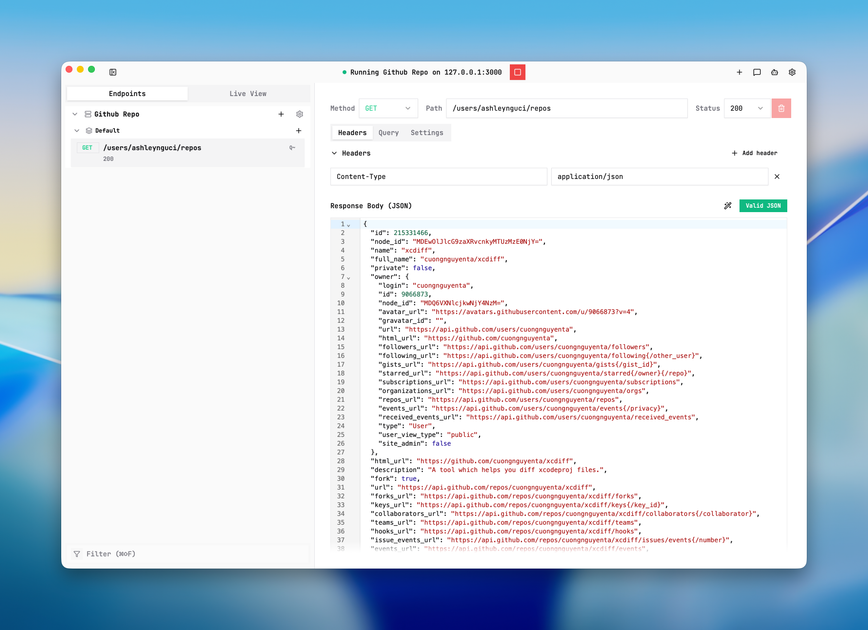
Mockphine is a local mock API server for dev and QA teams to control endpoint behavior (mock, passthrough, disabled) with Live View visibility.
What is Mockphine?
Mockphine is a local mock API server for dev and QA teams to control endpoint behavior (mock, passthrough, disabled) with Live View visibility.
Instead of guessing how unstable backends or staging changes affect your tests, Mockphine focuses on local-first control and real-time inspection. This helps teams debug faster, keep UI and QA cycles moving, and reduce surprise behavior during ongoing development.
Key Features
- Deterministic route matching for each endpoint: Define exact rules so endpoint behavior stays consistent across runs and shared team workflows.
- Controlled passthrough mode: Keep partially finished services connected by routing specific requests through to the real backend while protecting teams from accidental live calls.
- Per-endpoint strict vs fallback behavior: Configure how the server should behave when conditions aren’t met, with behavior centralized in one place.
- Real-time “served-by” and payload visibility (Live View): Inspect whether each response was mocked, strict-failed, or passed through as requests occur.
- Failure and delay simulation: Simulate latency, failures, and retries to validate how your frontend and QA flows handle adverse conditions.
- Shared request logs for dev + QA collaboration: Use common request-level evidence so issues can be reproduced and discussed across roles.
How to Use Mockphine
- Install Mockphine for your OS (the site provides downloads for macOS and Windows).
- Start a local server and configure endpoint routing rules for your API calls, choosing mock, passthrough, or disabled per route.
- Run your normal frontend or test workflow against the local server.
- Use Live View to inspect request outcomes as you test—confirm whether each response was mocked, failed under strict rules, or passed through.
- Iterate on behavior by adjusting routing and simulation settings (e.g., delays or failures) until your local test loop reflects what you need to validate.
Use Cases
- Debugging UI behavior while backends are unstable: When services are delayed or changing, route specific endpoints to mocked responses so the UI and QA loop can continue without stalling.
- Testing strict failure and retry logic: Simulate failures and delays locally, then confirm in Live View which requests failed (strict-failed) versus which ones passed through or returned mocked payloads.
- Gradual integration of incomplete services: Use controlled passthrough to connect only the endpoints that are ready, while keeping other endpoints disabled or mocked to prevent accidental live usage.
- Reproducing request-level issues across dev and QA: Share request logs so both teams can verify the same request behavior and payload details during local testing.
- Reducing surprises from staging changes: Make local API behavior explicit from the first call, so changes in staging don’t silently alter the outcomes of your test runs.
FAQ
-
What does “passthrough” mean in Mockphine? Passthrough routes a configured endpoint through to its real backend instead of serving a mock response, while still letting you manage which endpoints are allowed to go live.
-
Can I disable an endpoint locally? Yes. Mockphine supports routing endpoints in disabled mode in addition to mocked and passthrough behaviors.
-
How do I know whether a response was mocked or came from the backend? The product includes Live View with real-time visibility of whether each response was mocked, strict-failed, or passed through.
-
Does Mockphine help simulate latency and failures? Yes. It supports failure/delay simulation to validate retries, timeouts, and fallback behavior before release windows.
-
Where can I download Mockphine? The site lists downloads for macOS and Windows.
Alternatives
- API mocking tools using static server stubs: These focus on returning predefined responses but may not provide the same level of real-time “served-by” visibility for each request outcome.
- In-browser mocking approaches (service worker-based): These are useful for frontend integration loops, but may differ in how they handle local-first route control and request source inspection across a team.
- API virtualization tools (network/service virtualization): Typically aimed at larger or more enterprise workflows; they may differ in setup style and suitability for small dev + QA teams running local loops.
- General request/route simulation utilities: Alternative solutions can simulate network conditions, but may not combine deterministic per-endpoint routing with the same degree of served-by and payload inspection in one local workflow.
Alternatives

ClawTick
ClawTick is a CLI-first AI agent automation platform for scheduling webhook tasks on cron with monitoring, alerts, retries, and execution logs.

Falconer
Falconer is a self-updating knowledge platform for high-speed teams to write, share, and find reliable internal documentation and code context in one place.

OpenFlags
OpenFlags is an open source, self-hosted feature flag system with a control plane and typed SDKs for progressive delivery and safe rollouts.

skills-janitor
Audit, track usage, and compare your Claude Code skills with skills-janitor—nine focused slash commands and zero dependencies.

MakerLoft
MakerLoft is an AI app builder for non-developers that connects to your GitHub repo to generate working apps with auth, payments, files, jobs.

Rectify
Rectify is an all-in-one operations platform for SaaS, combining monitoring, analytics, support, roadmaps, changelogs, and agent management—via conversation.