

Monarch
Monarch is a personal finance app that connects your accounts to track spending, categorize transactions, analyze reports, and set budgets and goals.
What is Monarch?
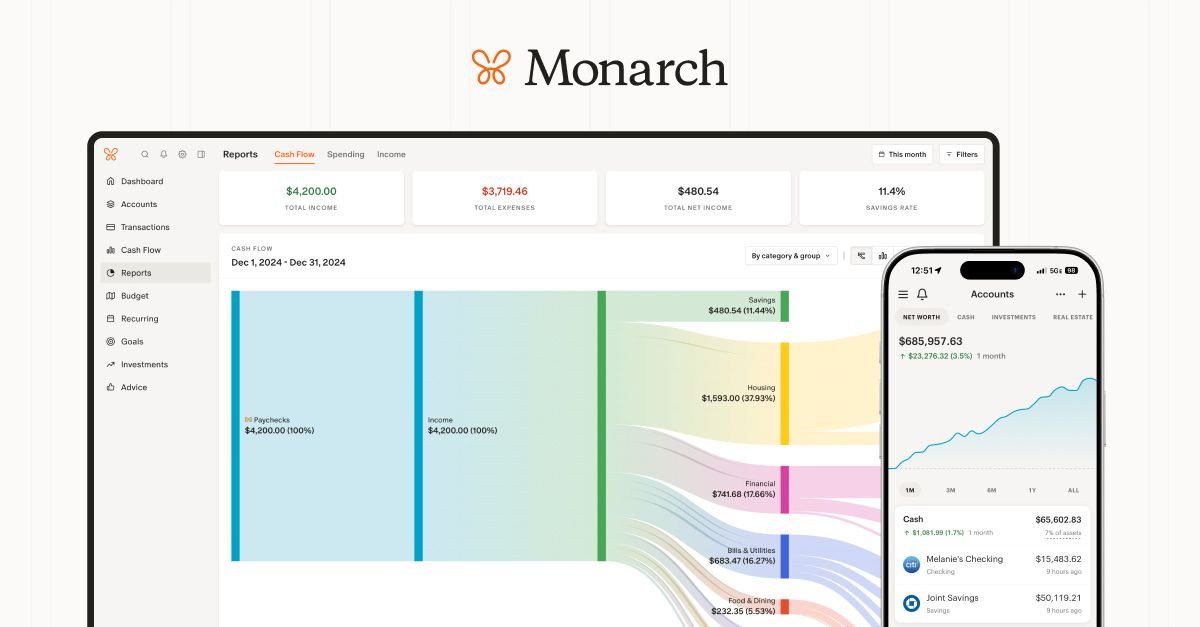
Monarch (Monarch Money) is a personal finance app designed to help you manage your money in one place. It brings together accounts so you can see where money is going, track spending and cash flow, and work toward goals.
The app connects to financial institutions, organizes transactions, and provides tools for budgeting, collaboration, reporting, and goal tracking. Its core purpose is to create a clearer view of your financial situation and make it easier to plan for the future.
Key Features
- Connect accounts in one view: Sync bank accounts, credit cards, loans, real estate, and investments to view an overall financial picture.
- Transaction list and review workflow: Consolidate transactions into a searchable list and let you mark transactions as reviewed.
- Auto-detected recurring subscriptions: Detect recurring charges (e.g., streaming services, gyms, app memberships) so recurring spending is easier to spot.
- Budgeting designed to adapt: Build budgets that can “flex” to your needs rather than forcing your spending into a fixed plan.
- Collaboration with a partner: Invite a partner to view the full picture and budget together (the site notes collaboration at no extra cost).
- Reports and charts: Use customizable charts to explore spending trends, income, and net worth over time.
- Goals planning and tracking: Set savings targets for items like a vacation or emergency fund, then track progress over time.
- Multi-device access: Use Monarch on the web, iOS, and Android with data kept in sync.
- Broad institution connectivity: The app syncs with multiple financial data providers and supports 13,000+ financial institutions (as stated on the site).
How to Use Monarch
- Sign in and connect your accounts (bank accounts, credit cards, loans, real estate, and investments).
- Review and categorize transactions—Monarch can categorize finances after connection.
- Set up budgets and goals based on your needs, then track progress using the app’s budget and goals tools.
- Use reports and charts to check spending trends, income, and net worth over time.
- If applicable, invite your partner so you both can see the shared picture and manage a joint budget.
Use Cases
- Consolidate multiple accounts into one dashboard: Connect all accounts (including investments and loans) to track net worth and get a single view of your overall finances.
- Track day-to-day spending and cash flow: Use the transaction list and spending/cash flow views to understand where money is going and where you stand.
- Keep recurring bills under control: Rely on Monarch’s detection of recurring subscriptions to catch forgotten charges and monitor monthly spending.
- Plan a specific financial goal: Create a savings plan for a vacation, home remodel, or rainy-day fund, set targets, and adjust cash flow as needed to stay on track.
- Manage finances with a partner: Sync accounts for both people and work from a shared view to budget together and align on goals.
FAQ
Does Monarch work on mobile and desktop?
Yes. Monarch works across web, iOS, and Android, and the site states that your data stays in sync across devices.
What accounts can I connect to Monarch?
The site says you can connect bank accounts, credit cards, loans, real estate, and investments.
Can Monarch detect recurring subscriptions?
Monarch automatically detects recurring subscriptions (such as streaming services, gyms, and app memberships) based on the site’s description.
Can I collaborate with my partner?
Monarch supports collaboration by letting you invite your partner to view the full picture and budget together. The site also notes collaboration “at no extra cost.”
How does Monarch help beyond basic budgeting?
In addition to budgeting, the site describes transactions in a consolidated list, customizable reporting with charts (spending, income, net worth), and goal tracking.
Alternatives
- Personal finance dashboards: Alternatives are apps that aggregate accounts and display spending, net worth, and cash flow in one place; they typically differ in how they handle categorization, reporting, and account syncing.
- Subscription and expense tracking tools: If your main goal is monitoring recurring charges, look for tools that focus on subscription detection and charge categorization.
- Budgeting apps with shared household views: For joint budgeting, compare apps that support adding a partner and managing shared budgets, since collaboration features vary by product.
- Spreadsheet-based financial planning: Some users prefer manual or semi-automated spreadsheets for budgeting and goal planning; this can be flexible but usually requires more upkeep than an account-connected app.
Alternatives

Finchum
Finchum is a personal finance planning tool that forecasts future bank balances, helping users visualize financial runway, mortgage readiness, and large purchase timelines through secure, read-only account synchronization.

CashPylot
CashPylot is an all-in-one business finance dashboard for startups: track expenses, manage invoices, and forecast cash flow with insights.

Ramp
Ramp is a spend management platform combining corporate cards, expense management, travel, accounts payable, and accounting automation for finance teams.

Double
Double practice management software for bookkeepers and accountants with QuickBooks/Xero integration to streamline month-end close, reviews and client portal updates.

Estimatic AI Estimating Software
Create accurate estimates in minutes with Estimatic AI. Automate material takeoffs, pricing, and proposals with AI estimating that wins jobs.
Lums
Lums is an AI-powered personal finance and budgeting application that provides real-time balance predictions, automated transaction categorization, and proactive smart alerts to help users save more.