

nocal
nocal unifies calendar and notes with weekly Markdown planning, tasks, and a built-in MCP server for AI agents to read/write context.
What is nocal?
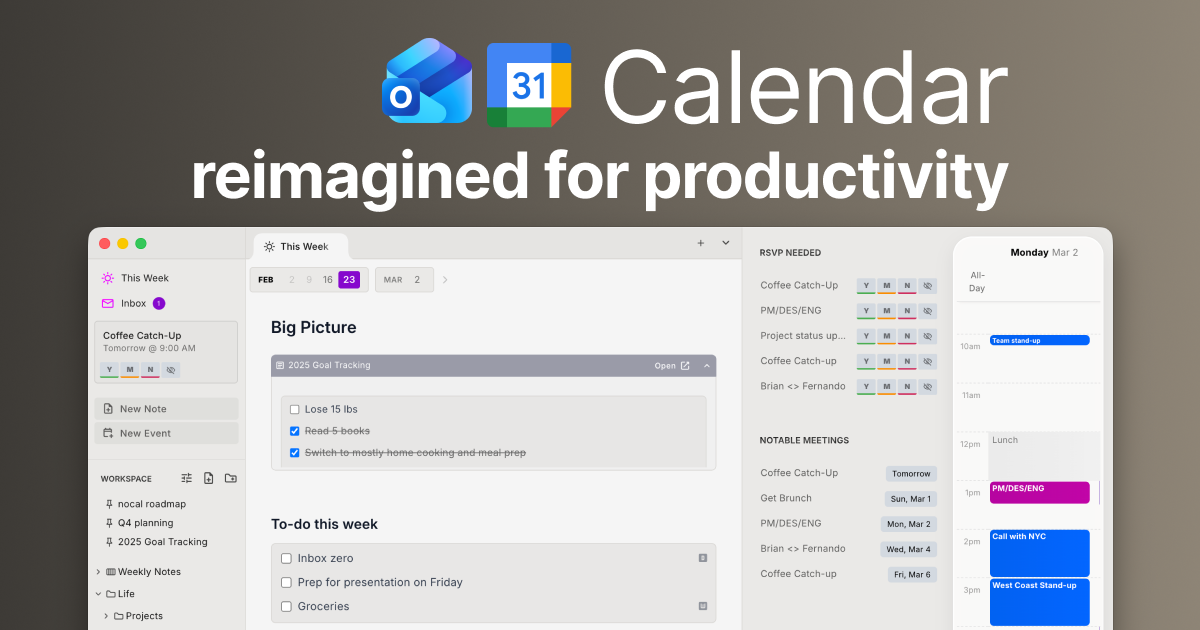
nocal is a calendar-and-notes workspace that unifies scheduling with writing and task tracking in one app. It provides a weekly view where you can create notes (including rich elements) and manage action items directly alongside your calendar.
A core part of nocal’s purpose is to work as a “writeback layer” for AI agents using MCP (Model Context Protocol). Agents can read relevant note and calendar context from nocal and then write structured results back into notes, so work can persist beyond chat history.
Key Features
- Weekly notes in Markdown with rich components: Create weekly plans using Markdown and embed elements like bullet lists, numbered lists, task lists, tables, collapsible code blocks, and blockquotes directly inside your calendar view.
- Natural-language scheduling for events: Add schedule items using natural language such as “Lunch with Alex tomorrow at noon.”
- Smart, less-disruptive schedule view with hotkeys: Use a focused “This Week” view and hotkeys to quickly bring up your schedule when you need it, then return to your work.
- Built-in MCP server for AI agents: Provide MCP tools so models (e.g., Cursor, ChatGPT, Claude) can retrieve the right note history and current project context from nocal.
- Structured writeback with safe patch semantics: Agent outputs are written back into nocal notes using patch semantics, helping keep results organized and available for later reference.
- Knowledge graph-style linking and nesting: Build interconnected context by nesting notes inside notes or linking notes across your workspace, creating a growing web of project knowledge.
- Unified inbox for calendar events: Triage and respond to personal and work invites from a single inbox view tied to your calendar.
How to Use nocal
- Install the app on your device (Mac/Windows desktop and iPhone/Android mobile are listed as available).
- Start with the weekly canvas: Open the weekly view (“This Week”) and add events plus notes in Markdown. Use rich components (tables, task lists, etc.) when you need structured content.
- Capture action items as tasks: Turn follow-ups and planning details into task lists so they stay connected to the week and calendar context.
- Add schedule items quickly: Use natural-language entry for events (for example, to schedule meetings without manually formatting time details).
- Connect notes for later retrieval: Nest notes or link related references so you can trace background and decisions from the meetings where they came from.
Use Cases
- Plan your week with embedded details: Use the weekly Markdown editor with rich components to combine meeting notes, tasks, and planning artifacts (like tables or collapsible code blocks) into one cohesive weekly document.
- Manage meeting preparation without leaving the calendar: Link meeting notes from within other notes and keep key context (e.g., “Notes for this week’s key meetings”) alongside the events so preparation stays in view.
- Coordinate follow-ups from invites: Use the unified inbox to triage personal and work event invitations and decide what needs attention for the upcoming week.
- Maintain release notes and roadmaps through agent writeback: Use nocal’s built-in MCP server to let agents read relevant research and branch decisions, then write structured release-note drafts or roadmap updates back into your notes.
- Build project knowledge over time: Create a connected workspace where notes reference each other, so you can follow a “train of thought” to find supporting research, decisions, and feedback.
FAQ
-
Does nocal support AI agents? Yes. nocal includes a built-in MCP server so agents can retrieve context from nocal and write results back into notes.
-
What formats can I write in? Notes are created in Markdown, with support for embedded rich components such as bullet lists, numbered lists, task lists, tables, collapsible code blocks, and blockquotes.
-
Can I schedule events using text instead of manual entry? The page mentions natural-language scheduling, including examples like “Lunch with Alex tomorrow at noon.”
-
Which platforms are available? The page lists downloads for Mac, Windows, iPhone, and Android.
-
Is nocal only for personal scheduling? The page describes a unified inbox for both personal and work events, plus linking meeting notes and tracking action items from within your calendar view.
Alternatives
- Standalone calendar apps with notes side panels: Many calendar tools support event scheduling and optional note fields, but may not combine weekly Markdown notes, rich embedded components, and writeback workflows for AI agents.
- General-purpose note-taking apps: Apps focused on notes and knowledge management can handle linking and Markdown, but may require separate calendar tooling and may not provide the same built-in MCP server + structured writeback approach described for nocal.
- Project management or task-list platforms: Tools that center tasks and project artifacts can help track action items, but the workflow emphasis differs from nocal’s calendar-integrated weekly canvas and unified inbox.
- AI workflow tools that integrate with external docs: If your current setup is agent-driven, you can consider alternative agent/MCP stacks that write to external storage, though the experience may differ because nocal is positioned as the writeback layer within your notes and calendar workspace.
Alternatives

LIAM
LIAM is an AI copilot that drafts email replies, organizes your inbox with auto-labels and prioritization, and schedules meetings from your calendar.

Codex Plugins
Use Codex Plugins to bundle skills, app integrations, and MCP servers into reusable workflows—extending Codex access to tools like Gmail, Drive, and Slack.
Gemma AI
Gemma AI is a smart application that calls you directly with personalized, intelligent voice reminders to ensure you never miss important tasks, appointments, or deadlines.

ClawTick
ClawTick is a CLI-first AI agent automation platform for scheduling webhook tasks on cron with monitoring, alerts, retries, and execution logs.

AakarDev AI
AakarDev AI is a powerful platform that simplifies the development of AI applications with seamless vector database integration, enabling rapid deployment and scalability.

Planndu: Daily Task Planner
Planndu is an intuitive productivity application designed to help users organize tasks, manage projects, build routines, and enhance focus using tools like AI generation and a built-in Pomodoro timer.