

Orbit
Orbit helps you track subscriptions and AI spend in one place—detect forgotten subscriptions and send smart renewal alerts before charges.
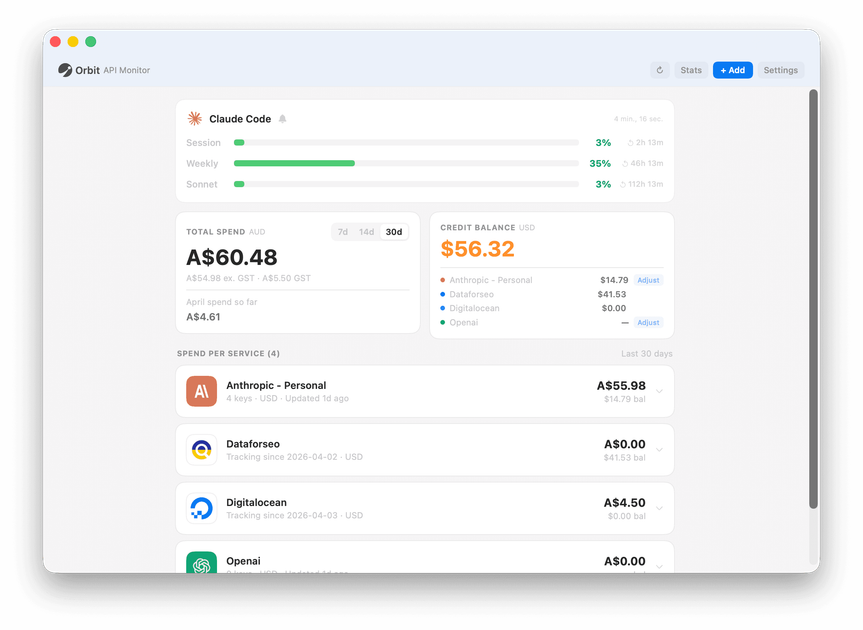
What is Orbit?
Orbit is a subscription and usage tracker designed to help you monitor what your tools actually cost you. It focuses on tracking subscriptions and detecting “hidden” subscriptions you may have forgotten, and it also supports tracking AI-related spend.
Orbit’s core purpose is to give you visibility into renewals and upcoming charges so you can decide whether to keep or cancel before money is taken.
Key Features
- Subscription detection for “hidden subs”: Orbit is designed to find subscriptions you forgot you had, not just those you manually add.
- Auto-categorisation of subscriptions: detected subscriptions are organized into categories so you can review spending by type.
- Smart renewal alerts and reminders: configurable alerts help you control renewal notifications and see what’s renewing.
- Renewal context for upcoming charges: alerts include details like the service name, renewal timeframe, and the expected charge amount.
- Privacy-focused handling during detection: the product states that it can auto-detect subscriptions without exposing private data, and that sensitive data is striped out.
- Multiple setup options: initial workflows include manual and document upload, followed by email and bank connect.
How to Use Orbit
- Start in the onboarding flow using one of the supported methods mentioned on the site (manual/doc upload, then email or bank connect).
- Let Orbit detect your subscriptions and then review the automatically categorised list.
- Check smart alerts for upcoming renewals; use the renewal reminders to decide whether to keep each subscription.
- Where needed, communicate within Orbit’s messaging prompts shown for renewals/trial endings (e.g., confirming whether to keep or cancel).
Use Cases
- Find forgotten recurring subscriptions: If you’re unsure which services are charging you, use Orbit’s “hidden subs” detection to surface items you may have missed.
- Review spending by category: Filter subscriptions by category and dates to understand where your recurring costs are coming from.
- Manage renewal decisions before charges: When Orbit sends an alert that a subscription will renew in a set number of days (including the expected amount), you can decide to keep or cancel.
- Track free trials ending: Use the renewal alerts to spot free-trial conversions where the first paid month amount is provided, so you can act before the charge.
- Monitor overall AI spend and subscriptions in one place: Orbit is positioned to track subscriptions alongside AI usage and AI spend so you can manage both recurring subscriptions and tool-related compute costs together.
FAQ
-
How does Orbit detect subscriptions? Orbit supports multiple ways to get started (manual/doc upload first, then email and bank connect). It also states that it can auto-detect subscriptions without exposing private data, with sensitive data stripped out.
-
Will Orbit organize subscriptions for me? Yes. The site states that subscriptions are auto-categorised and can be filtered by category and dates.
-
What information do renewal alerts include? The example notifications shown include the service name and renewal timing (e.g., renewing in a number of days) along with the expected renewal charge amount.
-
Does Orbit track AI usage/spend? The meta description indicates Orbit tracks “Claude usage and AI spend in one place,” alongside subscriptions.
-
Is there a free beta? The meta description states that a “Free beta” is available.
Alternatives
- Budgeting and expense apps with subscription tracking: These help track recurring charges, but may focus more broadly on expenses rather than the specific renewal-alert and hidden-subscription workflow described for Orbit.
- Subscription management and cancellation reminder tools: These center on managing renewals and reminders; workflows may differ depending on whether they rely on manual entry versus detection via email/bank connection.
- Personal finance dashboards that categorize transactions: If you prefer transaction-based tracking, these can provide category breakdowns, though they may not explicitly target “hidden subs” detection or renewal-specific prompts.
- AI usage/cost tracking tools: If your primary concern is AI spend (rather than subscriptions), category-specific AI cost trackers can be more tailored, but may not cover subscription management as directly.
Alternatives

PromptScout
PromptScout tracks how your brand is mentioned, which competitors are recommended, and what sources are cited in AI answers—plus website audits.

SaveMRR
SaveMRR scans Stripe billing data to find SaaS MRR leaks and help recover failed payments, save cancellations, and win back churn—60-sec Free Revenue Scan.

Sleek Analytics
Lightweight, privacy-friendly analytics with real-time visitor tracking—see where visitors come from, what they view, and how long they stay.

Struere
Struere is an AI-native operational system that replaces spreadsheet workflows with structured software—dashboards, alerts, and automations.

ClayHog
ClayHog tracks AI Search Visibility & GEO—see what ChatGPT, Gemini, Perplexity, Claude, and Google AI Overviews say about your brand, incl. citations and sentiment.

beehiiv
beehiiv is an all-in-one newsletter and website platform with publishing, growth, analytics, and monetization tools for creators and brands.