

pause.do
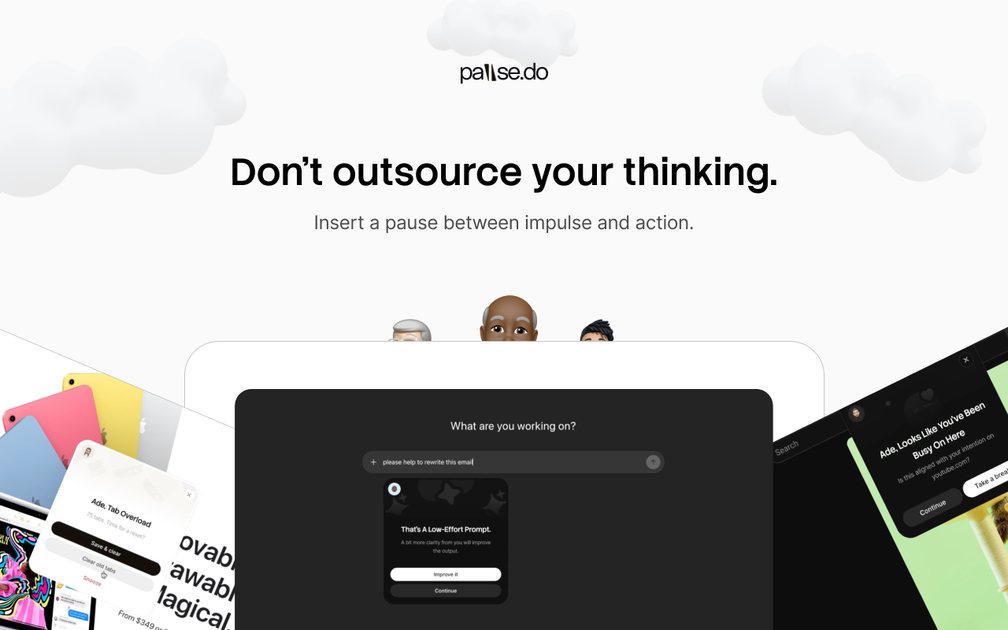
pause.do is a privacy-first browser extension that interrupts unintentional browsing—before AI prompts, during long scrolls, and when tabs drift.
What is pause.do?
pause.do is a privacy-first browser extension designed to interrupt moments of unintentional browsing—when you scroll for too long, when too many tabs build up, and before you prompt an AI to “think” for you. Its core purpose is to create small gaps between impulse and action so you can choose where your attention goes.
Rather than blocking your workflow, pause.do introduces gentle check-ins tied to specific browsing patterns. It also provides an “Attention Map” and related insights so you can see how your focus shifts across sites and over time.
Key Features
- Think First (AI prompts interruption): Appears before you prompt AI, with prompts such as “Why are you here?” and “What are you actually trying to do?” to help you reflect before outsourcing thinking.
- Scroll Pause (extended scrolling check-in): Triggers after extended scrolling with a short check-in, designed to make continued scrolling a conscious choice.
- Session Pause (long time-in-app awareness): Tracks how long you’ve been inside an app and surfaces a pause when time stretches beyond intention.
- Tab Overload (tab limit awareness): When your tab count crosses your configured limit, pause.do slows the moment and suggests closing “what’s noise.”
- Focus Limit (time-window protection): Lets you set a focus window; during it, high-drift apps trigger firmer pauses intended to support deep work rather than restriction.
- Attention Map & insights: Shows attention movement throughout the day, highlights patterns like drift/overload/recovery trends, and includes additional views such as loop detection and app insights.
- Human + AI balance signals: Surfaces when you relied on AI versus when you didn’t, based on your usage patterns.
How to Use pause.do
- Install the extension from your browser’s add-on store (the site notes installation for Chrome Web Store/add-on store). pause.do is available on major browsers listed in the FAQs.
- Use it as you browse: pause.do appears at the moments it targets (before AI prompts, during extended scrolling, during long sessions, and when tab counts cross the limit).
- Set your focus window (via Focus Limit) if you want stronger interruptions for high-drift apps during a planned deep-work period.
- Review your day: open the extension’s “Attention Map” and related insights to see how attention shifted, where drift begins, and any detected patterns.
Use Cases
- Before asking AI for help: If you frequently use AI for prompts without clarifying your goal, Think First interrupts before you prompt so you can restate what you’re actually trying to achieve.
- Reducing “infinite scroll” sessions: When a feed keeps going beyond what you intended, Scroll Pause provides a brief check-in so you can decide whether to continue.
- When “one minute” becomes a long session: For apps that tend to pull you in, Session Pause surfaces awareness after you’ve been inside longer than you planned.
- Taming tab sprawl and switching overhead: If you often reach a high tab count and lose context, Tab Overload slows the moment and encourages closing low-value tabs.
- Supporting planned deep work: During a focus window, Focus Limit triggers firmer pauses on high-drift apps to help you stay oriented to the task.
FAQ
-
What is pause.do? pause.do is a browser extension that creates small moments between impulse and action. It interrupts during targeted moments (before AI prompts, during long scrolls, when sessions run long, and when tab overload occurs) so you can choose where to direct attention.
-
Which browsers are supported? The site states pause.do works on Chromium-based browsers (Chrome, Edge, Arc, Brave) and Firefox.
-
Is it free or paid? The extension is free to install and use. A one-time license unlocks all five pause types (including Think First for AI), the full Attention Map and insights, and future updates, with no subscription.
-
How does pause.do handle data? The site says attention data stays on your device. It also states that it doesn’t sell or share your data, and that only aggregated, anonymized insights may be used to improve the product.
-
Does pause.do block websites or lock you out? The site describes pauses as non-blocking: it states there are no lockouts and no shame, positioning interruptions as gentle check-ins.
Alternatives
- Focus/blocking browser extensions: Tools that block distracting sites or enforce time limits can help structure attention, but they focus on enforcement rather than creating small reflective gaps.
- Digital wellbeing / screen-time dashboards: Operating-system or browser-based reporting can show usage patterns, but may not provide the same in-the-moment interruptions before AI prompts, scroll continuation, or tab overload.
- AI usage organizers (prompting/workflow tools): Some tools help manage AI workflows or prompts; compared with pause.do, they typically assist with prompt organization rather than pausing at the moment of impulsive action.
- Tab management tools: Extensions that organize or limit tabs address overload directly, but may not include the broader set of pause triggers (AI prompts, scrolling, and session timing) or attention map insights.
Alternatives

Decision Jar
Create virtual jars of options with Decision Jar—shake your phone to pick instantly, use AI suggestions, and view decision logs over time.

Biji
Biji is a versatile platform designed to enhance productivity through innovative tools and features.

FC Tactix
FC Tactix is a football coaching platform with an interactive tactics board, AI play generation, session planning, and player development tools.

Planndu: Daily Task Planner
Planndu is an intuitive productivity application designed to help users organize tasks, manage projects, build routines, and enhance focus using tools like AI generation and a built-in Pomodoro timer.
MealTime
MealTime is your personal, offline-first recipe companion designed to help you save, organize, plan meals, and generate smart grocery lists, all while keeping your data private.

Clawcard
Clawcard: AI agents get a real inbox, phone number & virtual credit card for OpenClaw. Secure, autonomous agent operations.