FC Tactix
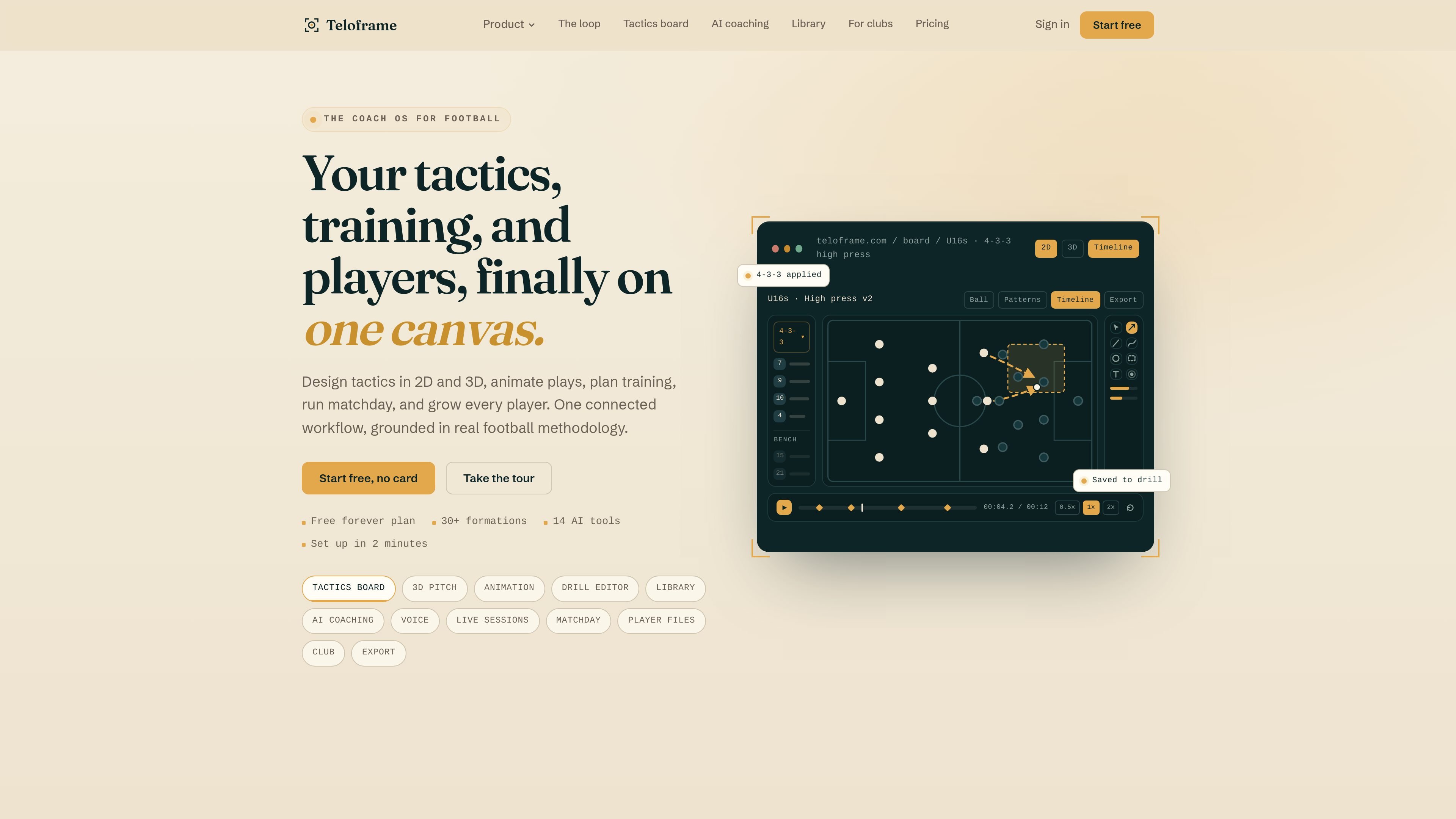
FC Tactix is a football coaching platform with an interactive tactics board, AI play generation, session planning, and player development tools.
What is FC Tactix?
FC Tactix is a coaching platform that combines a football tactics board with planning, drill building, team management, and player development tools. It’s designed to help coaches and analysts design tactics, plan sessions, and communicate training plans in a visual workflow.
The platform centers on interactive 2D/3D tactical visualization, including board-based AI play generation and animation, plus features for running sessions on the field and producing exportable content for presentations or social clips.
Key Features
- Tactics board with 2D and 3D visualization: Build and view tactical concepts in both 2D and 3D, including 3D camera presets such as broadcast angle and player POV.
- 30+ formations with one-click shape placement: Apply multiple formation templates, from common structures (e.g., 4-3-3) to more specialized layouts with smart positioning.
- 14 drawing tools for tactical annotation: Mark runs, passing lanes, zones, and pressing triggers with a set of tools intended for clear visualization.
- Board AI for generating animated sequences from text: Create animated board sequences by describing a tactical idea in plain language.
- Animated play and drill editing with export: Animate plays step by step using keyframe animation and export outputs as PNG, GIF, or MP4, including landscape and 9:16 vertical formats.
- Session planning and live delivery mode: Use a weekly planner with a block-based session builder, drill timers, attendance tracking, and post-session reflections.
- Team management and development tracking: Manage squads, staff, resources, and availability; build structured player development plans with SMART goals, rubric-based evaluations across 8 dimensions, evidence tracking, and printable reporting.
- Collaboration through club workspaces: Co-edit supported plans with real-time presence and use role-based access and approval workflows inside a club workspace.
How to Use FC Tactix
Start with the free plan and open the tactics board to design a formation using the included templates. Add annotations with the drawing tools, then generate or animate a play sequence either step-by-step or by using board AI with a plain-language prompt.
From there, use the session planner to assemble a weekly session using reusable building blocks, and optionally run live session mode with drill timers and attendance tracking. Export board scenes or animations (PNG/GIF/MP4) for presentations or vertical social clips, and use player development and team management features to record evaluations and availability.
Use Cases
- Create and present matchday briefings: Build multi-scene tactical storyboards and present the visuals for team talks, classrooms, or video breakdowns.
- Generate and refine training sequences: Use board AI to draft an animated sequence from text, then adjust positioning and annotations using drawing tools and animation controls.
- Plan a weekly training cycle: Use the session planner’s block-based builder to assemble sessions, deliver drills with timers in live mode, and capture post-session reflections.
- Run structured player development reviews: Set development plans with SMART goals, track evidence, evaluate across 8 dimensions with rubrics, and print structured reports.
- Coordinate tactics with a coaching staff: Collaborate in a club workspace using role-based access, shared libraries, and approval workflows while co-editing tactics with live presence.
FAQ
- Is there a free plan? Yes. The site states that a free plan is available with no credit card required.
- What outputs can I export from FC Tactix? The platform supports exporting content as PNG, GIF, and MP4, including both landscape and 9:16 vertical formats.
- Can I generate tactical animations from text? Yes. FC Tactix includes board AI that generates animated board sequences from plain-language prompts.
- Does FC Tactix support live training delivery? Yes. The session planner includes live session mode with drill timers, attendance tracking, adaptive fallbacks, and post-session reflections.
- Can multiple staff members collaborate? The platform supports real-time co-editing and club workspaces with role-based access and approval workflows.
Alternatives
- Video + play-diagram toolsets: Use generic diagramming or video-editing tools to create visual plays and presentations, but you typically won’t get a dedicated football tactics board workflow with 2D/3D co-editing and board AI.
- Traditional coaching spreadsheets and note-taking: Spreadsheets can track sessions and player notes, but they usually lack the integrated tactics visualization, animation, and export formats described for FC Tactix.
- Sports planning and team management platforms: Platforms focused on attendance, squads, and training planning can cover operations, but may not provide the same board-first tactics creation, animation, and prompt-driven AI sequence generation.
- General design and animation tools: Tools for 3D view and animation can produce visuals, but they aren’t specialized for formation templates, passing-lane overlays, and tactics-focused drawing tools.
Alternatives
Padel Chess
Padel Chess is a puzzle-based learning platform helping padel players improve tactical decision-making with chess-like scenarios on positioning and shot selection.
What Do I Wear Run
Get personalized, weather-based running outfit recommendations featuring curated gear from top brands like Satisfy, On, and Bandit.
GitFit.AI
GitFit.AI: AI fitness logger, calorie counter & habit tracker. Log meals & activity via photos & text. Simplify your health journey.
Padel Chess
Padel Chess is a unique learning platform that uses chess-like puzzles to help padel players improve their tactical skills, court positioning, and decision-making.
Vekta
Vekta is an AI-powered training and coaching platform for endurance athletes and coaches—linking planning, session analysis and performance insight in one system.
Decision Jar
Create virtual jars of options with Decision Jar—shake your phone to pick instantly, use AI suggestions, and view decision logs over time.