

PinchBench
Compare OpenClaw agent performance on PinchBench across 100+ LLMs with success-rate rankings from automated checks and LLM-judged grading.
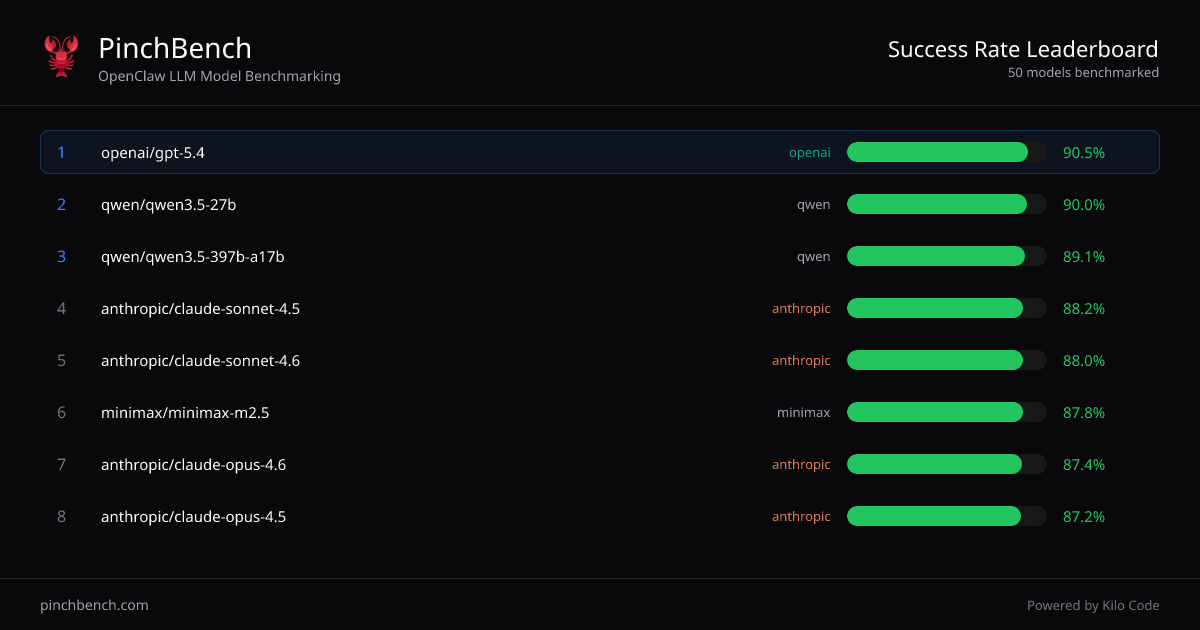
What is PinchBench?
PinchBench is an OpenClaw LLM model benchmarking site that ranks AI models by success rate on standardized coding tasks. Its core purpose is to help you compare multiple LLMs using the same agent-based test setup, so you can choose a model based on measured outcomes rather than assumptions.
The site presents “Success rate by model” rankings and lets you view more tasks and grading details. It also indicates that grading and scoring are automated using automated checks and an LLM judge.
Key Features
- Success-rate rankings across models: Displays a sorted table of models with fields for “Best %,” “Avg %,” and related score columns to compare performance consistently.
- OpenClaw agent benchmarking: Evaluates models specifically in the context of an “OpenClaw” agent workflow, reflecting how models perform on agent-driven coding tasks.
- Automated grading with checks and an LLM judge: Scores are derived from automated checks and an LLM judge, providing a repeatable evaluation method.
- Budget filtering (max $ per run): Includes a budget filter labeled “Max $per run,” allowing you to focus comparisons within a cost constraint shown by the interface.
- Transparent test materials and criteria: Notes that “All tasks and grading criteria are open source,” and provides a way to view tasks.
How to Use PinchBench
- Navigate to PinchBench and use the model ranking table to compare models by success rate.
- Optionally adjust budget filtering using the “Max $ per run” control to narrow results to models that fit your stated cost limit.
- Use task views and grading details (including open grading criteria) to understand what the scores measure before selecting a model.
Use Cases
- Selecting an LLM for an OpenClaw coding agent: Compare candidate models by measured success rate on standardized agent tasks, then pick the best-performing option for your use case.
- Evaluating quality vs. average performance: Use the table’s “Best %” and “Avg %” columns to differentiate models that may peak well versus those with more consistent results.
- Cost-aware model comparison: Apply the max $ per run filter to compare models under a budget ceiling while still relying on the same benchmark tasks.
- Reviewing how scores are computed: Check open tasks and grading criteria to verify what “success” means in the benchmark, and to assess whether it aligns with your expected behavior.
- Comparing multiple providers in one view: Use the consolidated rankings to compare models from different providers (as shown in the table, e.g., OpenAI, Anthropic, Qwen, Minimax, and Google models).
FAQ
-
How does PinchBench determine a model’s success rate? Success rate is measured as the percentage of tasks completed successfully across standardized OpenClaw agent tests, using automated checks and an LLM judge.
-
Can I see what the benchmark tests include? Yes. The page provides options to view tasks, and it states that tasks and grading criteria are open source.
-
What metrics are shown in the rankings? The ranking table includes success-related percentage fields such as “Best %” and “Avg %” (with additional score columns visible in the interface).
-
Is there a way to filter models by cost? The interface includes a budget filter labeled “Max $per run,” which you can use to restrict the displayed results.
-
Does PinchBench evaluate general chat quality? The site specifically benchmarks models on OpenClaw agent coding tasks, and the success rate shown corresponds to that standardized benchmark context.
Alternatives
- General LLM leaderboards: Broad, non-task-specific rankings can be useful for a quick scan, but they typically don’t measure performance on OpenClaw agent coding tasks.
- Own evaluation harness / internal benchmarks: Running a curated set of coding tasks and applying your grading approach can better match your requirements, but it requires setup and ongoing maintenance.
- Provider-specific evals and benchmarks: Some vendors publish performance results across benchmarks; these may differ in task design and grading from PinchBench, so comparisons should be treated cautiously.
- Agent-framework evaluation tools: Tools that let you test LLMs with agent workflows can provide workflow-aligned results, but may not offer the same standardized cross-model benchmark and open grading criteria as PinchBench.
Alternatives

AakarDev AI
AakarDev AI is a powerful platform that simplifies the development of AI applications with seamless vector database integration, enabling rapid deployment and scalability.

BookAI.chat
BookAI allows you to chat with your books using AI by simply providing the title and author.

skills-janitor
Audit, track usage, and compare your Claude Code skills with skills-janitor—nine focused slash commands and zero dependencies.

FeelFish
FeelFish AI Novel Writing Agent PC client helps novel creators plan characters and settings, generate and edit chapters, and continue plots with context consistency.

BenchSpan
BenchSpan runs AI agent benchmarks in parallel, captures scores and failures in run history, and uses commit-tagged executions to improve reproducibility.

ChatBA
ChatBA is generative AI for slides: create slide deck content fast with a chat-style workflow, turning your input into a draft.