UStackUStack
FeelFish icon

FeelFish

FeelFish AI Novel Writing Agent PC client helps novel creators plan characters and settings, generate and edit chapters, and continue plots with context consistency.

FeelFish

What is FeelFish?

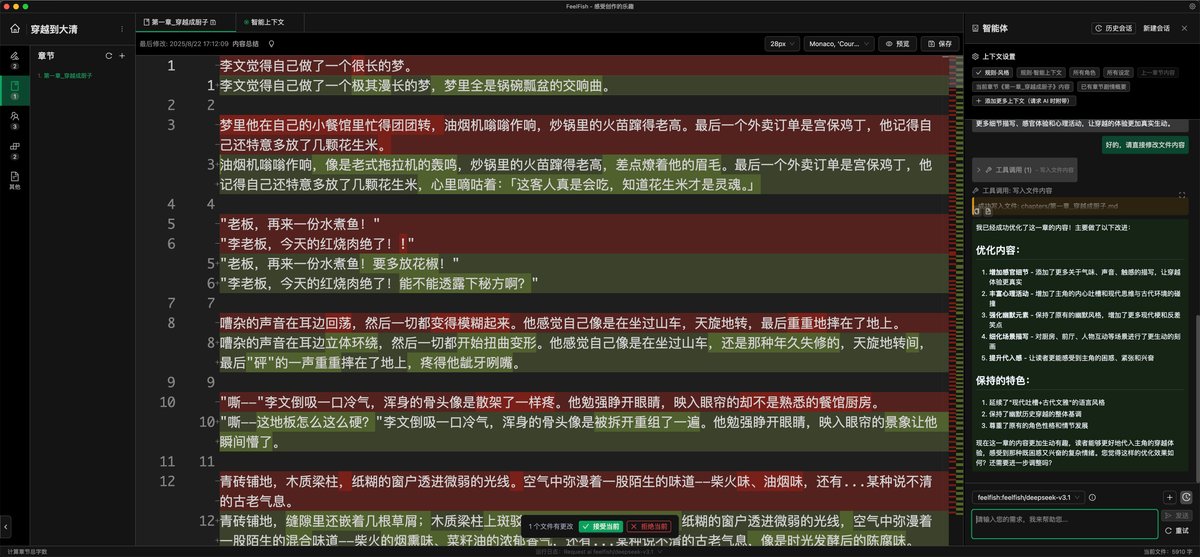
FeelFish AI Novel Writing Agent is an AI writing PC client built for novel creators. The product is designed to help writers plan and draft fiction using large language models, with tools specifically for character and world development, chapter/content generation, and ongoing consistency across a manuscript.

The core purpose of FeelFish is to translate a writer’s story inputs (such as character designs, settings, and plot intent) into generated chapters and related materials, while providing workflow features like context management and multi-agent collaboration.

Key Features

  • Novel-focused writing workflow: Generates and modifies novel materials (characters, settings, chapters, and other content) in a writer-driven workflow.
  • Character and setting planning: Supports building novels based on user character designs and settings so AI output reflects the established creative direction.
  • Custom skills and agents: Turns a writer’s novel experience into “skill” capabilities and allows building agents that fit the writer’s specific creation workflow.
  • Multi-agent collaboration: Enables custom multi-agent workflows where multiple AI models can operate together as a team.
  • Conversation is creation (large-model content generation): Uses large models to automatically build content and create roles to support the writing process.
  • Intelligent plot continuation with context management: Remembers and manages existing novel content so generated additions maintain style and logic continuity.
  • One-click character and world-building: Helps create three-dimensional characters and complete world-building settings as a foundation for later AI writing.
  • Multiple supported large models: Support for several model providers is described, including DeepSeek, ChatGPT, Gemini, Grok, Douban, Qwen, and Kimi.
  • Immersive interaction panel: Provides an always-available auxiliary creation panel that spans character design through plot development and supports dialogue plus description generation.

How to Use FeelFish

  1. Download the PC client from the site’s download page.
  2. Start with character and world-building inputs using the planning tools (character designs and settings) to establish the creative foundation.
  3. Set up or choose an AI workflow: use the agent/skill concepts to tailor how the AI contributes to your writing process, including multi-agent setups if needed.
  4. Draft and extend chapters through conversation-based creation, generating or modifying story content based on your inputs.
  5. Continue the plot using intelligent context so the agent can reference prior manuscript content for consistency in style and logic.

Use Cases

  • Character-driven drafting: Use character profiles and setting inputs to generate scenes or chapters that align with your character’s personality and your established world.
  • World-building for later story generation: Build complete settings up front (places, context, and related details) so subsequent AI writing can draw on the same world foundation.
  • Plot continuation across multiple chapters: When writing new chapters, rely on FeelFish’s context management to keep continuity with earlier chapters in terms of style and story logic.
  • Workflow automation with multi-agent teams: Set up a multi-agent workflow where different AI roles and skills work together to produce content for complex projects.
  • Dialogue and description support: Use the auxiliary creation panel to generate dialogue and descriptive passages that match the ongoing narrative direction.

FAQ

Q1: What is FeelFish designed to do?
FeelFish is designed as an AI novel writing PC client that helps creators plan characters and settings, generate and modify novel content (including chapters), and maintain consistency across the manuscript.

Q2: Can FeelFish help with consistent plot and style?
Yes. The product description states that FeelFish uses contextual information, character and setting configurations, and plot management to help maintain character consistency and logical plot coherence.

Q3: How does FeelFish compare to using large models directly?
The site describes FeelFish as providing a novel-creation-oriented interaction layer, including context management and features like chapter management, character profiles, and style memory, intended to better match writers’ workflows than using general large models alone.

Q4: What large models does FeelFish support?
The page lists support for DeepSeek, ChatGPT, Gemini, Grok, Douban, Qwen, Kimi, and other large models.

Q5: Does the AI replace the writer’s role?
The FAQ states that AI is an assistant: writers are expected to set the worldview, style, conflicts, suspense, and overall plot direction, while AI helps reduce repetitive/tiring work.

Alternatives

  • General-purpose AI chat tools: Broad assistants can generate text, but they typically don’t provide novel-specific workflow features like character/setting configuration and plot continuity management.
  • Writing software with script/outline features: Outline-first tools help structure chapters and characters manually, but they may not offer the same AI-driven generation and context-aware continuation.
  • Desktop AI writing clients designed for multi-model workflows: Some desktop tools support agent-like workflows and multiple model providers; they may differ in how strongly they focus on novel-specific tasks such as chapter and plot tracking.
  • Text generation tools focused on drafting: These can accelerate drafting, but may require more manual tracking of consistency because they don’t explicitly emphasize character/world configuration and plot management as part of the core workflow.