
Fast modeling workflow
PixyCAD is built around fast iteration, letting you create, adjust, and refine models without a heavy CAD workflow getting in the way.

PixyCAD is a 3D CAD app for macOS and iPadOS to sketch, model, and export 3D printing files, with Apple Pencil support and Mac refinement.
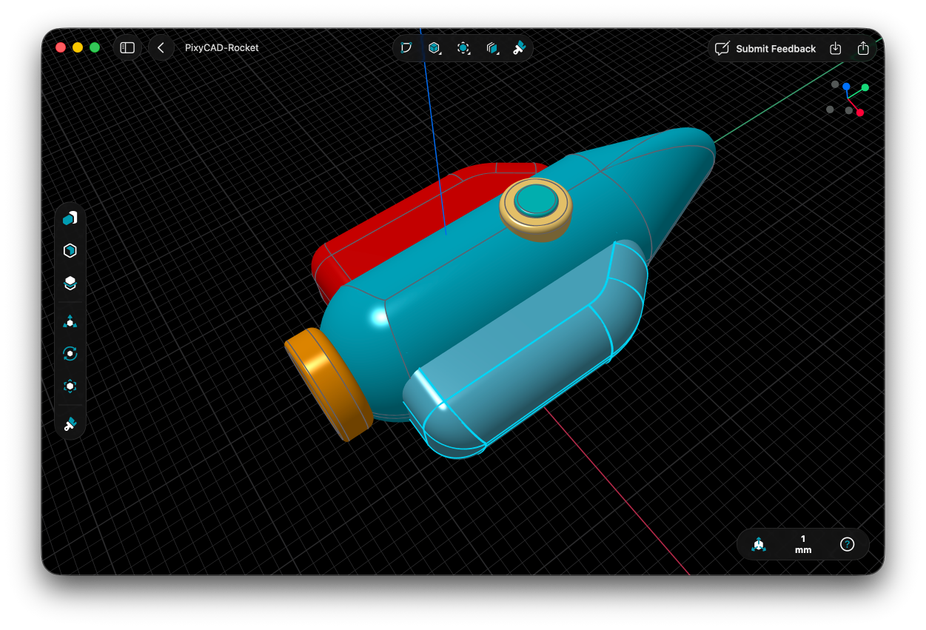
PixyCAD is a 3D CAD app for macOS and iPadOS aimed at makers, 3D printing enthusiasts, and people who want a more approachable way to model in 3D. The site presents it as a tool that removes some of the usual friction from CAD so users can move from an idea to a solid model and then to a printable file.
The product is designed around quick iteration and device-native use. On iPad, you can sketch with Apple Pencil; on Mac, you can refine with keyboard and mouse. PixyCAD also runs on-device rather than in the cloud, and its export options include STL and 3MF for printing, with STEP and Parasolid formats available in paid plans for exchange with other CAD tools and manufacturers.
PixyCAD is built around fast iteration, letting you create, adjust, and refine models without a heavy CAD workflow getting in the way.
On iPad, you can sketch with Apple Pencil and then turn that sketch into a precise 3D model. The site positions this as a way to start without prior CAD experience.
The app runs entirely on your device and is described as Metal-optimized, with smooth rotation, panning, and editing on detailed models.
You can start on iPad and continue on Mac, using the same workflow across Apple devices.
PixyCAD exports STL and 3MF for slicing and printing, with higher-resolution export available in paid plans.
Paid Maker plans add STEP import/export, Parasolid import/export, and PixyCAD file import/export for use with other CAD tools and manufacturers.
Use PixyCAD to sketch an idea on iPad with Apple Pencil, then convert it into a more precise 3D model without needing prior CAD experience.
Design parts for 3D printing by exporting STL or 3MF, then send the files to a slicer for printing.
Begin a project on iPad and continue refining it on Mac using keyboard and mouse when you want tighter control or a different input method.
Use the paid file formats to exchange models with other CAD software or share them with manufacturers who need STEP or Parasolid inputs.
Work through early concepts quickly by making repeated adjustments to measurements and geometry on-device, without relying on cloud-based editing.
PixyCAD supports macOS and iPadOS. The site says it requires iPadOS 26.0+ or macOS 15.0+ with Apple Silicon.
Yes. The pricing page offers a free Starter plan with core modeling tools and up to two projects. Paid Maker options add unlimited projects and professional export/import formats.
PixyCAD exports STL and 3MF for printing. The paid Maker plans also add STEP and Parasolid import/export, plus PixyCAD file import/export.
Yes. PixyCAD says you can start on iPad with Apple Pencil and continue on Mac with keyboard and mouse, with a consistent workflow across devices.
The site presents PixyCAD as approachable for beginners and also useful for makers and 3D printing enthusiasts. The pricing FAQ says it includes built-in tutorials, but the source does not describe formal collaboration features.

DeepMotion is a web-based AI motion capture and 3D animation platform with Animate 3D for video-to-animation and SayMotion for text-to-animation.

sizeless digitizes utility construction with SiteScan: capture trenches on iPhone Pro and create 3D point clouds, DWG/DXF as-built plans, and GIS pipe-route models.

Atlasly is an AI site analysis and feasibility tool for architects, developers, and planners, assessing constraints, walkability, and urban context in web app or MCP-connected AI assistants.

anyCreature turns a short text order into a game-ready 3D creature, compiled from one JSON spec with animation, vertex colour, AO baking and an offline viewer.

模袋云 is an accessible online villa modeling software.

Vizcom is an AI design platform for product designers and teams that turns sketches into photorealistic 3D renders, with iteration and team workflows.