
Parametric fractal structure
Adjust fibres, chirality, recursive levels, detuning, gap fill, torus profile, child height, bridge shape, openings, node spread, node sites, depth, curve samples, and node budget to shape the recursive torus.

Explore Tortoise Generator, a browser-based visualiser for recursive fractal tori from counter-rotating Hopf fibres, with 3D printing output.
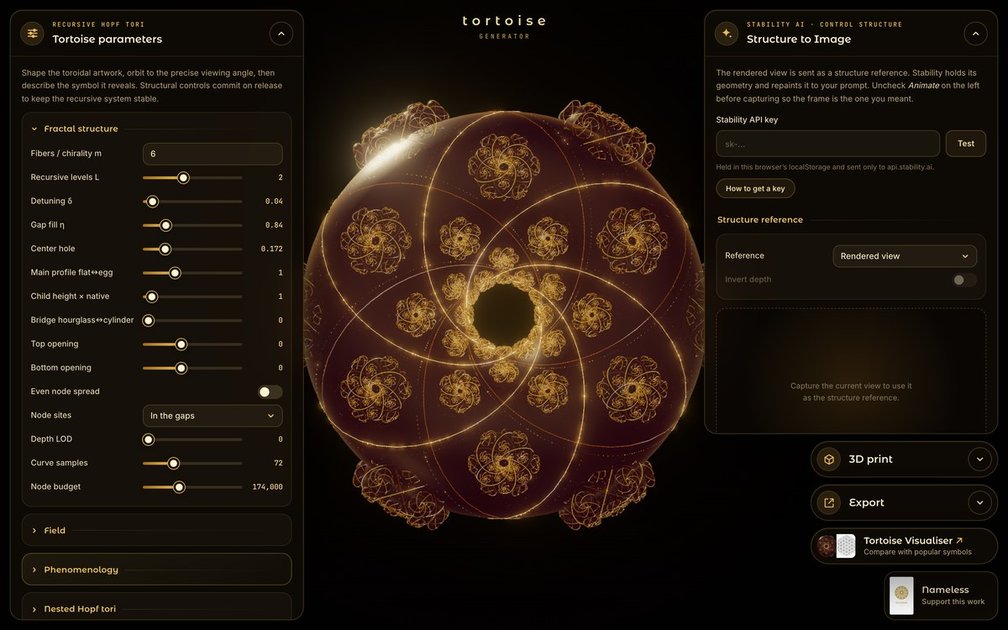
Tortoise Generator is a browser-based interactive tool for shaping and viewing a recursive fractal torus built from counter-rotating Hopf fibres. Its controls separate the underlying structure from visual interpretations, allowing users to change geometry, field rendering, symbolic forms, animation, camera position, and material appearance while exploring the same mathematical object.
The visualiser also supports practical outputs. Users can export and import JSON presets, copy a preset to the clipboard, capture a frame as a structure reference for a Stability AI image workflow, and generate a watertight solid intended for 3D printing. The project is presented as free and open source; the supplied site pages do not establish additional pricing, licensing, browser-support, or integration details.
Adjust fibres, chirality, recursive levels, detuning, gap fill, torus profile, child height, bridge shape, openings, node spread, node sites, depth, curve samples, and node budget to shape the recursive torus.
Switch between an off state, glow over the structure, and field-only views, with controls for shell spread, spikes, filaments, rim glow, copies, inner fill, twist, haze, flow, pulses, and plasma quality.
Render the same underlying geometry through arms, wings, serpents, dragons, rings of fire, prayer beads, interlace bands, faces, eyes, treasures, bodies, trees, mountains, and other symbolic forms, while changing colours and model settings.
Explore nested Hopf tori with configurable nesting levels, spacing, fractal shells, particle settings, colour shift, and positive or negative innermost variants.
Control animation, particle flow, fibre visibility, carrier tori, crossing lattices, camera views, depth of field, lighting, materials, fog, bloom, and other display parameters. Presets can be exported or imported as JSON.
Capture a view for structure-reference image generation through Stability AI, or create a watertight solid model with print method, size, strand thickness, levels, orientation, smoothness, and joining controls for 3D printing.
Adjust recursive levels, fibre families, node placement, torus proportions, and bridge geometry to study how parameter changes alter the generated structure and its crossings.
Use phenomenology modes, colour families, field effects, camera controls, and animation to create symbolic or atmospheric visual studies while retaining the same underlying geometry.
Capture a chosen still frame as a structure reference, add prompts and negative prompts, select a style and output format, and generate an image through the connected Stability AI workflow.
Prepare the structural model for physical fabrication by choosing a printing method, target size, strand thickness, retained levels, orientation, smoothness, and joining strategy before exporting the solid model workflow.
Use JSON presets to record a configuration, restore a previous state, or move an artwork setup between sessions or compatible instances of the visualiser.
Open the Tortoise Generator in a browser and adjust the structural parameters, viewing angle, field settings, phenomenology, model, animation, and display controls. Structural controls commit on release to keep the recursive system stable.
Yes. The visualiser includes a JSON preset export, JSON preset import, clipboard copying, and a reset to the gold preset. These controls let you save or restore an artwork configuration.
The visualiser can capture the current frame as a structure reference and send it to the Stability AI image-generation workflow. You must provide and test your own Stability API key; the page states that each generated image costs 3 credits and that the key is stored in the browser's localStorage and sent to api.stability.ai.
The Solid model workflow turns the on-screen frame into a watertight solid for 3D printing. It uses the structure itself rather than the phenomenology bodies, joins fibres at crossings, connects smaller copies to their torus, and omits copies that are too fine to print.
The source identifies the project as free and open source and links the visualiser to open-source work on GitHub. It does not provide further licensing details on the supplied pages.

DeepMotion is a web-based AI motion capture and 3D animation platform with Animate 3D for video-to-animation and SayMotion for text-to-animation.

sizeless digitizes utility construction with SiteScan: capture trenches on iPhone Pro and create 3D point clouds, DWG/DXF as-built plans, and GIS pipe-route models.

zCAD AI turns engineering briefs and optional reference images into inspectable B-rep CAD parts and assemblies for revision, export, or work in zCAD Online.
Atlasly is an AI site analysis and feasibility tool for architects, developers, and planners, assessing constraints, walkability, and urban context in web app or MCP-connected AI assistants.

anyCreature turns a short text order into a game-ready 3D creature, compiled from one JSON spec with animation, vertex colour, AO baking and an offline viewer.

模袋云 is an accessible online villa modeling software.