

ZapDigits
ZapDigits helps marketing agencies create white-label marketing dashboards and client reports by combining analytics and SEO data in one place.
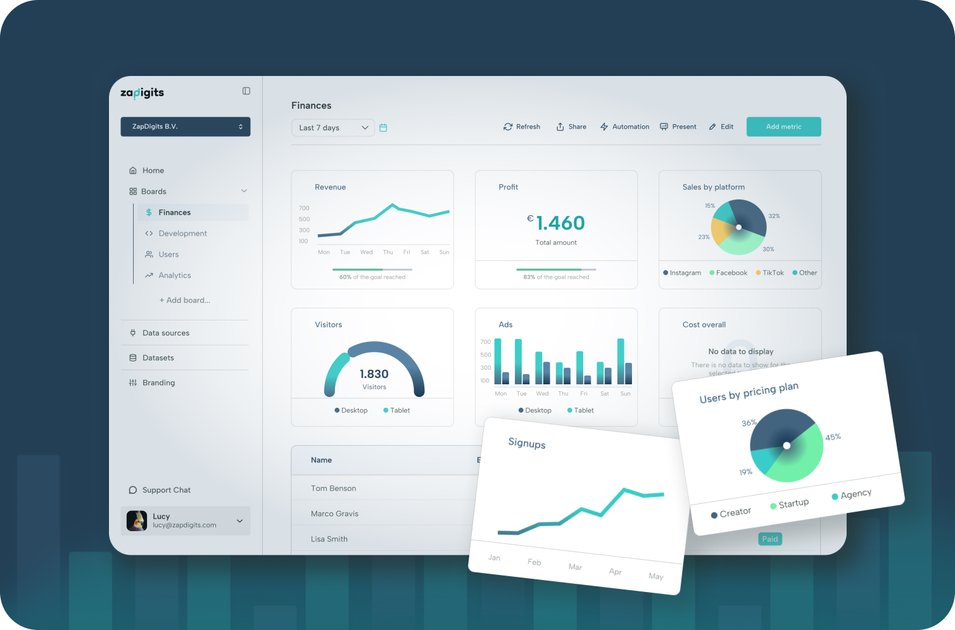
What is ZapDigits?
ZapDigits is a dashboard and reporting platform designed for marketing agencies. It connects multiple data sources to build dashboards and produce client reports, with tools for layout, branding, and ongoing task work around creatives and reporting.
The product emphasizes consolidating data sources in one place so agencies can create consistent views per client or campaign and reuse reporting layouts across their workflow.
Key Features
- AI agent for marketing data: Use an AI agent that “talks to your marketing data” to help interact with metrics within the system.
- White-label dashboards: Provide client-facing dashboards with custom branding so reporting can match each client.
- Drag-and-drop dashboard layout: Arrange widgets and reporting components using a drag-and-drop layout builder.
- Widget library for common metrics: Start from prebuilt metric widgets that cover common reporting needs.
- Multi-source connections (30+ data sources): Connect many data sources instantly and build charts from those datasets.
- Save views per client or campaign: Keep different dashboard configurations aligned to specific clients or campaign contexts.
- Custom data via upload or API: Upload your own datasets or use API access for more complex dashboards.
- Task management and team workflow: Create tasks and manage creatives alongside reporting work.
How to Use ZapDigits
- Set up your dashboard: Connect the data sources you need (from the available 30+ sources or via upload/API for custom datasets) and choose a starting layout from the widget library.
- Build and arrange widgets: Use the drag-and-drop editor to place charts and metric widgets into a dashboard.
- Brand and tailor views: Apply custom branding for each client and save separate views per client or campaign.
- Create outputs and collaborate: Generate reports that match how your team and clients work, then use task management to coordinate creative and reporting tasks.
Use Cases
- Client reporting with consistent branding: An agency creates a white-labeled dashboard for a client, applies the client’s branding, and saves a view tied to a specific campaign.
- SEO and analytics consolidation: An agency combines analytics and SEO data into one dashboard instead of maintaining separate reporting tools.
- Custom reporting from proprietary data: A team uploads its own datasets or uses API access to build charts that aren’t covered by standard connectors.
- Ongoing campaign monitoring plus workflow management: While tracking performance on dashboards, the team assigns tasks and manages creatives in the same workspace.
- Reusable templates across multiple clients: The agency builds a dashboard layout with common metric widgets and reuses it by saving different client/campaign views.
FAQ
-
What makes ZapDigits different from other reporting tools? ZapDigits focuses on white-label dashboards for agencies that unify 30+ data sources and include tools for dashboard layout, client-specific views, and task/creative management.
-
How long does it take to set up ZapDigits? The page mentions a founder call takes 15–20 minutes, but it does not state a specific setup time for the product itself.
-
What data sources can I connect to ZapDigits? ZapDigits supports 30+ data sources and also allows uploading your own data sets and using an API for complex dashboards.
-
Can I customize the dashboards? Yes. You can use drag-and-drop layout, choose from a widget library, and apply custom branding. You can also save views per client or campaign.
-
Is my data secure with ZapDigits? The provided content includes links to privacy and security pages, but it does not include security guarantees or technical details in the excerpt.
Alternatives
- Reporting/dashboard platforms with built-in connectors: Tools that aggregate analytics into dashboards can serve a similar role, but may require more manual setup for white-label client reporting.
- BI/dashboard tools: Business intelligence platforms can build complex dashboards from multiple data sources, but they may shift more work onto the agency for layout and client-specific reporting workflow.
- Marketing automation reporting tools: Platforms focused on marketing operations may offer reporting and workflow, but typically differ in how they centralize multi-source dashboards and white-label outputs.
Alternatives

PromptScout
PromptScout tracks how your brand is mentioned, which competitors are recommended, and what sources are cited in AI answers—plus website audits.

ClayHog
ClayHog tracks AI Search Visibility & GEO—see what ChatGPT, Gemini, Perplexity, Claude, and Google AI Overviews say about your brand, incl. citations and sentiment.

beehiiv
beehiiv is an all-in-one newsletter and website platform with publishing, growth, analytics, and monetization tools for creators and brands.

Skayle
Skayle is a fully automated content and visibility engine that runs search-powered research before writing to help brands rank on Google and AI search.

SaveMRR
SaveMRR scans Stripe billing data to find SaaS MRR leaks and help recover failed payments, save cancellations, and win back churn—60-sec Free Revenue Scan.

Sleek Analytics
Lightweight, privacy-friendly analytics with real-time visitor tracking—see where visitors come from, what they view, and how long they stay.