
One window for multiple agents
Run multiple coding agents from a single interface instead of juggling separate windows. Tempest names Claude Code, Aider, OpenCode, Copilot CLI, Cline, and Goose among the supported tools it presents in its UI.

Tempest is a local-first desktop app for running AI coding agents in parallel on isolated git worktrees and branches. It helps developers coordinate tools like Claude Code, Aider, and OpenCode from one interface without requiring an account.
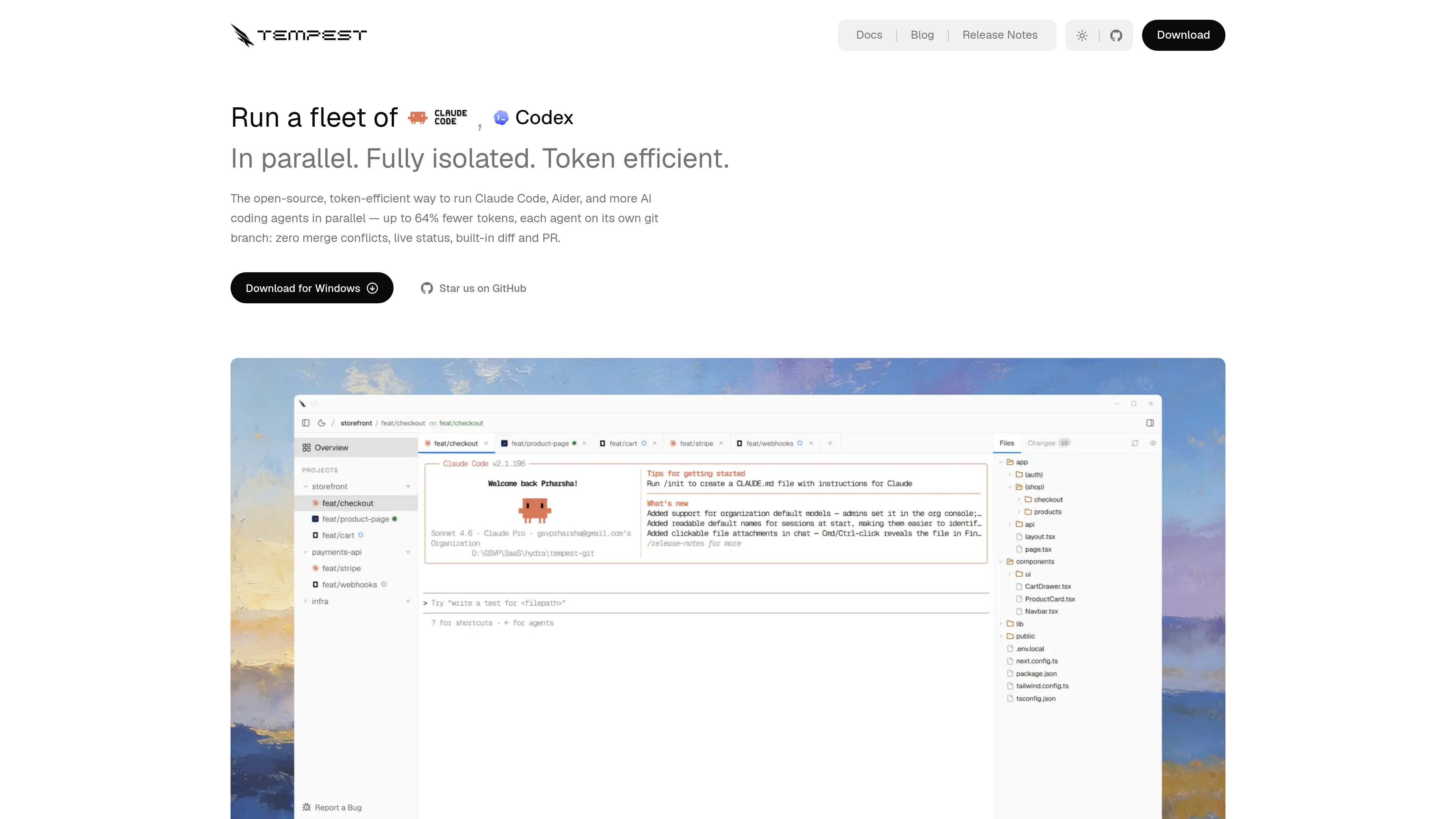
Tempest is a local-first desktop app for running AI coding agents in parallel. It is designed for developers who want to launch several agent sessions at once while keeping each one isolated in its own git worktree and branch.
The product centers on shared repository understanding and separated execution. Tempest builds a local code-knowledge graph on your machine, shares that context across sessions, and lets agents work side by side without colliding. The site positions it as a way to coordinate tools like Claude Code, Aider, OpenCode, and other coding agents from one interface.
Tempest is available for Windows, macOS, and Linux. The site says it runs entirely on your machine, requires no account or subscription to start, and is free and open source under Apache 2.0.
Run multiple coding agents from a single interface instead of juggling separate windows. Tempest names Claude Code, Aider, OpenCode, Copilot CLI, Cline, and Goose among the supported tools it presents in its UI.
Each session gets its own git worktree and branch automatically, so agents do not edit the same files at the same time. Tempest positions this as the main way it avoids merge conflicts and accidental overlap.
A shared local code-knowledge graph is built on your machine and reused across sessions. Tempest says this can reduce context tokens by up to 64% and tool calls by up to 58%.
Tempest shows live agent status, so you can see when each turn finishes without watching tabs manually. This is designed for running several sessions at once.
You can review changes in a live diff viewer, then stage, commit, push, and open a PR without leaving the app. That keeps the handoff from agent output to Git workflow in one place.
A live localhost preview updates inside the app as code changes land. Tempest also includes a real terminal with ANSI color, in-session search, and clickable links.
Open several agent sessions on the same repository to compare different implementation approaches, then keep the one that works best.
Keep client or feature work separated by branch and worktree while switching between agents without manual stash or branch cleanup.
Use the live diff viewer and PR flow to review each agent's changes before promoting them into the main codebase.
Run local coding agents on Windows, macOS, or Linux without creating accounts or depending on a hosted service.
Let one shared repository index serve several sessions so repeated context gathering is reduced across parallel runs.
Tempest runs AI coding agents in parallel, each in its own isolated git worktree and branch. That keeps sessions from touching the same files or stepping on uncommitted changes.
The source lists Claude Code, Aider, OpenCode, Copilot CLI, Cline, and Goose, and also references Codex, Gemini CLI, Hermes Agent, DeepSeek, Mistral, and Ollama in the broader workflow descriptions. Tempest presents this as a one-window runner for multiple agents.
Tempest is available for Windows, macOS, and Linux. The download page lists Windows installers, Linux AppImage and Debian packages, and macOS archive and disk image downloads.
Tempest says it runs locally on your machine and that your code never leaves it. The product copy also says no account, subscription, or sign-up is required to install and use the desktop app.
The product highlights session continuity: if you close a tab and reopen it, an agent resumes where it left off with full history intact.

ByteAsk is a terminal-first AI coding agent for C and C++ that edits repositories and verifies changes with the real compiler, debugger, sanitizers, and tests before showing a diff. It offers a free tier plus paid plans, with editor connectors and zero-retention handling described in the source.

Ghost é um assistente de IA para terminal, para conversar, gerar código e executar tarefas no prompt. Traz modelos gratuitos, funciona no Linux, macOS e Windows e é open source.

CreateOS Sandbox is an isolated compute environment for running code and agent workloads inside Firecracker micro-VMs. It is designed for workflows that need machine-level isolation, private networking between sandboxes, and programmatic control through SDK, CLI, or MCP.

hob is an independent workspace for coding agents that keeps agent sessions, terminals, history, and follow-up work organized around the tools and providers you already use. It is aimed at developers who want local control over routing, history, and workspace structure rather than a bundled model stack.

Manta AI is an autonomous web app testing tool for teams that want to map application behavior, catch regressions, and generate tests without writing scripts or maintaining selectors. It works from a URL and supports plain-English test flows, run results with screenshots, and scheduled or deployment-triggered checks.

SonOf connects to your repo and PM tool, audits the codebase and surrounding product context, and turns approved work into shipped tickets with senior engineering review. It is aimed at founders and engineering leaders who need backlog help without hiring a full team immediately.