
Multi-agent workspace
Open multiple Claude Code, Codex CLI, and shell terminals in one window, keep sessions alive in tabs, and arrange visible terminals in a grid from 1 to 6 rows and columns. Workspace layouts are remembered per project.
Termexo is a Windows desktop workspace for running and monitoring Claude Code, Codex CLI, and shell sessions in one project-based window. It helps developers track agent status, resume prior sessions, arrange terminals, and switch Claude Code model profiles locally without an account.
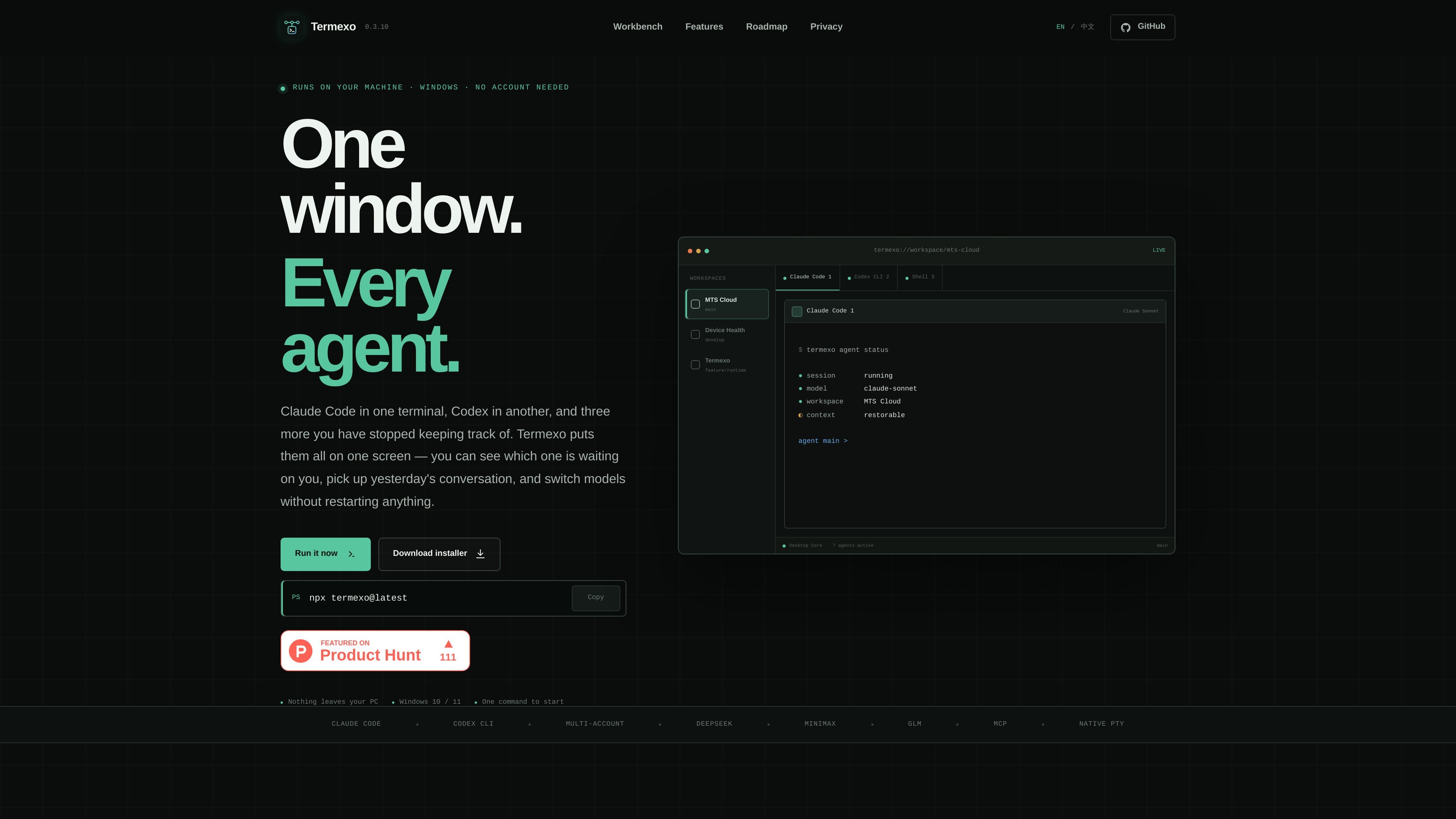
Termexo is a Windows desktop workspace for running and monitoring multiple coding-agent terminals from one window. It is designed for workflows that use Claude Code, Codex CLI, and shell sessions in parallel, combining their views into project-based workspaces rather than requiring separate terminal windows.
The application keeps sessions, terminal state, project layouts, and model selections on the local computer. Users can arrange visible terminals in a grid, identify agents that need input or approval, search prior sessions, and resume them through the coding CLIs' own commands. Termexo also provides model profiles for routing Claude Code to supported providers or compatible endpoints.
The homepage describes the current product as local-first and account-free. It identifies remote approval, quota visibility, CLI installation and upgrades, separate logins, proxy configuration, and agent-to-agent handoffs as planned roadmap items rather than current capabilities.
Open multiple Claude Code, Codex CLI, and shell terminals in one window, keep sessions alive in tabs, and arrange visible terminals in a grid from 1 to 6 rows and columns. Workspace layouts are remembered per project.
See whether an agent is working, waiting for input, awaiting approval, finished, or failed across open projects. Taskbar flashes, system notifications, and persistent in-app banners highlight sessions that need attention.
Search saved Claude Code and Codex sessions across projects by name, path, branch, or model, then reopen them using the CLIs' native resume commands so their existing context returns.
Create model profiles for Claude Code and switch providers without reinstalling the CLI or editing configuration files manually. Supported examples include Anthropic, DeepSeek, MiniMax, GLM, and compatible endpoints.
Keep project folders, open terminals, grid layouts, selected models, and related workspace state on the local machine so a workspace can be reopened with its prior setup.
Follow the Windows language automatically or choose from Chinese, English, Spanish, French, German, Japanese, and Korean.
Keep Claude Code, Codex CLI, and shell sessions visible together while working on the same project or related tasks. The grid lets users choose which terminals to watch without closing the others.
Run several projects in parallel and rely on project-specific layouts and saved terminal state when switching between them. This suits developers who move frequently between repositories or workspaces.
Search for a previous session using its project, path, branch, or model, then continue from the CLI's stored context instead of reconstructing the task in a new terminal.
Use a different provider for a Claude Code task when testing model behavior or cost tradeoffs, while preserving the same CLI workflow and switching profiles from the application.
Monitor long-running agent tasks while working elsewhere on the desktop. Persistent notifications and taskbar signals make approval or input requests visible even when another terminal or project is active.
Termexo runs on Windows 10 and Windows 11. The homepage presents an installer and an npm command, `npx termexo@latest`, for starting the application.
No account is required. Termexo is described as a local application with no cloud service or server to log into, and its project paths, sessions, terminal state, and settings remain on the computer.
The homepage specifically mentions Claude Code and Codex CLI. Termexo displays their sessions in one window, keeps sessions alive in tabs, and can resume saved sessions through the CLIs' own `claude --resume` and `codex resume` commands.
Termexo can save model profiles for Claude Code and route the CLI to Anthropic, DeepSeek, MiniMax, GLM, or another compatible endpoint. The source does not provide a complete compatibility list for other agents or environments.
Termexo reads Claude Code and Codex session files without editing or deleting them, and stores API keys in Windows Credential Manager rather than plain-text configuration files. The homepage does not provide broader security or team-administration details.

ByteAsk is a terminal-first AI coding agent for C and C++ that edits repositories and verifies changes with the real compiler, debugger, sanitizers, and tests before showing a diff. It offers a free tier plus paid plans, with editor connectors and zero-retention handling described in the source.

CreateOS Sandbox is an isolated compute environment for running code and agent workloads inside Firecracker micro-VMs. It is designed for workflows that need machine-level isolation, private networking between sandboxes, and programmatic control through SDK, CLI, or MCP.

hob is an independent workspace for coding agents that keeps agent sessions, terminals, history, and follow-up work organized around the tools and providers you already use. It is aimed at developers who want local control over routing, history, and workspace structure rather than a bundled model stack.

Manta AI is an autonomous web app testing tool for teams that want to map application behavior, catch regressions, and generate tests without writing scripts or maintaining selectors. It works from a URL and supports plain-English test flows, run results with screenshots, and scheduled or deployment-triggered checks.

SonOf connects to your repo and PM tool, audits the codebase and surrounding product context, and turns approved work into shipped tickets with senior engineering review. It is aimed at founders and engineering leaders who need backlog help without hiring a full team immediately.

Ghost é um assistente de IA para terminal, para conversar, gerar código e executar tarefas no prompt. Traz modelos gratuitos, funciona no Linux, macOS e Windows e é open source.