
Read and navigate structured documents
Format supported code and data, switch between rendered and raw views, search within documents, fold sections, and jump directly to a line or structure node.

CodePrettify is a JSON formatter and developer tools product for Chrome, Edge, and Windows. It helps users format, inspect, repair, compare, and generate code from structured data locally.
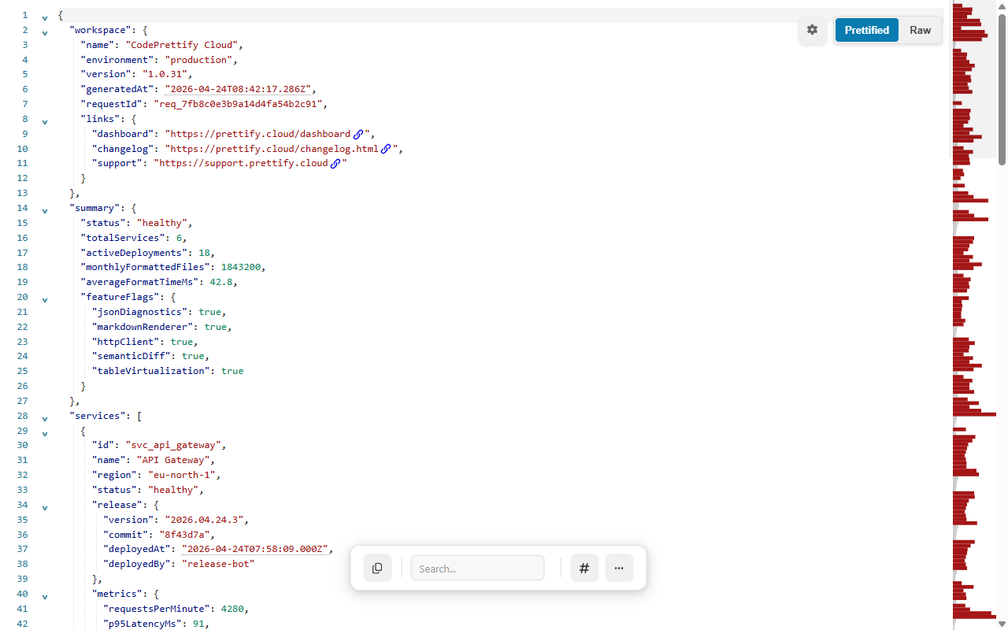
CodePrettify is a JSON formatter and developer tools product for Chrome, Edge, and Windows. It turns raw JSON responses, local files, and other supported code formats into a workspace for reading, validating, repairing, comparing, and exporting structured data.
The product is designed for local workflows. The homepage says it supports JSON, JavaScript, TypeScript, Markdown, XML, YAML, TOML, CSS, CSV, and RSS/Atom feeds, with the Windows app adding CSV and HTML support plus native local-file workflows. The pricing page says the currently shipped browser and Windows features are available to early testers for $0.
Format supported code and data, switch between rendered and raw views, search within documents, fold sections, and jump directly to a line or structure node.
Use JSON Path, schema validation, diagnostics, statistics, and table or diagram views to inspect payloads without leaving the workspace.
Repair messy JSON-like input, review a repair report, and apply an ordered transformation recipe before exporting the result.
Generate typed models or JSON Schema locally from a JSON sample, with support for TypeScript, Zod, C#, Java, Kotlin, Python/Pydantic, Go, Rust, Swift, Dart, and JSON Schema.
Compare documents with a full-screen diff, including synchronized scrolling, swap sides, and a semantic mode that compares structure instead of formatting noise.
Run regex tests, inspect HTTP responses, and use a sandboxed JavaScript playground for local testing and request workflows.
Format API responses or local files, expand nested objects, follow JSON Path queries, and validate a payload against a schema while staying in the same viewer.
Paste a sample JSON object or array and generate typed models or a schema for downstream development work, then copy or export the result locally.
Repair malformed JSON-like content, review what was corrected, and reshape the data into a cleaner structure before sharing or exporting it.
Compare two document versions and use semantic diff mode when key order or formatting has changed but the underlying data should be compared instead of the text layout.
Search, test, and iterate on small snippets or requests with the regex playground, JavaScript playground, or HTTP client when you need quick local debugging.
Yes. The pricing page says early testers can install the browser extension or Windows app and use the currently shipped features for $0, with no trial timer, subscription, payment details, or account required.
CodePrettify is offered as a browser extension for Chrome and Edge, and as a Windows app in Microsoft Store. The pricing page also says you can install either product or both.
The product is built for formatting, inspecting, repairing, transforming, comparing, and generating from local or browser-accessible code and data. The pricing page says core processing stays on your device, and the HTTP Client sends a request only when you press Send.
The source describes both products as early tester access rather than a restricted demo. The available features are the ones currently shipped, but the pricing page notes that future optional products or tiers may be priced separately.
The homepage and pricing page point readers to a one-page manual and feature guides. Those pages are the best starting point if you want setup, workflow, and feature details.

ByteAsk is a terminal-first AI coding agent for C and C++ that edits repositories and verifies changes with the real compiler, debugger, sanitizers, and tests before showing a diff. It offers a free tier plus paid plans, with editor connectors and zero-retention handling described in the source.

Ghost — терминальный AI-ассистент для чата, генерации кода и запуска задач в командной строке. Бесплатные модели, Linux, macOS, Windows, open source.

Vi3ecode is a maintained development environment for working with AI coding agents. It keeps project context, terminal, Git, memory, flows, review, and communication connected around the agent you already use.

Devin is an AI coding agent and software engineer that helps developers and engineering teams plan and execute complex software tasks. It is available through desktop, cloud, JetBrains, and CLI surfaces, with plans for individuals, teams, and enterprises.

imgcook is a design-to-code tool that converts design drafts into front-end code. It supports plugin-based and developer workflows for Sketch, Photoshop, VS Code, and CLI usage.

Pi Coding Agent is a terminal-based coding agent for developers who want a minimal, extensible harness for interactive work and automation. It supports model switching, session branching, and multiple run modes including TUI, print/JSON, RPC, and SDK.