
Three pull-request lists in one view
The main panel groups pull requests into three lists: items needing your review, your own pull requests, and organization pull requests. Clicking a row opens the pull request on GitHub.

PRNotch is a macOS app that shows GitHub pull requests in a panel under the Mac camera notch. It helps users scan review queue status, CI state, and alerts, then open the selected pull request on GitHub.
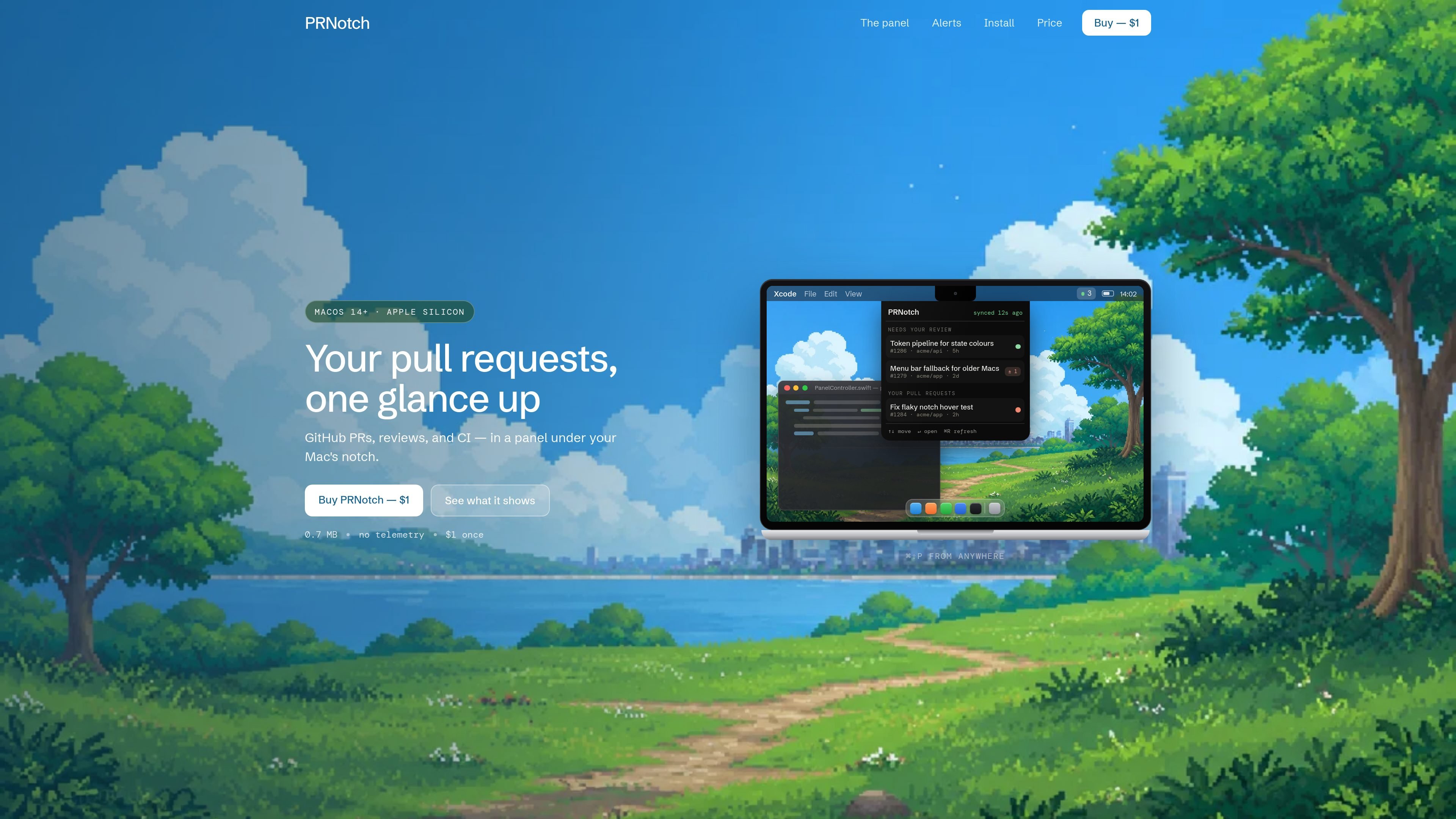
PRNotch is a macOS desktop app for checking GitHub pull requests from a panel placed under the Mac’s camera notch. It is built around three main lists: pull requests needing your review, your own pull requests, and pull requests from your organizations.
The product is aimed at reducing tab switching for people who want a fast read on review queue status, CI state, approvals, and changes requested. It opens the relevant pull request on GitHub when you select a row, and it adds optional alerts, keyboard shortcuts, and a menu bar fallback for older Macs.
The pricing page says the app is sold for a one-time payment of $1, with no subscription. It also states that the app is 0.7 MB, signed and notarised, and makes one outbound call to api.github.com with no analytics or vendor-operated server.
The main panel groups pull requests into three lists: items needing your review, your own pull requests, and organization pull requests. Clicking a row opens the pull request on GitHub.
Rows show review and CI status using badges and dots, including draft, approvals, changes requested, ready, passed, failed, and running states. The page also shows the last sync time.
The app can interrupt you with notch pop-up alerts and alert sounds for events such as failed checks. The site describes seven alert types and notes that reviews and checks can surface without requiring you to watch the panel constantly.
Settings include GitHub token management, refresh interval choices, alert toggles, a preference to show all PRs in your org, a hide-bot-PRs option, and an open-at-login setting.
The interface supports keyboard control with ⌘⇧P to open, arrow keys to move, Enter to open on GitHub, and Esc to close. A menu bar fallback is also shown for older Macs.
The app is signed and notarised, is listed as 0.7 MB in size, and says it makes one outbound call to api.github.com with no analytics or server operated by the vendor.
Use PRNotch when you want a quick view of the review queue, your own open PRs, and organization PRs without navigating back to GitHub tabs.
Use the app while reviewing code to see approvals, changes requested, draft state, and CI outcomes alongside the PR list, then open the selected item directly in GitHub.
Use the alert controls if you want the app to interrupt you only for specific events, such as failed checks or review updates, rather than keeping the panel open all the time.
Use the settings to adapt the app to a lighter or more conservative workflow by choosing a refresh interval, hiding bot PRs, limiting org views, or opening at login.
Use the keyboard shortcuts when you want to open and move through pull requests quickly from anywhere on the Mac, or rely on the menu bar fallback on older Macs.
PRNotch is a macOS app that shows GitHub pull requests in a panel under the Mac camera notch. It is designed for quick review of your queue, your pull requests, and pull requests in your organizations.
The site says it uses a GitHub token, with support for a gh CLI token, a GITHUB_TOKEN, or pasting a token manually. The token is stored locally and is only readable by you.
The app presents a review queue, your own pull requests, and organization pull requests. Rows open on GitHub, and the interface includes keyboard shortcuts such as ⌘⇧P to open, arrow keys to move, Enter to open, and Esc to close.
PRNotch includes alert controls for check failures, reviews, and other notch alerts, plus settings such as refresh interval, alert sound, show all PRs in my org, hide bot PRs, and open at login.
The pricing page lists Apple silicon (M1+) and macOS 14 Sonoma or later, and the product is sold for $1 one time with no subscription.

ByteAsk is a terminal-first AI coding agent for C and C++ that edits repositories and verifies changes with the real compiler, debugger, sanitizers, and tests before showing a diff. It offers a free tier plus paid plans, with editor connectors and zero-retention handling described in the source.

PromptScout tracks how ChatGPT, Gemini, Google AI Overviews, and Perplexity mention your brand or competitors, then pairs those results with source analysis and website audits. It helps teams decide what to fix in content, positioning, or site readiness next.

Goldfish is an AI memory app for macOS that helps you reply, write, summarize, and continue using the context already on your Mac. It stores memory locally and writes in your tone.

CreateOS Sandbox is an isolated compute environment for running code and agent workloads inside Firecracker micro-VMs. It is designed for workflows that need machine-level isolation, private networking between sandboxes, and programmatic control through SDK, CLI, or MCP.

Biji - это универсальная платформа, разработанная для повышения продуктивности с помощью инновационных инструментов и функций.

Sleek Analytics is a privacy-friendly web analytics tool with real-time visitor tracking, Core Web Vitals, and revenue attribution. It helps site owners understand traffic and conversions without cookie banners or a heavy setup.