Quillbot icon

Quillbot

Quillbot is an AI writing workspace for paraphrasing, grammar checking, summarizing, and related editing tasks. It also offers extensions and apps across browsers, Word, desktop, and mobile environments.

Quillbot

Overview

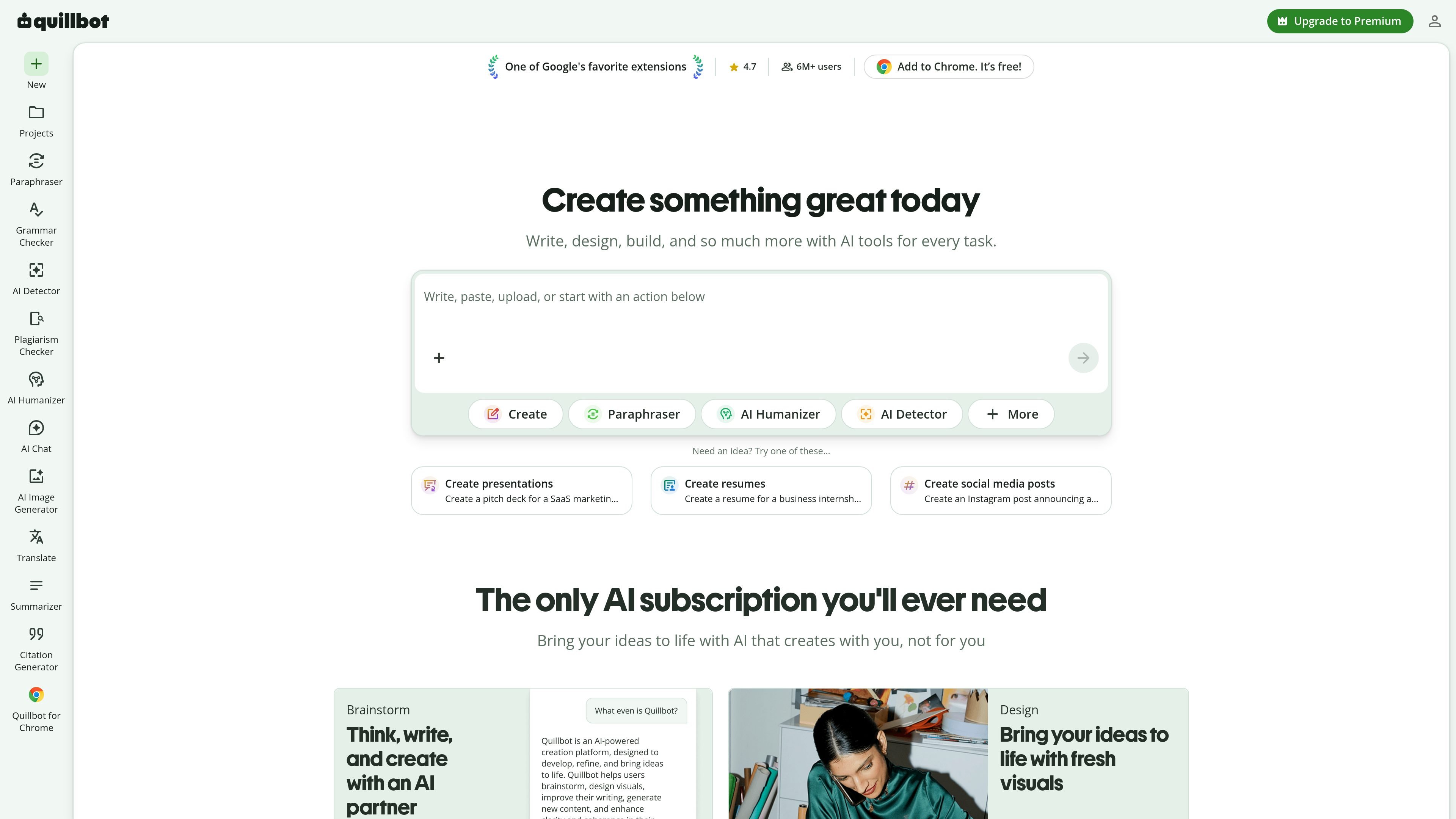
Quillbot is an AI writing and content workspace centered on rewriting, grammar correction, summarization, detection, and related writing tasks. The site presents it as a tool for writing, designing, and creating, with entry points for paraphrasing, grammar checking, AI detection, plagiarism checking, translation, citation generation, image creation, and PDF tools.

The product is built for people who work with text across browsers, documents, and apps. The source highlights Chrome, Edge, Safari, Word, iOS, Android, Windows, and macOS access, along with a Summarizer that can condense up to 600 words for free and a Grammar Checker that fixes grammar, spelling, and punctuation without sign-up.

Core capabilities

Paraphrasing

Rewrite text instantly with the Paraphraser, which is presented as a core writing tool on the site.

Grammar checking

Fix grammar, spelling, and punctuation issues from pasted text with the free Grammar Checker.

Summarization

Condense long articles, reports, or documents into paragraph, bullet, or custom summaries.

AI detection

Identify AI-written text and AI-generated images with the detector tools listed on the site.

Writing support tools

Translate text, generate citations, and check plagiarism from the writing tools menu.

Cross-platform access

Use browser extensions, a Word add-in, and desktop or mobile apps to work across different environments.

Common ways to use Quillbot

  • Editing everyday writing

    Draft or revise text by rewriting sentences, improving fluency, and checking grammar before sharing it.

  • Summarizing source material

    Turn long articles, research papers, or notes into shorter summaries for faster reading and review.

  • Job search documents

    Create resumes, cover letters, and other application materials with tools for rewriting and polished writing.

  • Cross-platform writing

    Work across browsers, Word, and desktop or mobile apps when you need the same writing tools in different places.

  • Originality review

    Check for AI-generated text or plagiarism before publishing or submitting content.

Pros and Cons

Pros

  • Covers several writing tasks in one product, including paraphrasing, grammar checking, summarizing, translation, citations, and plagiarism checking.
  • Offers free access for at least some core tools, including the Grammar Checker and Summarizer pages shown in the source.
  • Supports multiple platforms and extensions, including Chrome, Edge, Safari, Word, iOS, Android, Windows, and macOS.
  • Includes both writing and originality tools, so users can move between drafting, editing, and checking within the same workspace.

Cons

  • The supplied pricing page does not show a full plan table, so exact plan differences are unclear from the available evidence.
  • Some tool details are only partially described in the source, so advanced limits and output formats are not fully documented here.

FAQ

Do I need an account to use Quillbot's free tools?

No sign-up is required to use the free grammar checker and summarizer pages shown in the source. Other tools and premium features may have different access requirements, but the provided pages only confirm free access for those tools.

What does the Summarizer do?

Quillbot's Summarizer condenses long articles, research papers, or other documents into short paragraphs or bullet points while preserving the original context. The source also describes custom summaries and a free limit of up to 600 words per summary on that page.

What does the Grammar Checker do?

The Grammar Checker is designed to fix grammar, spelling, and punctuation errors from pasted text using AI. The source page describes it as free and available without sign-up.

Where can I use Quillbot?

The source shows browser extensions for Chrome, Edge, and Safari, plus apps for Android, iOS, Windows, and macOS, and a Word add-in. This suggests Quillbot is meant to work across both browsers and desktop or mobile apps.

Does Quillbot have paid plans?

The source does not provide a complete pricing table. It does show free tool access on some pages and a Premium upgrade prompt, so pricing appears to include at least a free experience and a paid tier, but the exact plans are not shown in the supplied evidence.

Quick Facts

Category
AI writing tools
Website
quillbot.com
Core tools
Paraphraser, Grammar Checker, Summarizer, AI Detector, Plagiarism Checker, Translate, Citation Generator
Platforms
Chrome, Edge, Safari, Word, iOS, Android, Windows, macOS
Free access
Yes, for at least some tools shown in the source
Notable workflow
Write, rewrite, summarize, detect, and edit in one workspace
Quillbot - AI Tool, Features, Use Cases & Alternatives | UStack