
Revenue attribution
Shows visitors, sources, revenue, revenue per visitor, and renewals credited to the customer's first source. Revenue can be connected to supported payment providers through read-only keys and webhooks.

clicks.page is cookieless website analytics with source, conversion, and revenue attribution for founders and indie hackers. It supports realtime reporting, payment-provider connections, a REST API, and an MCP server for AI-assisted setup and analysis.
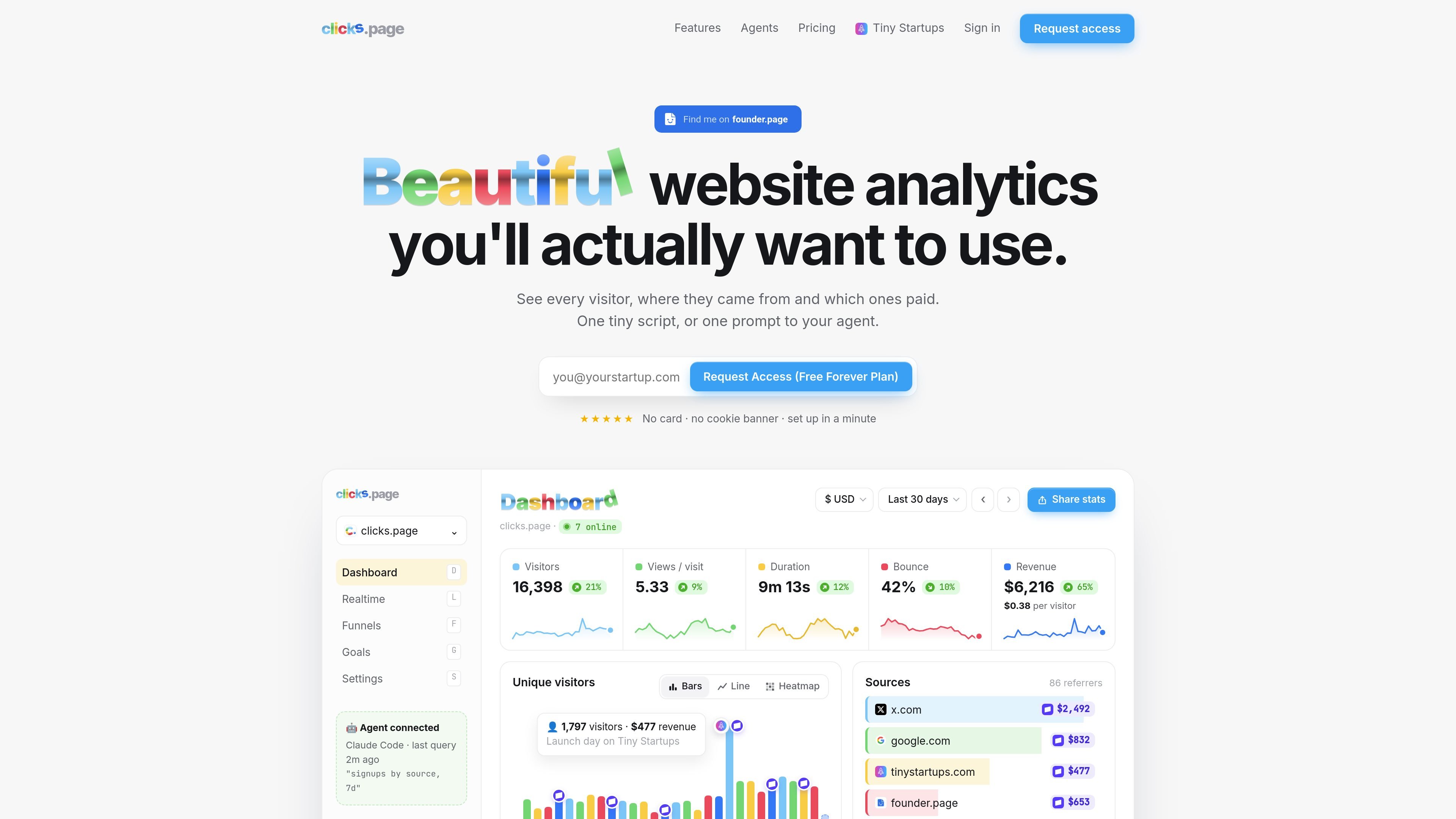
clicks.page is a cookieless website analytics product for tracking visitors, acquisition sources, conversions, and revenue. It combines standard traffic reporting with payment attribution, allowing a site owner to see which sources brought visitors and which sources generated paying customers.
The product is designed to work with AI-assisted setup and analysis. An agent can create or connect an account, add a site, install the tracking script, and connect to the MCP server or REST API. For implementation, the tracker supports custom events, while the reporting API provides realtime data, time series, breakdowns, funnels, goals, and conversion metrics.
Shows visitors, sources, revenue, revenue per visitor, and renewals credited to the customer's first source. Revenue can be connected to supported payment providers through read-only keys and webhooks.
Provides a live visitor count, world map, and activity feed so teams can monitor traffic as it arrives rather than waiting for a reporting period to finish.
Offers summary statistics, time series, top pages and sources, and breakdowns by source, referrer, UTM fields, location, device, browser, operating system, entry, exit, page, and event.
The tracker supports custom events through clicks.track(name, props) or data-clicks-event attributes. The API also supports funnels, goals, conversion reporting, and server-side revenue events.
Filters bots, headless browsers, datacenter traffic, and referrer spam. It also supports cookieless measurement, stores no raw IP addresses, and honors Global Privacy Control and Do Not Track.
Includes a REST API, an MCP server, and an agent-oriented signup and installation flow. AI coding agents can install the script, check installation status, and answer questions from connected analytics data.
Connect acquisition sources to payment data to compare which channels produce revenue, revenue per visitor, and renewals rather than evaluating campaigns only by traffic volume.
Use the realtime count, world map, and activity feed to watch a launch, campaign, or product announcement as visitors arrive and identify incoming sources while activity is happening.
Add signup or other custom events, define a conversion goal, and use funnels to examine the path from a page visit to an action such as signup or payment.
Install the script and connect the MCP server so an AI coding agent can set up tracking, verify deployment, and answer questions about sources, visitors, conversions, and revenue.
Use source, UTM, country, city, device, browser, page, and event breakdowns to investigate traffic quality and distinguish useful visitors from bot, datacenter, or referrer-spam activity.
The setup guide describes an agent-assisted workflow: sign up through the agent API, add the site, choose Free forever or Pro, place the tracking script in the document head of every page, deploy, and verify installation through the site status endpoint. An MCP connection can then be added for analytics questions.
Yes. The documented tracker does not use cookies or localStorage, does not store raw IP addresses, and honors Global Privacy Control and Do Not Track. The site presents this as a cookieless, privacy-friendly analytics approach.
Revenue connections are documented for Stripe, Paddle, Polar, Lemon Squeezy, Dodo Payments, and Creem. A read-only provider key can import past payments and periodic updates, while webhooks can provide faster payment notifications. Both methods can be used together, with provider IDs used to avoid counting a payment twice.
The product provides a REST API at https://clicks.page/api/v1 and an MCP server at https://clicks.page/mcp. The API covers site statistics, breakdowns, time series, realtime data, funnels, goals, conversions, revenue, and installation status; the MCP server is intended for querying analytics through an AI agent.
The documented Free forever option supports up to 10,000 pageviews per month and includes the product badge, with no card required. The Pro option has a seven-day free trial, removes the badge, requires a card, and is offered in 10k, 100k, and 1M monthly pageview sizes with monthly or yearly billing.

PromptScout tracks how ChatGPT, Gemini, Google AI Overviews, and Perplexity mention your brand or competitors, then pairs those results with source analysis and website audits. It helps teams decide what to fix in content, positioning, or site readiness next.

SaveMRR is a Stripe retention tool for SaaS teams that scans billing data for churn and MRR leaks, then automates recovery through dunning, cancel-save offers, win-back emails, and onboarding nudges. It is built for founders and bootstrapped teams using Stripe.

Hype is a web tool for finding trending YouTube topics by category, time range, and scoring mode. It helps creators spot emerging ideas, inspect source videos, and decide what to cover next.

Sleek Analytics is a privacy-friendly web analytics tool with real-time visitor tracking, Core Web Vitals, and revenue attribution. It helps site owners understand traffic and conversions without cookie banners or a heavy setup.

Struere is an AI-native platform for turning spreadsheet data into structured operational software with dashboards, alerts, and automations. It is aimed at teams that want to replace manual spreadsheet workflows without building custom tools from scratch.

ClayHog es una plataforma de visibilidad en AI search para seguir cómo aparecen las marcas en ChatGPT, Gemini, Perplexity, Claude y Google AI Overviews. Centraliza citas, competidores, sentimiento y oportunidades de contenido.