
Delegated code builds
Send a task with a title, acceptance criteria, and stack. Codemind writes the implementation on its servers instead of making your coding agent handle the full write-run-fix loop.

Codemind is a delegated coding service that writes and tests JavaScript or TypeScript code against acceptance criteria, then returns the files to a coding agent. It helps developers offload implementation and verification while keeping planning and review in their existing agent session.
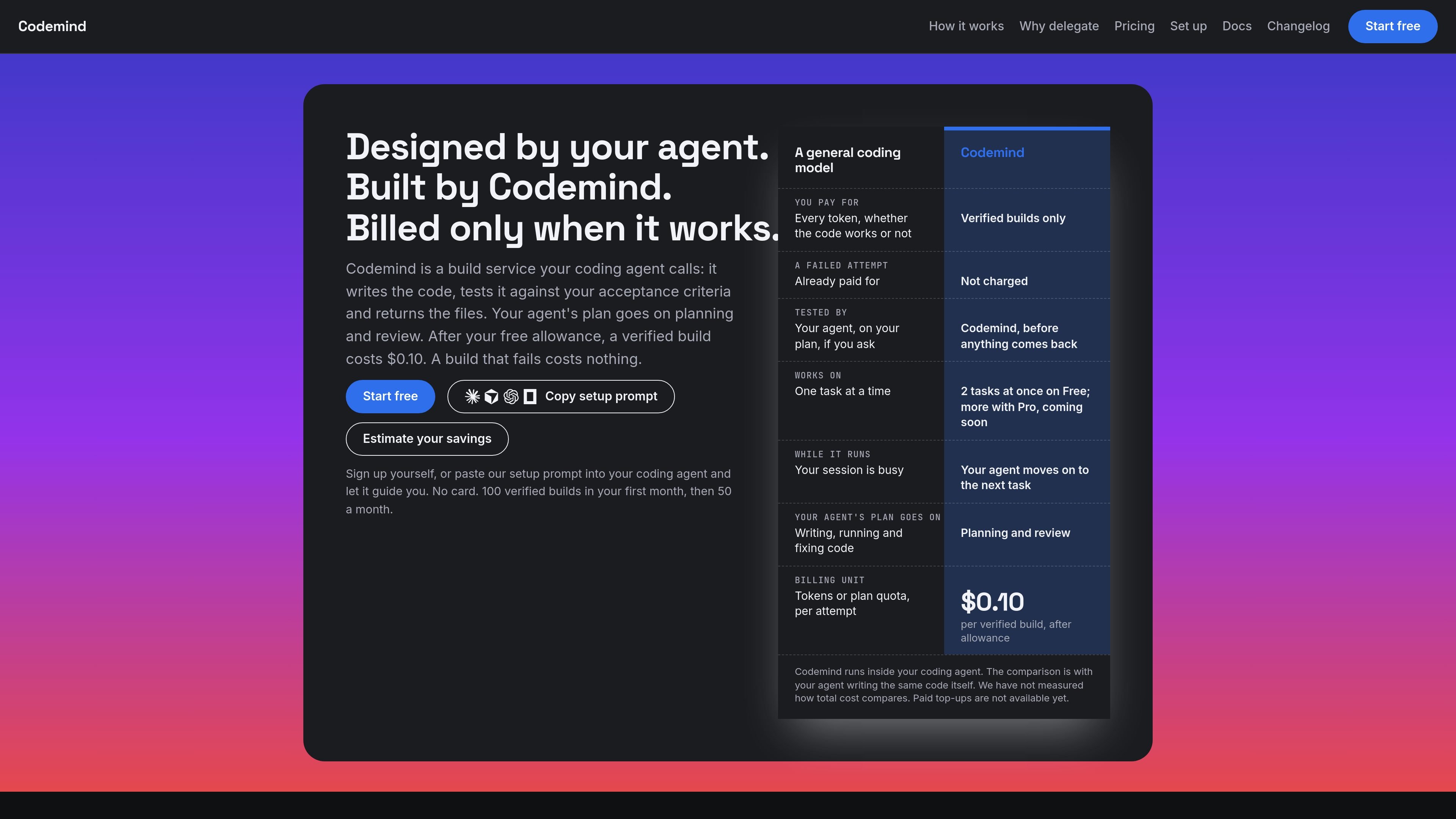
Codemind is a delegated coding build service used from a coding agent. The agent sends a task, acceptance criteria, and stack; Codemind writes the code, tests it against those criteria, and returns the resulting files and build status. The product is intended to move implementation and testing work outside the agent’s active session while leaving planning and review with the agent.
The service currently builds JavaScript and TypeScript, including Cloudflare Workers, Node, and React work. It can create code, change files supplied with a task, and run reviews or tests on request. A build is verified only when its code passes tests derived from the acceptance criteria; failed builds return an error code and do not incur a charge. Codemind is available through MCP and REST, with support listed for several coding-agent clients.
Title: Codemind as a delegated coding service
Send a task with a title, acceptance criteria, and stack. Codemind writes the implementation on its servers instead of making your coding agent handle the full write-run-fix loop.
Tests are written from the acceptance criteria and run before the result is returned. Criteria that are too vague to test are flagged before the build starts.
Passing builds return files to the agent, while failed builds return a failed status and error code. Your agent can then retry or handle the task itself.
A build that passes its tests is counted as one verified build. Failed builds are not charged, and builds inside the free allowance cost nothing either way.
Codemind can modify existing files when the current file is sent with the task, and it can perform a code review or test run when requested by the agent.
Builds run on Codemind’s servers, allowing the agent to send another task while a build is running. Free accounts support up to two concurrent builds and 20 builds per hour.
Give an agent a well-defined feature or issue with acceptance criteria and let Codemind implement and test it while the agent proceeds with planning or another task.
Send an existing file with a change request when a project needs a targeted modification. The completed file is returned to the agent for writing into the project.
Use Codemind for Cloudflare Workers, Node, or React work where the desired behavior can be expressed as testable criteria before implementation begins.
Ask the agent to request a review or test run when implementation needs an additional check, rather than handling every verification step inside the main coding session.
Paste Codemind’s setup prompt into a supported coding agent. The agent reads the onboarding instructions, adds the Codemind server to the host, and asks you to reload it. A free account is created when it connects. You can also add the MCP server manually with an API key.
Your agent sends a task title, acceptance criteria, and stack. Codemind writes the code and tests it against criteria derived from the request. A passing build returns the files and a verified result; a failed build returns a failed status with an error code and no charge.
Codemind currently builds JavaScript and TypeScript, including work for Cloudflare Workers, Node, and React. Other languages are not currently supported.
The Free allowance includes 100 verified builds in the first month and 50 each month afterward, with up to two builds at once and 20 per hour. After the allowance, the listed price is $0.10 per verified build, but paid top-ups are not yet available. New builds are refused after the allowance until the next month begins unless paid billing has become available.
Codemind can be used through supported coding agents over MCP, or through REST from your own code. The site lists Claude Code, Cursor via its agent CLI, Codex CLI 0.160.1 or later, and OpenCode as supported; Cline is listed as coming soon.

ByteAsk is a terminal-first AI coding agent for C and C++ that edits repositories and verifies changes with the real compiler, debugger, sanitizers, and tests before showing a diff. It offers a free tier plus paid plans, with editor connectors and zero-retention handling described in the source.

GitBot is a local browser-based workspace for creating reusable coding bots powered by Claude Code, Codex, or OpenCode. It helps developers run those agents across repository folders with persistent threads and configurable permissions.

Manta AI is an autonomous web app testing tool for teams that want to map application behavior, catch regressions, and generate tests without writing scripts or maintaining selectors. It works from a URL and supports plain-English test flows, run results with screenshots, and scheduled or deployment-triggered checks.

Ghost es un asistente de IA para terminal para chatear, generar código y ejecutar tareas en la línea de comandos. Incluye modelos gratuitos, es compatible con Linux, macOS y Windows, y es de código abierto.

Vi3ecode is a maintained development environment for working with AI coding agents. It keeps project context, terminal, Git, memory, flows, review, and communication connected around the agent you already use.

Lucid Train is a local-first AI coding harness that turns repository code into architecture diagrams and uses those diagrams as specifications for coding agents. It is available as a desktop app and a lightweight Rust CLI, and it can run with local models or your own API keys.